Database Consolidation Part 1 – Business Drivers and Technical Challenges

Database consolidation has been a big trend in the industry for a while now. You can see this if you read the IT press, or if you listen to the relentless procession of people queueing up to talk about the “cloud”. I saw it in my time at Oracle, where we had an increasing number of customers come and talk to us about the pressures of running thousands of independent databases, all on their own servers, all taking up vast amounts of data centre real estate and acting like a dead weight around the neck of their IT organisations.

Of course, just rounding up all of your databases and sticking them on some big iron isn’t really going to bring you many benefits. The real benefits of a consolidation exercise come when you use it as a way of repositioning your databases as service offerings. These come under various guises: the “As A Service” models: Database-as-a-Service (DaaS), Infrastructure-as-a-Service (IaaS), Platform-as-a-Service (PaaS); the On-Demand models (e.g. Amazon’s Relational Database Service); and the ubiquitous cloud offerings (e.g. the Oracle Cloud). (My first job working with On Demand services was in 2003, so I still can’t use the term “cloud” without it coming out sounding as if I’m being sarcastic… I don’t mean to, but why does everyone always talk as if it’s a brand new idea?!)

Anyway, I’m going to make a bold claim and say that, at least to a DBA, it’s all the same thing. To me, database consolidation is about reducing vast estates of physical database servers into smaller, more tightly-managed groups of databases that can provide predefined services. (Oh and labelling them as a “cloud”, because if that word isn’t used at least a hundred times a day in our industry the world would end…) It’s also about turning your databases into a well-defined service – and therefore turning your users into your customers, even if they are actually part of your own organisation.

No matter what you call it, you can always spot a database consolidation exercise by the business drivers and the technical challenges.

Business Drivers

  • Cost reduction
  • Increased agility
  • Reduced complexity
  • Higher service levels

The cost reduction piece seems obvious – a smaller number of servers cost less to buy and run than a larger number, right? But it’s often misunderstood just how much of a cost saving can be made. Don’t just think about the servers, think about the savings in data centre footprint, in power and cooling. Think about the reduced administration costs, particularly if you design your service properly (i.e. the agility angle). Now think about the potential reduction in license costs. And an often-overlooked area of saving is the reduction in failures and outages caused by having a tightly designed and standardised operating model (i.e. the reduced complexity angle).

Increased agility is as important as cost reduction, something which may come as a surprise to those who are used to concentrating on technical rather than business challenges. To a CIO, the ability to react quicker, to take advantage of new opportunities as soon as they become apparent, is equally as important as controlling the bottom line. In a well-implemented database-as-a-service offering, deployments of new databases / services are fully automated. Automatic provisioning has to be a default requirement in the design. Likewise the ability to automatically scale (up or down) in order to meet changing demand is a must. That scaling needs to be possible on two levels: at the individual database level to meet the developing requirements of each “customer” and at the macro level to expand (or contract) the capability of your DaaS offering depending on overall demand.

It may not always seem like it at first, but the consolidation of your databases onto a DaaS platform should result in reduced complexity. Why? Well because at the heart of any consolidation exercise must be standardisation. Every large IT organisation has a plethora of different databases running different versions on different operating systems. No matter how stringent your deployment procedures are, it’s guaranteed that if your databases are built manually then each one will have a subtle difference based on a) when it was built, b) who built it, and c) what sort of day they were having at the time. Human beings are complex creatures, they behave in unexpected ways – the only way to have true consistency is to have your database deployment automated. And then there are the systems that you may have inherited, perhaps as the result of an acquisition or departmental reorganisation. You know the ones, they are usually sat in the corner untouched and unloved, because nobody dares go near them in case they break. In a DaaS environment every database is, at least outwardly, identical. This means that as a DBA you don’t have to worry about the way you treat them – what you can do with one database you can do with any of them. It’s all about manageability.

And the outcome of that reduced complexity must therefore be higher service levels. You can pretty much guarantee that any organisation with 1000 databases all running on similar path levels on the same OS, using the same file layouts, with automated management scripts to deploy them or tear them down (and perhaps even to patch them) will deliver a higher uptime than an organisation with a multitude of different databases on different operating systems, each one of which has its own subtleties and nuances.

Technical Challenges

So now that we’ve covered why it’s worth doing, what are the challenges associated with actually doing it? I’ve had a lot of exposure to DaaS and consolidation environments, both at Oracle (hands on in a support role) and in my new role at Violin (in a technical presales capacity). One particular experience which serves me well is the four years I spent working on British Telecom’s DaaS environment for Surren Partabh, who is BT’s CTO of Core Technologies. When it came to DaaS, BT were light years ahead of the game – their mutiple DaaS environments have been in place for years already and support many hundreds of databases. There is an interesting case study about BT DaaS here – if you are considering a consolidation exercise (and you can ignore the author’s overuse of the word “cloud”) then it’s well worth a read. As Surren says, “Our Oracle Database 11g consolidation has enabled us to reduce our server sprawl, deploy databases faster, and operate with 20% fewer DBA’s”.

So what are the challenges?

  • Availability
  • Capacity
  • Security
  • Maintenance

Availability is a challenge, not really in a technical sense (at least not any more than normal) but because of the increase in risk. When you consolidate your databases you put all of your eggs in one basket. If you have a large part of your business dependent on your DaaS platform and it takes a plunge, the pressure is truly going to be on. Having said that, my experience is that availability increases during database consolidation. HA and DR are easier to plan for and incorporate into a DaaS design than on the ad-hoc basis of a siloed database environment. Extensive backup and DR solutions cost money, which means that inevitably you end up with databases in your environment whose HA characteristics you are not always comfortable with. When you have all your eggs in the aforementioned basket it becomes impossible to argue about whether good backup solutions, HA and DR etc are worth the investment. Consequently you can achieve economies of scale by implementing a single solution across your whole environment – with the happy consequence that systems which may not have qualified for this level of service if they were independent end up getting a free ride. One thing to remember about consolidation though: test your backups, test your HA and test your DR… test it again and again. I know what it’s like to lose >50 production databases in one single calamity – and I can promise you it’s not a nice place to be.

Capacity for me is the biggest challenge of all. In fact it’s so critical to the idea of database consolidation that it is the reason I started writing this blog entry. Don’t forget that capacity isn’t just about disk space, it’s about CPU resources, it’s about memory, networking, IO requirements… essentially everything that is a finite resource. Capacity is something you have to plan for when you design and build a DaaS environment; get it wrong in one direction (too much) and you won’t achieve those cost savings that were one of the driving forces behind the whole exercise… get it wrong in the other direction (too small) and that cherished availability will be compromised, possibly affecting your entire solution. In fact, capacity planning for database consolidation is such an important topic that having started this blog entry with it in mind, I am going to give it its own entry entirely…!

Security is a challenge which has similar characteristics to those I described for availability. By putting all of your databases on one platform you increase the risk – security therefore needs to be strictly controlled. At a very simplistic level, unauthorised acquisition of administrator privileges on a consolidated environment could lay open your entire data estate. Compliance is another potential issue: things are complicated by environments where different databases have different regulatory or legal requirements. For example, if one of the databases on a DaaS system needs to meet Payment Card Industry standards then all of the underlying architecture will be affected, potentially resulting in all of the databases needing to meet PCI standards. Of course, as with availability, this can work in your favour because if you design the system with security and compliance in mind, you may find that databases which were previously somewhat lacking in the security department are dragged kicking and screaming into a compliant state (often under the threat of being cast out of the environment if they fail to comply). The other major consideration for security is the use of virtualisation. By placing each database in its own virtual environment, an additional layer of security can be wrapped around it, effectively segregating it from its neighbours whilst still retaining the benefits of a shared infrastructure. This is a massive trend in the industry now and is something that, I believe, is inevitable for most enterprise database environments.

And finally we come to maintenance. I cannot emphasise enough how important it is to define the maintenance strategy of a DaaS / consolidation environment before you implement it. Most vendors now, whether they be software (e.g. Oracle), operating system or hardware (server, storage, network etc) are focussed on providing zero-downtime products capable of non-disruptive maintenance. But no matter how much you spend, there will inevitably be times when you need to take a planned outage. And of course, with all your internal customers now using the same shared infrastructure, that downtime is going to have quite an effect. Here is what is going to happen if you don’t plan to avoid it up front: your DaaS environment has 26 databases on it, labelled A to Z. The application owner of A is hitting a problem which, unfortunately, requires maintenance on the underlying infrastructure. This patch, firmware upgrade, whatever it may be, requires downtime which will take the service offline. You were promised by all your vendors that their products would never require downtime… but hey guess what? So you go to application owner B and you say I need to take the system down this weekend – and he says “No way, not this weekend – we have a critical application upgrade planned. Can you wait until the weekend after?”. So you tell this to application owner C and she says, “We have our upgrade the week after – we already had to delay it because of B so we cannot wait any longer”. Trust me that you will never get as far as Z! You could pull rank of course, so you go to the CTO and say, “These guys are driving me mad, can you help me out?” but the CTO says, “What are you crazy, it’s the quarter end this month – we can’t do any of this stuff!”. Here is my advice to anyone implementing a DaaS or consolidation environment: Define maintenance windows into the service agreement, then make your internal customers sign up to these terms before they are allowed on to your platform. If they don’t agree to these maintenance cycles then they need to go and build their own system! This is also another argument for virtualisation, because – although it doesn’t completely solve the problem – adding an extra layer of abstraction down at the hypervisor level allows for everything above that to be treated independently.

Those are the technical challenges, but what about the design choices? There are three (or four depending on your view) architectural methods of achieving a consolidation or DaaS platform. In part two of this series I will examine them and have a look at the benefits and pitfalls associated with each. If you made it this far you will be delighted to hear that I am only just started…

Database Consolidation Part 2 – Shared Infrastructure Design Choices
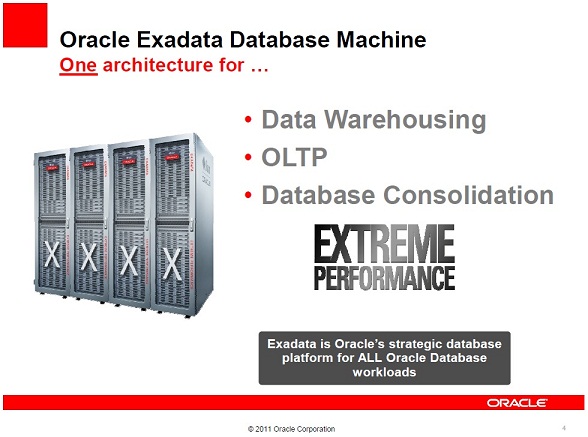
The Strategic Platform for ALL Database Workloads

I was invited to Microsoft HQ in the UK yesterday to be a speaker at one of their launch event for SQL Server 2012. It’s the second of these events that I’ve appeared at and it finally made me realise I need to change something about this blog.

So far until now I have resisted making any critical remarks about the Oracle Exadata product here, other than to quote the facts as part of my History of Exadata series. I’m going to change that now by offering my own opinions on the product and Oracle’s strategy around selling it.

Before I do that I should establish my credentials and declare any bias I may have. For a number of years, until very recently in fact, I was an employee of Oracle Corporation in the UK where I worked in Advanced Customer Services. I began working with Exadata upon the release of the “v2” Sun Oracle Database Machine and at the time of the “X2” I was the UK Team Lead for Exadata. I personally installed and supported Exadata machines in the UK and also trained a number of the current Exadata engineers in ACS (although that wasn’t exactly difficult as all of the ACS engineers I know are excellent). I also used to train the sales and delivery management communities on Exadata using my trademarked “coloured balls” presentation (you had to be there).

I now work for Violin Memory, a company that (to a degree) competes with Oracle Exadata. Exadata is a database appliance, whilst Violin Memory make flash memory arrays… so that doesn’t immediately sound like a true competition. But I’ll let you into a little secret: Exadata isn’t a database appliance at all – it’s an application acceleration product. That’s what is does, it takes applications which businesses rely on and makes them run faster. And in fact that’s also exactly what Violin is – it’s an application acceleration product that just happens to look like a storage array.

So now we have everything out in the open I’m going to talk about my issue with Exadata – and you can read this keeping in mind that everything I say is tainted by the fact that I have an interest in making Violin products look better than Oracle’s. I can’t help that, I’m not going to quit my exciting new job just to gain some journalistic integrity…

There are a number of critiques of Exadata out there on the web, ranging from technical discussions (the best of which are Kevin Closson’s Critical Analysis videos) to stories about the endless #PatchMadness from Exadata DBAs on Twitter. My main issue is much more fundamental:

Oracle now say that Exadata is the strategic database platform for ALL database workloads. This did not used to be the case. If you read my History of Exadata piece you will see that when the original v1 HP Oracle Database Machine was released, “Exadata” was the name of the storage servers. And those storage servers were, in Oracle’s own words, “Designed for Oracle Data Warehouses“.

Upon the release of the v2 Sun Oracle Database Machine there came an epiphany at Oracle: the realisation that flash technology was essential for performance (don’t forget I’m biased). This was great news for Violin as back in those days (this was 2009) flash was still an emerging technology. However, the Sun F20 Accelerator cards that were added to the v2 were (in my biased opinion) pretty old tech and Oracle was only able to use them as a read cache. However, that didn’t stop Oracle’s marketing department (never one to hold back on a bold claim) from making the statement that the v2 was “The First Database Machine For OLTP“. We are now on the X2 model (really only a minor upgrade in CPU and RAM from the v2) and Oracle has now added Database Consolidation to the list of things that Exadata does. And of course the new bold claim has now appeared, as in the image above, “Exadata is Oracle’s strategic database platform for ALL database workloads“. Sure the X2 now came in two models, the X2-2 and the X2-8, but they weren’t actually different in terms of the features that you get above a normal Oracle database… you still get the same Exadata storage, Hybrid Columnar Compression and Exadata Flash Cache features regardless of the model.

So what’s my problem with this? Well first of all let’s just think about what a workload is. Essentially you can define the workload of a database by the behaviour of its users. There are two main types of workload in the database world, OnLine Transactional Processing (OLTP) and Data Warehousing (DW). OLTP systems tend to have highly transactional workloads, with many users concurrently querying and changing small amounts of data. Conversely, DW systems tend to have a smaller number of power users who query vast amounts of data performing sorts and aggregation. OLTP systems experience huge amounts of change throughout their working period (e.g. 9am-5pm for a national system, 24×7 for a global system). DW systems on the other hand tend to remain relatively static except during ETL windows when massive amounts of data are loaded or changed.

In fact, you can pretty much picture any workload as fitting somewhere on a scale between these two extremes:

Of course, this is a sweeping generalisation. In practice no system is purely OLTP or purely DW. Some systems have windows during which different types of workload occur. Consolidation systems make things even more complicated because you can have multiple concurrent workloads taking place.

There’s a point to all this though. Take a random selection of real life databases and look at their workloads. If you agree with my OLTP <> DW scale above then you will see that they all fit in different places. Maybe you don’t agree with it though and you think there are actually many more dimensions to consider… no matter. What we should all be able to agree on is this:

In the real world, different databases have different workloads.

And if we can agree on that then perhaps we can also agree on this:

Different workloads will have different requirements.

That’s simple logic. And to extend that simple logic just one more step:

One design cannot possibly be optimal for many different requirements.

And that’s my problem with Oracle’s strategy around selling Exadata. We all know that it was originally designed as a data warehouse solution. Although I defer to Kevin’s knowledge about the drawbacks of an asymmetric shared-nothing MPP design, I always thought that Exadata was an excellent DW product and something that (at the time) seemed like an evolutionary step forward (although I now believe that flash memory arrays are a revolutionary step forward that make that evolution obsolete – keep remembering that I’m biased though). But it simply cannot be the best solution for everything because that doesn’t make sense. You don’t need to be technical to get that, you don’t even need to be in IT.

Let’s say I wanted to drive from town A to town B as fast as I can. I’d choose a Ferrari right? That’s my OLTP requirement. Now let’s say I wanted to tow a caravan from A to B, I’d need a 4×4 or something with serious towing ability – definitely not a Ferrari. There’s my DW requirement. Now I need to transport 100 people from A to B. I guess I’d need a coach. That’s my Database Consolidation requirement. There is no single solution which is optimal for all requirements. Only a set of solutions which are better at some and worse at others.

A final note on this subject. The Microsoft event at which I spoke was about Redmond’s new set of database appliances: the Database Consolidation Appliance, the Parallel Data Warehouse, and the Business Decision Appliance. Microsoft have been lagging behind Oracle in the world of appliances but I believe that they have made a wise choice here in offering multiple solutions based on customer workload. And they are not the only ones to think this. Look at this document from Bloor comparing IBM and Exadata:

“Oracle’s view of these two sets of requirements is that a single solution, Oracle Exadata, is ideal to cover both of them; even though, in our view (and we don’t think Oracle would disagree), the demands of the two environments are very different. IBM’s attitude, by way of contrast, is that you need a different focus for each of these areas and thus it offers the IBM pureScale Application System for OLTP environments and IBM Smart Analytics Systems for data warehousing.”

Now… no matter how biased you think I am… Maybe it’s time to consider if this strategy of Oracle’s really makes sense?

SLOB on Violin 3000 Series with PCIe Direct Attach

A reader Alex asked if I could post a comparative set of tests from my previous 3000 series Infiniband testing but using the PCIe direct-attached method. I was actually very keen to test this myself as I wanted to see how close the Infiniband connectivity method could get to the PCIe latencies. Why? Well, PCIe offers the lowest overhead but also causes some HA problems.

When SSDs first came out they were just that, solid state disks – or at least they looked like them. They had the same form factor and plugged into existing disk controllers, but had no spinning magnetic parts. This offered performance benefits but those benefits were restricted to the performance of those very disk controllers, which were never designed for this sort of technology. We call this the first generation of flash.

To overcome this architectural limitation, flash vendors came out with a new solution – placing flash on PCIe cards which can then attached direct to the system board, reducing latency and providing extreme performance. This is what we call the second generation of flash. It is what vendors such as Fusion IO provide – and looking at FIO’s share price you would have to congratulate them on getting to market and making a success of this.

However, there are other architectural limitations to this PCIe approach. One is that you cannot physical share the storage provided by PCIe – sure you can run some sort of sharing software to make it available outside of the server it is plugged into, but that increases latency and defeats the object of having super-fast flash storage plugged right into the system board. Even worse, if the system goes down then that flash (and everything that was on it) is unavailable. This makes PCIe flash cards a non-starter for HA solutions. If you want HA then the best you can do with them is use them for caching data which is still available on shared storage elsewhere (the Oracle Database Smart Flash Cache being one possible solution).

At Violin we don’t like that though. We don’t believe in spending time and CPU resources (or even worse, human resources) managing a cache of data trying to improve the probability and predictability of cache hits. Not when flash is now available as a tier 1 storage medium, giving faster results whilst using less space, power and cooling.

Another problem with PCIe is that the number of slots on a system board will always be limited – for reasons of heat, power, space etc there will always be a limit beyond which you cannot expand.

And there’s another even more major problem with PCIe flash cards, which no PCIe flash vendor can overcome: you cannot replace a PCIe card without taking the server down. That’s hardly the sort of enterprise HA solution that most customers are looking for.

This is where we get to the third generation of flash storage, which is to place the flash memory into arrays which connect via storage fabrics such as fibre-channel or Infiniband. This allows for the flash storage to be shared, to be extended, to offer resilience (e.g. RAID) and to have high-availability features such as online patching and maintenance, hot-swappable components etc.

This is the approach that Violin Memory took when designing their flash memory arrays from the ground up. And it’s an approach which has resulted in both families of array having a host of connectivity features: PCIe (for those who don’t want HA), iSCSI, Fibre-Channel and now Infiniband.

But what does the addition of a fibre-channel gateway do to the latency? Well, it adds a few hundred microseconds to the latency… In the scheme of things, when legacy disk arrays deliver latencies of >5ms that’s nothing, but when we are talking about flash memory with latencies of <1ms that suddenly becomes a big deal. And that’s why the Infiniband connectivity is so important – because it ostensibly offers the latency of PCIe but with the HA and management features of FC.

So let’s have a look at the latencies of the 3000 series using PCIe direct attach to see how the latency measures up against the Infiniband testing in my previous post:

Filename      Event                          Waits  Time(s)  Latency       IOPS
------------- ------------------------ ------------ -------- ------- ----------
awr_0_1.txt   db file sequential read      308,185       33     107     7,139.2
awr_0_4.txt   db file sequential read    4,166,252      510     122    24,883.1
awr_0_8.txt   db file sequential read    9,146,095    1,245     136    41,569.2
awr_0_16.txt  db file sequential read   19,496,201    3,112     160    70,121.9
awr_0_32.txt  db file sequential read   40,159,185   11,079     275    92,185.0
awr_0_64.txt  db file sequential read   81,342,725   49,049     602    99,060.1

We can see that again the latency is pretty much scaling at a linear rate. And up to 16 readers (which is double the number of CPU cores I have available) the latency remains under 200us. This is very similar to the Infiniband results, where up to (and including) 16 readers I also had <200us latency.

A couple of points to note:

  • Again the lack of CPU capability in my Supermicro servers is prohibiting me from really pushing the arrays – causing the tests above 16 readers to get skewed. I have requested a new set of lab servers with ten-core Westmere-EX CPUs so I just need to sit back and wait for Father Christmas to visit
  • The database block size is 8k
  • To make matters even more complicated, this was actually a RAC system (although I ran the SLOB tests from a single instance)

That last point is worth expanding. I said that PCie does not allow for HA. That’s not strictly true for Violin however. In this system I have a pair of Supermicro servers, each connected via PCie to my single 3205 SLC array and presenting a single LUN, which I have partitioned and presented to ASM as a series of ASM disks.

Because ASM does not require SCSI-3 persistent reservations or any other such nastiness, I am able to use this as shared storage and run a 11.2.0.3 RAC and Grid Infrastructure system on it. I’ve run all the usual cable-pulling tests and not managed to break it yet, although I’m not convinced it is a design I would choose over Infiniband if I had to choose… mainly because the PCIe method does not incorporate the Violin Memory HA Gateway, which gives me the management GUI and an additional layer of protection from partial / unaligned IO.

I now need to go and beg for that bigger server so I can get some serious testing done on the 6000 series array which is currently laughing at me every time I tickle it with SLOB

What Every CIO Wants

Some weeks ago I was fortunate enough to read a preview copy of Stephen O’Donnell’s book What Every CIO Wants: A Guide for Global Technology Sales People. Steve is, amongst other things, the Chairman of the Industry Advisory Board for Violin Memory, as well as being the former Global Head of Data Centre Operations for BT (a company where I spent many years working when I was in Oracle Advanced Customer Services).

Needless to say I think it’s an excellent book (or I wouldn’t be blogging about it!) Aimed at sales people who need to pitch at C-level in the technology industry, it provides an insight into the mindset of Chief Information Officers and other C-level executives. In fact, I wonder if Steve has sold himself short in that it could almost be a guide for budding CIOs, explaining how they should be thinking and what their priorities are.

Without wanting to give away any of the content I strongly recommend reading and re-reading the section on ARC – Agility Risk and Cost. This is absolutely critical to understanding the way that the business of IT is run. In fact I would say that you don’t need to be in sales to need to understand the mindset of CIOs and CTOs – any DBA who is looking to propose any sort of investment would do well to read this and understand the concept of ARC, then frame their arguments accordingly.


SLOB on Violin 3000 Series with Infiniband

Last week I invited Martin Bach to the Violin Memory EMEA headquarters to do some testing on both our 3000 and 6000 series arrays. Martin was very interested in seeing how the Violin flash memory arrays performed, having already had some experience with PCIe-based flash card vendor.

There are a few problems with PCIe flash cards, but perhaps the two most critical are that a) the storage cannot be shared, meaning it isn’t highly-available; and b) the replacement of any PCIe card requires the server to be taken offline.

Violin’s approach is fundamentally different because the flash memory is contained in a separate unit which can then be presented over one of a number of connections: PCIe direct-attached, Fibre Channel, iSCSI… and now Infiniband. All of those, with the exception of PCIe, allow for the storage to be shared and highly-available. So why do we still provide PCIe?

There are two answers. The first and most simple answer is for flexibility – the design of the arrays makes it simple to provide multiple connectivity options, so why not? The second and more important (in terms of performance) is for latency. The overhead of adding fibre-channel to a flash memory is only in the order of one or two hundred microseconds, but if you consider that the 6216 SLC array has a read and write latency of 90 and 25 microseconds respectively that’s quite an additional overheard.

The new and exciting addition to these options is therefore Infiniband, which allows for extremely low latencies yet with the ability to avoid the pitfalls of PCIe around sharing and HA.

To demonstrate the latency figures achievable through a 3205 SLC array connected via Infiniband, Martin and I ran a series of SLOB physical IO tests and monitored the latency. The tests consisted of gradually ramping up the number of readers to see how the latency fared as the number of IOPS increased – we always kept the number of writers as zero. As usual the database block size was 8k. Here are the results:

Filename      Event                          Waits  Time(s)  Latency       IOPS
------------- ------------------------ ------------ -------- ------- ----------
awr_0_1.txt   db file sequential read        9,999        1     100     2,063.8
awr_0_4.txt   db file sequential read       29,992        5     166     5,998.8
awr_0_8.txt   db file sequential read       39,965        6     150     8,285.5
awr_0_16.txt  db file sequential read       79,958       15     187    13,897.8
awr_0_32.txt  db file sequential read      159,914       43     269    18,133.9
awr_0_64.txt  db file sequential read   21,595,919    6,035     280   115,461.1
awr_0_128.txt db file sequential read   99,762,808   69,007     691   124,907.4

The interesting thing is to note how the latency scales linearly. The tests were performed on a 2s8c16t Supermicro server with 2x QDR Infiniband connections via a switch to the array. The Supermicro starts having trouble driving the IO once we get beyond 32 readers – and by the time we get to 128 the load average is so high on the machine that even logging on is hard work. I guess it’s time to ask for a bigger server in the lab…

Exadata Re-Racking Service

I’ve heard from a few sources now that Oracle is offering a new Exadata Re-racking service for quarter and half racks. The idea, as I understand it, is that if you have your own rack equipment in your data centre and don’t want to use the rack that Exadata comes preinstalled in, you can pay an extra fee for Oracle’s Advanced Customer Services engineers (a fine bunch of people I must say!) to re-rack it. It appears that the machine is delivered to your data centre and then ACS will disassemble it at your site and reassemble it in your rack.

There appear to be some caveats, such as a pre-installation survey to check that your rack kit is suitable and a ban on putting anything else in the same rack. Also, since you cannot have this with the full rack I presume that this would preclude you from upgrading to a full machine in the future – at least not without having to relocate the kit, which I guess means downtime. I must stress that I don’t have the exact details, so talk to your friendly local Exadata sales rep if you want to know.

What I will say is that in all my time at Oracle the idea that customers could not re-rack the Exadata component servers was one of the few rules which was set in stone. Many customers asked, but all were told no. So what’s changed?

If you ask Oracle I am sure they would say that they are “listening to customer demand” and being “flexible”. On the other hand surely there must be some who will see this as a simple case of abandoning a principle in order to increase the attraction of Exadata and get more sales.

I’d love to know what happens to the empty Exadata rack once the kit has been moved. I’ll start checking to see if they appear on eBay…

SLOB testing on Violin and Exadata

I love SLOB, the Silly Little Oracle Benchmark introduced to me by Kevin Closson in his blog.

I love it because it’s so simple to setup and use. Benchmarking tools such as Hammerora have their place of course, but let’s say you’ve just got your hands on an Exadata X2-8 machine and want to see what sort of level of physical IO it can drive… what’s the quickest way to do that?

Host Name        Platform                         CPUs Cores Sockets Memory(GB)
---------------- -------------------------------- ---- ----- ------- ----------
exadataX2-8.vmem Linux x86 64-bit                  128    64       8    1009.40

Anyone who knows their Exadata configuration details will spot that this is one of the older X2-8’s as it “only” has eight-core Beckton processors instead of the ten-core Westmeres buzzing away in today’s boxes. But for the purposes of creating physical I/O this shouldn’t be a major problem.

Running with a small buffer cache recycle pool and calling SLOB with 256 readers (and zero writers) gives:

Load Profile              Per Second
~~~~~~~~~~~~         ---------------
  Physical reads:          138,010.5

So that’s 138k read IOPS at an 8k database block size. Not bad eh? I tried numerous values for readers and 256 gave me the best result.

Now let’s try it on the Violin 3000 series flash memory array I have here in the lab. I don’t have anything like the monster Sun Fire X4800 servers in the X2-8 with their 1TB of RAM and proliferation of 14 IB-connected storage cells. All I have is a Supermicro server with two quad-core E5530 Gainestown processors and under 100GB RAM:

Host Name        Platform                         CPUs Cores Sockets Memory(GB)
---------------- -------------------------------- ---- ----- ------- ----------
oel57            Linux x86 64-bit                   16     8       2      11.74

You can probably guess from the hostname that I’ve installed Oracle Linux 5 Update 7. I’m also running the Oracle Unbreakable Enterprise Kernel (v1) and using Oracle 11.2.0.3 database and Grid Infrastructure in order to take advantage of the raw performance of Violin LUNs on ASM. For each of the 8x100GB LUNs I have set the IO scheduler to use noop, as described in the installation cookbook.

So let’s see what happens when we run SLOB with the same small buffer cache recycle pool and 16 readers (zero writers):

Load Profile              Per Second
~~~~~~~~~~~~         ---------------
  Physical reads:          159,183.9

That’s 159k read IOPS at an 8k database block size. I’m getting almost exactly 20k IOPS per core, which funnily enough is what Kevin told me to expect as a rough limit.

The thing is, my Supermicro has four dual-port 8Gb fibre-channel cards in it, but only two of them have connections to the Violin array I’m testing here. The other two are connected to an identical 3000 series array, so maybe I should present another 8 LUNs from that and add them to my ASM diskgroup… Let’s see what happens when I rerun SLOB with the same 16 readers / 0 writers:

Load Profile              Per Second
~~~~~~~~~~~~         ---------------
  Physical reads:          236,486.7

Again this is an 8k blocksize so I’ve achieved 236k read IOPS. That’s nearly 30k IOPS per core!

I haven’t run this set of tests as a marketing exercise or even an attempt to make Violin look good. I was generally interested in seeing how the two configurations compared – and I’m blown away by the performance of the Violin Memory arrays. I should probably spend some more time investigating these 3000 arrays to see whether I can better that value, but like a kid with a new toy I have one eye on the single 6000 series array which has just arrived in the lab here. I wonder what I can get that to deliver with SLOB?

The History of Exadata

I’ve been working on a timeline for the history of Exadata, starting with the HP Oracle Database Machine and working through to the X2 series.

It’s interesting to see how Oracle’s presentation of the product has changed over time, particularly the marketing messages.

Also, if you didn’t know better you would probably think that Engineered Systems were something Oracle had been planning for years. But the original plans for the Oracle Database Machine were to allow multiple vendors and ports of the storage software, basically an open architecture.

Things have changed a lot since then…

Oracle minimises the Exadata minimal pack

As of Exadata Storage Software version 11.2.3.1 released in March 2012 the “minimal pack” has now been deprecated. This is a component of the storage server software patch which is actually applied to the database servers in order to bring them up to the same image version.

Those who have been patching Exadata for a while now may remember the days when the database servers were patched using the ironically-named “convenience pack”. At some point in 2011 that was renamed to be the minimal pack. Well now it is gone entirely, to be replaced with a yum channel on the Unbreakable Linux Network.

There appears to be a channel per software version, e.g. exadata_dbserver_11.2.3.1.0_x86_64_base.

In a way that sounds like a better solution – but it does of course mean some logistical changes if you are going to do it the way Oracle suggests. For a start you will need the database servers to have direct network access to the repositories on the ULN. Or failing that you may need to create your own mirror repositories somewhere on the internal network and point the Exadata machines at those.

One thing which isn’t made explicitly clear in the patch readme for 11.2.3.1 is that this will update the kernel on the X2-2 to 2.6.18-274… meaning your database servers are effectively moving from Oracle Linux 5 Update 6 to Update 7. The X2-8 on the other hand updates to 2.6.32-300.

It’s also interesting to note that Oracle is still persisting with the 2.6.18 Red Hat compatible kernel on the X2-2 database servers despite the 2.6.32 Oracle Unbreakable Enterprise Kernel (UEK) being out for years. In fact there’s even a UEKv2 out now.

Another thing I notice is that those customers who were brave enough to choose to run their Exadata database servers on Solaris 11 Express have now been served a desupport notice and have six months to upgrade to Solaris 11 proper. It’s not a drastically difficult upgrade to perform but I’m surprised about that six month limit, it seems a little unfair considering the one year grace period customers usually get with database patchsets.

ASM Metadata Utilities

One of the things I meant to write about when I started this blog was the undocumented stuff in Oracle that is publicly available. Since I used to spend a lot of time working with ASM I had an idea that I would write an article about kfed, the kernel file editor used to query (and in desperate circumstances actually change) the mysterious dark matter known as ASM Metadata.

I say mysterious, it isn’t actually that unfathomable, but I have heard a lot of people get confused between the ASM Metadata which resides at the start of each ASM disk (and contains structures such as the Partner Status Table) and the ASM “metadata” that can be backed up and restored using the commands md_backup and md_restore (essentially just information about directory structure and aliases etc in the diskgroup). As usual Oracle’s naming convention does not make things completely clear.

Anyway after a quick bit of Google-fu I’ve realised that I will have to scrap the whole idea anyway, because my ex-Oracle colleague Bane Radulović has written a great article all about kfed and then added insult to injury by eloquently explaining all about ASM Metadata.

Race you to write an article about AMDU then Bane…

Oh too late.