Forget Big Data. Stop talking about Analytics. There is a trend taking place in the marketplace right now, one that is really happening rather than just being spoken about.
That trend is Database Virtualisation. Or, as my U.S. cousins would spell it, Database Virtualization. (And whilst I am loath to drop the Queen’s English in favour of American spelling, years of typing “ANALYZE TABLE …” have worn me down to the point that I can forgive the odd Z here and there…)
So why am I making this sweeping statement? What evidence is there that this is happening? For years, virtualisation and tier one databases were like oil and water. Is this now changing, and if so then why?
The answer comes from a number of factors:
Maturity and adoption of virtualisation products
Oracle’s support policy on virtualised databases
The drive for consolidation and consumerisation of databases
One of the main constraints around the virtualisation of databases is I/O – in particular the latency (required for application performance) and IOPS (required for application scalability). Flash memory has arrived in the data centre at the perfect time to offer an advantage to this new trend. In fact, since the two primary markets for flash memory right now are database applications and VDI (virtualised desktop infrastructure), it seems like the logical conclusion to bring them together.
Maturity and Adoption of Virtualisation Products
Let’s face it, if you work for a medium to large organisation you probably already have virtualisation in place somewhere in the enterprise. In my role at Violin Memory I get to speak to a lot of different companies and they almost always have virtualisation technology in place for VDI, with quite a lot of them virtualising their SQL Server estates too. Oracle development and test databases are being virtualised more and more. But the production Oracle databases… the big ones with the tier one application on them… they are holding out until the bitter end. They are, as Don Bergal calls it, the last bastion of virtualization.
This is all changing now. Hypervisor products are mature, with VMware leading the pack. Oracle has its own virtualisation product, Oracle VM, which I happen to really like… not least because you can perform an online migration of a database, including RAC. It’s actually supported to move a RAC database that’s within a VM from one physical server to another whilst it is online. I never thought I would see the day. Microsoft has Hyper-V, Citrix has XenServer… the list goes on.
But it’s not just the hypervisors themselves that are maturing. There is a growing portfolio of software aimed at managing and monitoring virtualised databases. A great example is Delphix who make agile data management software which allows you to virtualise all of your “long tail” of development, test, integration and UAT environments. Delphix allows you to automatically clone your production database and create multiple virtualised copies of it, all using excellent compression algorithms to reduce the footprint required. If you look at the engineering team that Delphix have built up you can’t help but be impressed: Adam Leventhal, Kyle Hailey, Frank Sanchez (who pretty much wrote RMAN)…
Another example is Confio, who make software which allows you to accurately monitor database performance in virtualised environments. This is critical because one of the issues with virtualisation is that the new layer of abstraction added by the hypervisor can shield any resource monitoring tools running within the guest from a “true” view of resource utilisation on the host. [Kyle put a great write up of Confio on his blog here]
It’s not just newcomers that are playing the tune either. EMC (80% shareholder of VMware) recently announced the release of vFabric Data Director 2.0, their product for producing, managing and consuming virtualised Oracle databases. The trend is there for everyone to see.
Oracle’s Support Policy On Virtualised Databases
It’s a given that Oracle supports its own products on Oracle VM. That includes Oracle Linux, the database and even RAC. But what about the other hypervisors? What about the VMware, the most prominent hypervisor product and the one that many companies are already using for their non-production environments? At the time of writing, Oracle’s support policy (as stated in My Oracle Support note 249212.1) says (the red highlighting has been added by me):
Oracle has not certified any of its products on VMware virtualized environments. Oracle Support will assist customers running Oracle products on VMware in the following manner: Oracle will only provide support for issues that either are known to occur on the native OS, or can be demonstrated not to be as a result of running on VMware.
If a problem is a known Oracle issue, Oracle support will recommend the appropriate solution on the native OS. If that solution does not work in the VMware virtualized environment, the customer will be referred to VMware for support. When the customer can demonstrate that the Oracle solution does not work when running on the native OS, Oracle will resume support, including logging a bug with Oracle Development for investigation if required.
At first glance that seems a bit harsh – effectively Oracle is saying that they may decide to withdraw support unless you can prove any issue is not caused by VMware. However, the statement that Oracle does not certify its products on VMware is probably not that unfair, after all the process of certifying each Oracle product is very complex and time-consuming. And if Oracle spent all of those cycles certifying their massive software portfolio on VMware then they would probably have to do the same for Hyper-V (also not certified by Oracle) and every other hypervisor. You decide, but personally I think it’s reasonable. Don’t forget that there is a world of difference between something not being certified and not being supported though.
Actually, Oracle has softened its position on support regarding VMware. Until 11.2.0.2 came out in November 2010, it was unsupported to run RAC on VMware. This change is therefore quite significant – and in my view points to Oracle acknowledging that the shift to virtualisation is inevitable.
The bit about withdrawing support until “the customer can demonstrate” that the problem is still present without VMware is the thorny issue. Anyone considering using virtualisation on their production environment has to be a bit concerned by that. My experience is that Oracle Support will always work to resolve any issue and not use the “Sorry, it’s on a VM” excuse to leave you stranded… but the risk has to be registered all the same. VMware have their own support service which will wrap around that provided by Oracle and offer “total ownership”. And the truth is, as with all things related to Oracle Support (and any enterprise support organisation), the bigger you are as a customer, the more power you have to bend, bypass or just downright break the rules and still get what you want.
Drive for Consolidation and Consumerisation
Consolidation and consumerisation are two related trends which I have already discussed in some depth before. Consolidation is all about reducing complexity and cost through the use of standardised environments. There are some significant resource challenges around consolidation, but flash memory allows for many of them to be removed, or at least controlled. In fact, once you look at the arguments, flash memory is the only sensible storage option on which to build a consolidation platform.
Consumerisation is about the agility angle, about turning database into a service which is consumed by its users. That means automatic or self-service provisioning, defined service levels, maybe even cross-charging. If I could bring myself to say it, it means creating a private cloud.
Virtualisation is the ideal solution for consolidating and consumerising databases. It already has the provisioning and cloning technologies required to create a Database-as-a-Service platform. The independent nature of each operating system in a VM allows for a certain amount of protection, particularly during Oracle upgrades. And there are HA benefits to being able to migrate the entire VM off of the physical host when maintenance is required (ever seen what happens when a bit of planned hardware maintenance goes horribly wrong?).
No matter which way you look at it, virtualised databases are coming. You need to be ready for them.
In part 2 of this blog series I will discuss the challenges of database virtualisation. In case you can’t wait, they are: 1) Oracle licensing, 2) Latency (the bit where I say that you need flash), 3) I/O (the other bit where I say that you need flash), and 4) whether to spell it with an S or a Z.
[This is part four of a series of articles about database consolidation. Part one addressed the business drivers and technical challenges, with part two focussing on design choices. Part three was about capacity planning and the concept of overcommitting resources. This section will now look at each resource and see how flash memory helps achieve a better density of databases per consolidation platform.]
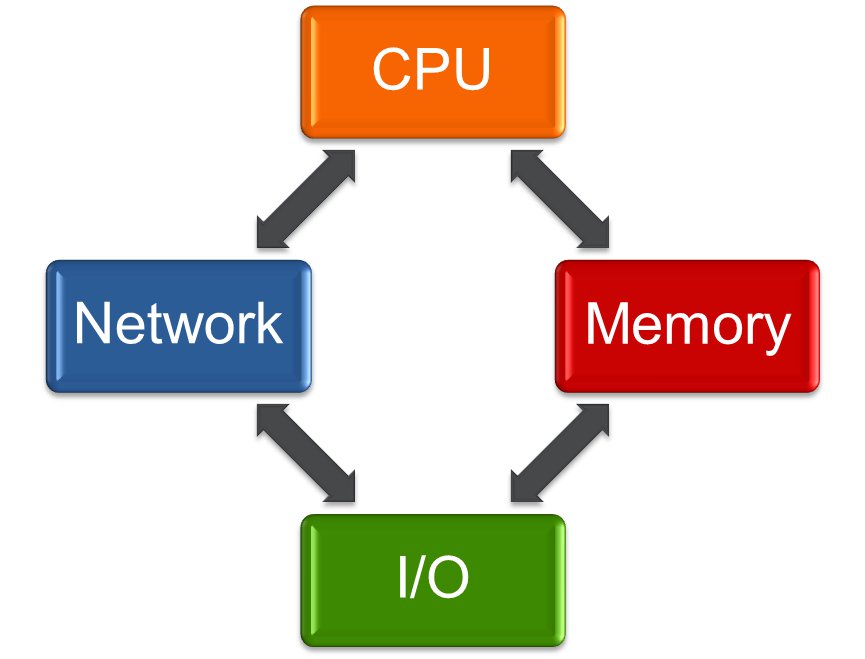
Finally we are at the bit where I talk about flash… If you made it this far then you have my unending respect. In this section let’s have a look at the different resources to consider when consolidating databases, focussing particularly on I/O, Memory and CPU. For the I/O piece we need to think about what the requirements are here – and the answer is that we need to have enough space to store our physical data, we need to be able to service the number of I/O requests coming in at any specific time (measured in I/Os Per Second or “IOPS”) and we need to ensure that each I/O request is serviced in a reasonable amount of time (the “latency”). So for clarity let’s list those issues and then address them one by one:
I/O – Storage Footprint
I/O – IOPS
I/O – latency
Memory
CPU
I/O – Storage Footprint
Is this the easiest requirement to plan for? Not necessarily, but I would argue that in most cases it is the easiest to change once you are in production (unless you include the process of justifying any extra unplanned cost!). Presenting additional storage (or indeed removing existing storage) is bread and butter for most Operations teams, so whilst it is always better to plan for these things in advance, it isn’t necessarily going to result in downtime or increased risk. Of course, there are exceptions to this – for example with the use of PCIe flash cards expansion is not a trivial exercise (as opposed to the array-based solution preferred by my company Violin Memory, where additional storage can be presented simply by adding arrays as building blocks).
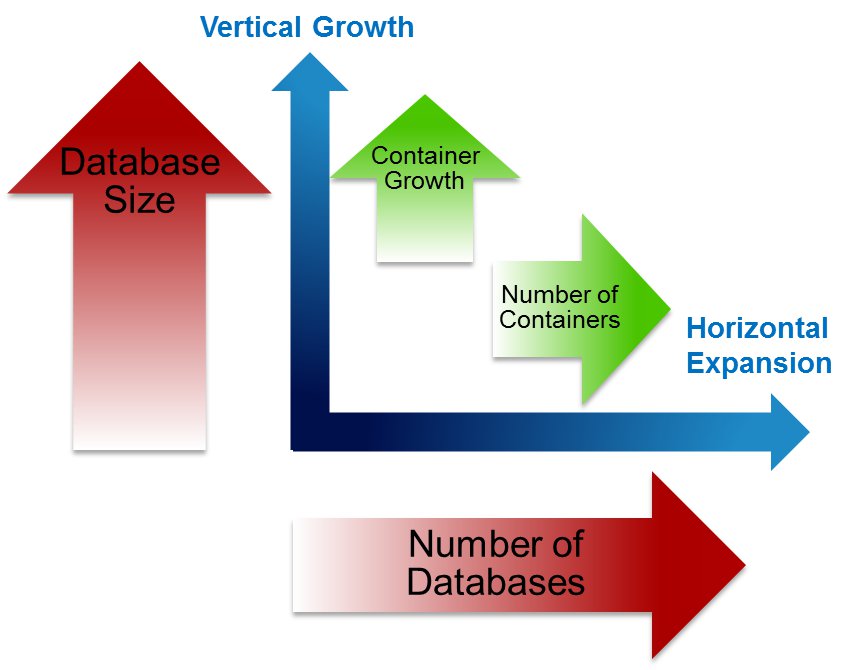
It’s worth keeping in mind that a consolidation environment will expand in two different dimensions, swallowing up your storage quicker than you might imagine. The individual databases will grow, as all databases inevitably do – but if you are building a true Database-as-a-Service model the number of databases will also grow over time. This is exacerbated by the two-dimensional growth of what I’m going to call the “container”. In a multi-tenancy environment the container will be the software home, plus the diagnostic destination where all those pesky tracefiles reside. In a virtualised environment the container is the VM, with its operating system and swapfile.
So before you know it all of your space predictions have been smashed. What can you do? Compression and de-duplication techniques can be used to reduce the storage footprint, although it’s worth keeping in mind that compression is essentially a trade-off where CPU resources and latency are sacrificed in order to gain more space. Given that CPU is also on our list of endangered resources, this might not be a great idea. De-duplication isn’t especially effective for databases, but it is very good for backups and virtualised environments. The best answer is to tightly control what goes in to your environement and make sure that storage can be added in a simple and modular manner.
On this line of thought, three important words are housekeeping, ILM and decommissioning (ok ILM isn’t really a word). Houskeeping, because you do not want to find that your system is out of space after some Oracle process (I’m looking at you DIAG) has been spooling massive tracefiles since day one. Running out of space, or indeed any resource, is bad news on a consolidation platform because there is a chance every hosted service will get dragged down as a result. Information Lifecycle Management is important because without a good ILM policy databases quickly turn into dumping grounds for data that refuses to die (we’ve all seen it). And decommissioning, because if your consolidation or DaaS platform is as successful as you hope, everyone will want to be on it… and nobody will want to leave. You have to clear out the dead wood, or those cost savings will never materialise.
What’s the flash angle here? Look at the operational costs of running all of this storage, particularly if you are having to overprovision and/or short-stroke to achieve the required IOPS (see below). How much does it cost to fill your data centre with racks of magnetic disks which have to be spun round at 15k RPM? How much power does that use? How much extra cooling do you need? What’s the price per square foot in your data centre? And most importantly, once you have taken into account all the extra disks you need to achieve the IOPS and latency requirements, what are you really paying for the usable storage?
I/O – IOPS
The term IOPS means I/Os Per Second. The “I/O” part of course means Inputs / Outputs, which we usually assume to mean from storage. In the storage industry people love talking about IOPS, although in the world of DBAs the term is far less prevalent. Another word that the storage industry loves is throughput (also known as bandwidth), which is the volume of data that can be transferred per unit of time, e.g. in megabytes per second. It’s important to understand that there is a simple relationship between IOPS and throughput:
Throughput = IOPS * block size
This means that if you were to perform 1024 IOPS and each operation was on a single 8k database block, the throughput would be 1024 * 8k = 8 MB/sec. (And by the way, if you aren’t used to looking at throughput figures then 8 MB/sec is not a lot… a Violin 6616 array can deliver 4 GB/sec from a single 3U unit). Where things get complicated is when your I/Os are of varying sizes.
When an Oracle database performs a full table scan it performs a db file scattered read which results in I/Os larger than the database block size (in fact usually a multiple of the database block size, with the multiplier being the value of the parameter DB_FILE_MULTIBLOCK_READ_COUNT). At the storage level this means reading sequential blocks – and if you are using rotational media (i.e. spinning magnetic disks) this is good news because you only have to suffer the seek time and rotational latency for the first block. After that point the disk head and spinning platter are in the correct place to read the remaining blocks. So if your system performs a lot of sequential I/O (such as in data warehousing) the storage characteristic you need to think about is probably throughput.
The alternative, lots of random I/O (such as that performed by db file sequential reads during index lookups), is terrible news for rotational media because that means for each block read there will be a seek time and some rotational latency. This reduces the total number of IOPS the system can perform, so if your system performs lots of random I/O (such as in an OLTP environment), the storage characteristic you need to concentrate on is probably IOPS.
Why does that matter here? Well because there is an extremely important observation to be made about the I/O generated by consolidation environments. So important that I’m going to put it on it’s own line:
As you consolidate more databases on to the same storage platform, the I/O will become more random.
This is not new to the world of virtualisation, where it has been known for some time that as you load VMs onto a physical system the underlying I/O becomes increasingly random. It also applies to databases, whether they are virtualised or not.
Since rotational media is so poor with random I/O, the conclusion we can come to is that as you increase the density of your consolidation environment, a disk-based storage system will become increasingly inefficient. Flash memory however has no such issues, because it is non-mechanical. There are no moving parts, no spinning disks and actuator heads to move, so no seek time and no rotational latency. Just lightening-fast I/O. As a result, a flash memory array can deliver a massive rate of IOPS compared to rotating disk array.
Why is this important? Resource limits for one thing – if you consolidate your databases onto a single storage platform then you need to be able to cope with the peak I/O demand of each system – or face performance issues. Worse still, if one database starts performing a lot of I/O you cannot guarantee any quality of service for the other databases… one system could compromise the entire platform.
A 3.5 inch 15k rpm SAS drive can deliver around 175 IOPS. Put that in a tray of 24 drives (such as a NetApp DS4243) and it will take up 4U and give you around 4,200 IOPS for 14TB of raw capacity. A Violin Memory 6616 flash memory array takes up 3U and gives you 16TB of raw capacity, but is capable of 1,000,000 IOPS. That’s one million versus a little over four thousand…
Of course disk array vendors have been around for a long time and so have come up with various coping strategies to mitigate these issues. The most basic strategy is to increase the number of spindles (i.e. the number of drives) therefore increasing the number of available IOPS. This means the number of drives is now based on the IOPS requirement rather than the capacity requirement – we call this overprovisioning. An obvious consequence of this is that you end up paying for far more capacity (as in disk space) than you need, which ruins the price you pay in terms of $ per usable GB. However, since you are buying far more disks, the price you pay in $ per raw GB will probably come down. Guess which one of those prices your disk array vendor will want you to look at? You can’t blame them, it’s just business… but keep your eyes open for the $ per usable GB value. Maybe even look at alternative metrics, like the $ per IOP.
Another coping strategy employed by disk array vendors is short-stroking. If you thought that overprovisioning sounded inefficient, think again. Consider a disk drive – let’s take the Seagate Cheetah 15K 600GB SAS drive as a fine example of modern rotating disk technology. This thing spins its platter round 15,000 times per minute, which is 250 times per second and as fast as any disk on the market can spin. That means each rotation takes 1/250th of a second, which is 4 milliseconds. So at the point when you want to read your data the disk will need to rotate anything from zero degrees (if you are fortunate and it’s in the right place) to 359.9 degrees (bad luck). Converting that to time, that’s anything from 0ms to 4ms, which is why the spec sheet says the average latency is 2ms (half-way between the best and worst case). Add to that the seek time, i.e. the time taken for the actuator head to move across the disk – which is an average of 3.4 / 3.9 ms for reads / writes – and you have a lot of wasted time. So to compensate for this, in short-stroking only the outer part of the disk is used to store data. This has two key advantages in performance: firstly the average seek time is reduced because the head never needs to move to the inner part of the disk; secondly the average throughput is increased because the outer part of the disk contains more sectors, so more data can be read or written per rotation. To achieve better latency and throughput from short-stroking, typically only 25% of the disk is usable although this can reduce further – 10% usable is not uncommon.
Now, for the flash angle, think about all of those disk drives. With overprovisioning and short-stroking in place to achieve the required number of IOPS, you probably have many orders of magnitude the amount of space that you need. That might not be a problem in itself, but all of those disk drives have to be powered, they all produce heat and noise, they all take up expensive physical rack space in the data centre. To fulfil a requirement for one million IOPS you may have to buy and run many racks of disks, whole floor tiles dedicated to spinning round those little metal platters 21.6 million times per day, every day. Or you could buy a single 6616 flash memory array which uses a fraction of the power, generates a fraction of the heat and takes up just 3U. That’s the flash angle – it’s a no brainer.
I/O – Latency
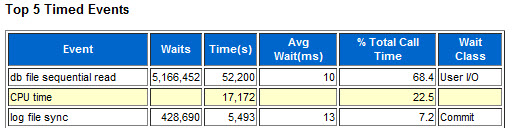
Latency is like the application stealth tax. Every I/O on your system has to suffer this time penalty, so whilst it might look like a small price to pay when you consider a single I/O, it soon stacks up. When you look at your whole system over a period measured in hours you will be shocked to find out how much time you are losing to I/O. Look at this AWR report from the busy CRM system behind a European insurance company’s call centre:
The AWR report was for a 15 minute snapshot and the database was running on a server with 96 cores. The average latency of 10ms meant that in total there were 52,200 seconds lost waiting on db file sequential read (i.e. index lookups, which means random I/O). That’s 870 minutes of CPU time for every minute of elapsed time. To put that another way, for every hour on the wall clock, 58 hours are lost waiting on I/O.
That in itself is a good reason to switch to flash memory and reap the benefits of a sub-millisecond latency. Even if the flash memory array could only deliver 1ms latency (and it will easily deliver lower than that) that’s a tenfold improvement, saving around 52 hours of wait time per hour of elapsed time.
But that’s the standard story of how flash accelerates database applications. Where is the relevance to consolidation? The answer lies in the predictable nature of latency on flash memory – and Violin in particular.
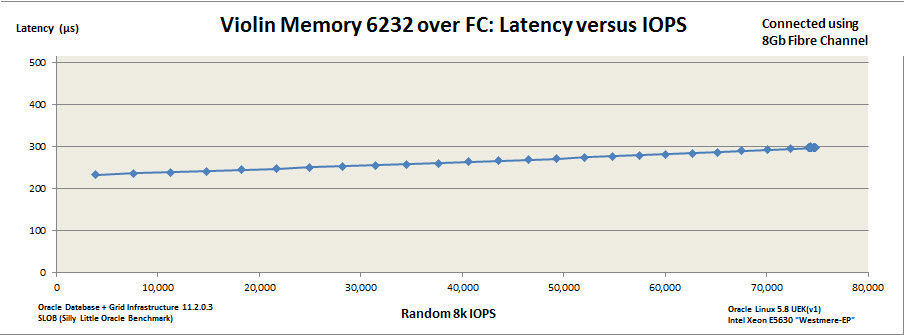
On a disk storage system latency will go through the roof when you reach near-capacity. Flash systems have predictable latency with near-linear increase. Violin is particularly good at this due to the nature of the vRAID technology which protects against the write-cliff (an interesting subject, but this post is long enough without me delving into that). Using SLOB I can generate a latency versus IOPS graph for the 6232 MLC array I currently have in my lab to prove this very point:
Even when I completely max out the server (I only have limited CPU power here – if I had more the array would easily keep going) I can’t push that latency up over 300 microseconds – and the performance is totally predictable. And that’s the value to a consolidation environment – no matter what the individual systems are doing they cannot compromise the storage system. Flash gives me better performance, but it also reduces the impact of problems. To put it in the language of CIOs, flash both increases my agility and reduces my risk.
Memory
If you have never experienced a database consolidation environment before it won’t necessarily be obvious, but memory is often the biggest resourcing problem. DRAM prices are more stable than they used to be, but it is still an expensive resource if you want to use it by the terabyte. It also adds considerably to the cost of the server in which it is placed, requiring more power and producing more heat. In part three of this series I talked about the practice of overcommitting resources, which assumes that your individual databases won’t all require their maximum resource utilisation at the same time. For a virtualised environment you can overcommit the memory of the VM operating systems, in fact this is a practice that has been around for years. But how to you overcommit the memory used by the database instances?
As every DBA knows, the Oracle database instance has two main memory structures, the SGA and the PGA. The SGA always used to be a fixed size, but recent versions of Oracle allowed it to vary based on requirement up to a predefined maximum size. The current version of Oracle now allows the same thing to happen with the PGA as well, meaning a predefined limit can now be set for the total of SGA + PGA, with the individual components varying in size based on workload – but never exceeding the limit.
Here’s a simple question for anyone who has worked with database products in the past… no, in fact, anyone who has worked with any software product at all. Do you want to trust your availability and service levels to a whole host of automatic memory management systems? I don’t. That’s not a criticism about software quality, just a simple statement of risk – I cannot afford the risk of not being in control.
There is an alternative though – the flash angle. The majority of most SGAs will be dedicated to database buffer cache – a portion of memory holding cached copies of data blocks. Database performance, as a science (or occasionally as an art) has been built around the fact that reads from memory (logical reads) are faster than reads from disk (physical reads). What happens if you replace the disk with flash? What happens if the physical read time reduces by orders of magnitude?
Disk access times are measured in milliseconds. Flash access times are measured in microseconds. Ok so DRAM access times are measured in nanoseconds, we aren’t going to throw away the buffer cache entirely – plus we have to acknowledge that when Oracle performs a physical read it has to take out latches, manipulate a whole load of doubly-linked lists, pin blocks and do many other things only very clever people understand (but you can be one of them by reading this excellent book) – all of which adds to response time. But the fundamental point remains, if flash allows for a significantly better response time, some of the stuff in that buffer cache can probably now afford to be “dropped” down to the storage layer. (Or as an alternative consideration, a second level of buffer cache could be created on flash using Oracle Database Smart Flash Cache.)
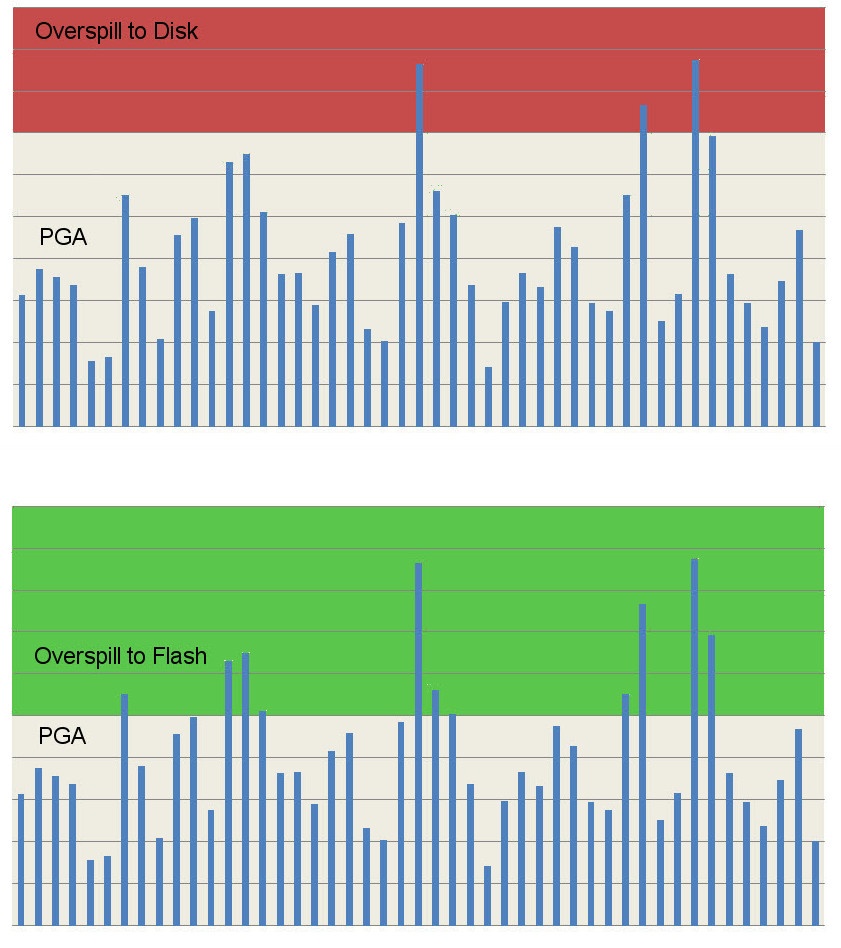
What about the PGA? It’s a similar story, one of the sets of components of the PGA are the SQL Work Areas which includes the sort area, hash area and bitmap merge area. Memory intensive operations such as sorts use this dedicated memory, but if the area size is exceeded they have to spill over to disk (e.g. the temporary tablespace). I am not suggesting that flash is fast enough so that this overspill can now be tolerated for all workloads; it will still be faster to perform sorts, for example, in memory. But when sizing these areas it is normal to pick a value that will encompass most tasks and then accept that there will be a few outliers which spill over to disk. With flash, the penalty paid for that overspill is much lower, which means that more outliers can be tolerated.
While we are on the subject of resources let me ask you a question. Why do you have DRAM in your server? You have CPUs to do the work, you have storage to keep persistent data, you have a network to allow remote entities (e.g. users) to drive the CPUs and access that data, maybe modify it too. But why is the DRAM there? After all, nothing stored in DRAM is persistent, so why bother with it in the first place? The answer relates to the processors – the workers that are responsible for making your system more than just a lump of dead electronics. You have DRAM to increase the utilisation of your processors. If you had no DRAM then your processors would be under-utilised because they would be constantly waiting on the high latencies associated with accessing data on storage. That’s a fact worth considering when you ask yourself what you would do differently with a ultra-low latency flash system. I’m not suggesting that you ditch DRAM entirely, but it’s a simple fact that the larger your memory structures, the more processing overhead has to go into managing them. Maybe the need for multi-terabyte database servers isn’t quite a strong as some of your hardware vendors would have you believe?
Flash memory gives you the ability to condense the memory footprint of a database instance beyond the point at which a disk-based database would start to exhibit performance issues. The consequence of this is that by using flash memory you can achieve a greater density of database instances per physical server without having to use additional DRAM.
CPU
Finally we come to CPU utilisation. It seems obvious that if you take all of your database environments and consolidate them onto one platform you will need a lot of CPU power to ensure they all coexist peacefully. This is where you really want to be able to overcommit, because CPUs are expensive. Maybe not as hardware components (although they certainly aren’t cheap), but as the major contributor to license cost. Oracle licenses most of its database software by the core, with a “multiplication factor” applied based on the type of processor. If you add more cores then you will probably need to buy more licenses for Oracle Database Enterprise Edition, more licenses for Oracle RAC, more tuning and diagnostic pack licenses, perhaps more Partitioning licenses… and any other of the options that you might be using. Active Data Guard, Advanced Compression, Advanced Security, Spatial… it all adds up! On the other hand, if you do not have enough cores then your databases will start fighting each other for resource and you will suffer all sorts of performance problems. It’s a difficult balance. Virtualisation is one possibility because you can soft partition to limit the CPU usage of each VM, but that doesn’t help with the licensing. Oracle does not recognise soft partitioning as a means for limiting the number of software licenses required, so although you can use Oracle VM with hard partitioning you are not going to be able to reduce license cost with VMware.
But there’s a flash angle here. What if you could increase the efficiency with which you utilise your CPUs? What if your system could use the same processors to do more real work? Flash memory allows this, because it can be used to reduce the amount of time processes spend waiting on I/O.
%iowait: the percentage of time that the CPU or CPUs were idle during which the system had an outstanding disk I/O request
This is interesting because in this definition the CPUs are otherwise idle. However, don’t be fooled – because this idle state is down to the fact that no more work can be done until the outstanding I/O request has been completed. A good example of this would be a database process waiting on db file sequential read (an index read, manifesting as a random I/O request on the storage system). If the database process is performing an index lookup then the next step is to manipulate the block into the buffer cache, so it cannot continue until the index data block has been retrieved from storage. Asynchronous I/O will not help here, there is nothing more that can be done until the index information has been retrieved.
Maybe this is easier to look at from a database wait interface perspective. Go back to the I/O Latency section above where I showed the AWR report waiting on db file sequential reads. That wait time is lost application time, it’s time that could have been spent doing real work if it wasn’t waiting on I/O.
Time… that’s what this is really about. If you think about it at a high level, the maximum amount of work that can be done on any system in a given time is dependant on the number of CPUs, since they are the entities performing the work. If you have 16 CPUs then you can perform a maximum of 16 hours of work in one hour of elapsed (wall clock) time. A proportion of that time will be spent waiting on I/O – and that is the time which is lost to the application. Replacing disk with flash memory means reducing the time spent waiting on I/O, which in turn means that a higher proportion of the maximum available time can be spent working.
Summary
So, database consolidation on flash memory – whether it be through a shared-platform or by use of virtualisation technologies – allows for more efficient utilisation of resources. Specifically it:
Provides the necessary storage capacity without having to overprovision expensive disk arrays, therefore reducing operational expenditures such as power, cooling and data centre footprint
Allows for more I/O operations to be performed per second, allowing for more databases to be consolidated per platform
Provides not only better latency but also protection from unpredictable latency when experiencing peak loads
Allows for a reduction in memory requirements, meaning that more instances can fit in the same amount of physical memory
Increases the utilisation of a system’s CPUs by reducing the amount of time spend waiting on I/O
The conclusion therefore is that consolidating on flash memory increases agility by allowing for a greater density of databases to be achieved on the underlying infrastructure; it reduces risk by offering better protection against peak capacity issues; and it reduces cost in comparison to disk by requiring less power, less cooling and less of that valuable space in the data centre.
More agility, less risk, lower cost. Now who wouldn’t want that?
In parts one and two of this article I blogged, extensively and laboriously, about database consolidation. I talked (at length) about the business drivers for this industry trend, then went on to discuss (for some considerable time) the technical challenges. I even droned on about the different design choices faced by enterprises who are about to embark upon a database consolidation exercise.
From this we can conclude a number of things, not the least of which is that I write too much. This is particularly true because none of what I’ve actually written so far contains any of the things that made me want to start blogging about database consolidation… I’ve saved all of those until now. We also concluded that consolidation is about cost reduction combined with increased manageability. I expanded on the manageability piece to encompass standardisation, agility and reduced complexity. But what about that cost reduction bit? If you cannot achieve cost reductions, where is the justification for all of this change?
Capacity: Enough – But Not Too Much
Part three is all about capacity. Not (just) as in disk space, but as in the amount of finite resources available. With any consolidation exercise the idea is always the same: take a large estate of disparate systems and condense them into a smaller, better-managed offering with clearly-defined service levels. That word “condense” is the key, because you aren’t just trying to join up the dots. If you go from having 100 databases all on their own dedicated servers, to having 1 uber-server running all your databases, that’s not necessarily a good thing. Not if that uber-server costs 100 times more than the original servers and takes up 100 times more floor space, uses 100 times more power etc. The true saving comes when you compare what you have to what you need… and discover a difference.
Of course, things are never that simple, because what you need is hardly ever constant. For any specific resource you can probably define an average requirement e.g. on a usual day I need this much processing power, this many I/Os to be serviced per second from my storage etc. But what about peaks? Each system has a time when it is at the peak utilisation of its resources, so during these peak times how big is the gap between the average and the maximum? These peaks can come in all sorts of forms, from daily schedules (e.g. logon storms caused at the start of new shifts on a call centre CRM system) to seasonal events (university enrolment or tax submission systems where users have an annual deadline).
Let’s consider ten databases which need to be consolidated. For simplicity we’ll assume that they are all identical in their behaviour and requirements. These ten databases run on ten identical servers, each with a capacity to deliver 10 of something. Let’s not worry about what that something is, whether it’s a specific property such as CPU, memory, etc; let’s just keep this generic and say that whatever it is can be measured. So our total capacity is 100. Now each database has an average requirement for 6, so if we were to consolidate then on average we need to be able to supply 60. That means I could potentially think about reducing my server requirements for the consolidation platform down from 100 to nearer 60. However, at peak times each database utilises up to 9. So actually, if all of these databases were to require their peak capacity at the same time (which they would, because I said they were identical) then I would need at least 90 or I would be unable to service the requirement. The trick with consolidation is to recognise that not all of your systems are likely to need their peak requirements at the same time. Thus with enough information I am able to take a well-educated and considered judgement (or alternatively a reckless gamble) that the combined load of all of my consolidated systems will never reach the theoretical maximum, therefore building a system that is smaller than the sum of its parts. This practice is known as overcommitting.
Overcommitting Resources
Now that we have the concept of overcommitting loosely defined, let’s think about which resources can be overcommitted. Incidentally, in the world of virtualisation, overcommitting is a long-standing concept. In fact, even in the world of Oracle we have already bumped into it in areas such as Instance Caging (although Oracle calls it “over-provisioning”, a term which means something different in the storage industry).
At a high-level we have the following resources to consider:
CPU
Memory
I/O
Network
Of course I/O can mean more than one thing. Obviously there is the total storage capacity required, but you also need to consider the I/O demand in terms of how much data can be delivered and at what latency. More on that later.
Now if you are new to database consolidation you may be tempted to think that CPU and I/O are going to be the main areas for concern, but actually by far the most common problem is memory. The reason for this is that CPU consumption and I/O rates tend to vary over time for each database, to the point that (if you choose your applications wisely) you are unlikely to see every database demand its peak requirement at the same time. This means you can overcommit, bringing you considerable infrastructure savings. But if you think about the memory components of a database, namely the SGA and PGA, how can consolidation help you achieve a saving there? One possible solution could perhaps be to use Oracle’s Automatic Memory Management feature to try and limit the size of each instance’s memory footprint but then overcommit the maximum sizes to allow them to grow when they need it. Good luck with that. The risk of every instance ballooning up to its full size is palpable (and my years working for Oracle have resulted in a deep mistrust of AMM and its predecessor ASMM…)
The answer to this issue is flash memory. Not just for the memory issues but for CPU and (perhaps obviously) I/O as well. Flash memory allows you to achieve a greater density of database consolidation. In part four I’ll explain why…
[But first, a small apology. There is a fourth bullet point up there which says “Network”. I don’t have much to say on networking when it comes to consolidation… in fact I often don’t have much to say on networking at all. My experience of working with network operations teams has generally led me to conclude that they don’t actually exist. Instead, they seem to have been replaced by automatic email response systems which wait a predefined amount of time and then reply with the message, “There are networking issues…”. And yes, I am aware of how lame this excuse is, but I’m sticking with it.]
Part one was all about the business drivers and technical challenges faced when building a database consolidation platform. Database consolidation is all about sharing infrastructure, so part two is about the design choices that are available…
An important architectural decision when consolidating databases is that of where the shared infrastructure should diverge. If we assume that your customers are applications which require a database service, at what point should each application be segregated from the others? Obviously you want to use the same underlying hardware, but what about the OS? What about the storage, do you want to segregate the data into different volumes on different LUNs? Maybe you want to share right at the top and just have different application schemas in one big container database?
Let’s have a look at the three main choices available:
Multi-Tenancy databases
Shared Platform databases
Virtualisation
A multi-tenancy database is a database which contains main different applications, each with their own schema. In many ways this model makes a lot of sense, since it allows for the highest level of resource sharing and an almost-zero deployment time for new schemas. And after all, Oracle is designed to have multiple users and schemas; the database resource manager allows for a level of QoS (quality of service) to be maintained whilst features such as Virtual Private Database can be used to enhance the security levels. Oracle allows for services to be defined which can then be controlled and relocated on a clustered database. Why not opt for this method? In fact, some customers do – although the vast majority don’t. The reasons for avoiding this method are further up this page, under the heading “Technical Challenges”. A single big database is a big single point of failure. You don’t want to hit an ORA-600 and see the whole thing come crashing down if it’s a container for your entire application estate! Say someone accidentally truncates a table and wants the whole database rolled back so they can retrieve their data, how can you work that situation out? Maintenance becomes a nightmare – can you really have all of your applications on the exact same release and patchset of Oracle? What about testing… Say one of your applications requires a patch for the optimizer, how do you go about testing every other application to ensure they are not affected? And security… it only takes one mistaken privilege to be granted and everything is exposed… do you really trust this model?
A shared platform database model provides segregation at the database level, so that a cluster of hardware (for example a six-node cluster running Oracle Grid Infrastructure) then runs different databases. This allows for a wide-ranging variety of database versions and patchsets to be run on the same platform, which is far more practical and makes the security issues far easier to cope with. Of course, it’s not without its challenges either. Firstly, there are still components that cannot be upgraded without affecting large groups (or all) of the customers: the operating systems, the Grid Infrastructure software, firmware for various components etc. Then there are the additional resource requirements for running multiple databases: extra RAM to cope with all of the SGAs and PGAs, extra CPU capacity to cope with all the additional processes from each instance, extra storage for all of those temporary and undo tablespaces, the online and archive redo logs, the SYSTEM and SYSAUX tablespaces. Maintenance requirements also increase, because although you can upgrade or patch each database independently you now have many more databases to upgrade / patch. This means administrative time increases dramatically – although you can combat this with the use of enterprise management tools such as Oracle Enterprise Manager.
An environment which uses virtualisation is perhaps the strongest design model. Virtualisation products have matured significantly in recent years to the point that they are now being used not just in non-database production environments but now for databases as well. Traditionally this is been a difficult subject for DBAs due to Oracle’s support policy for databases running on VMWare. This has softened considerably in recent years but Oracle still reserves the right withdraw support for an issue unless it “can be demonstrated to not be as a result of running on VMware”. Of course, Oracle has its own virtualisation product Oracle VM (which I have to say I actually really like) where support is not an issue, but I suspect that it has a far smaller share of the market than VMWare (although you wouldn’t know it from the aggressive marketing…). The great thing about virtualisation is that you have inherent security based on the segregation of each virtual machine. Maintenance becomes a lot easier because even OS upgrades can take place without affecting other users, whilst VMs can be migrated from one physical stack to another in order to perform non-disruptive hardware maintenance. Deployment and provisioning becomes easier as virtualisation products like VMWare and OVM are designed with these requirements in mind; the use of templates and the cloning of existing images are both great options. Similarly, expansion both at the VM level and across the whole platform is a lot easier. On the other hand, licensing (particularly of Oracle products) isn’t always clear (but then when is it?). The main challenge though is capacity, because now you not only have to consider all of those database SGAs and PGAs but also the operating systems and their various requirements, from root filesystems to swap files. Again I will talk about this in the second post on this topic.
Finally… there is a fourth model, which I haven’t mentioned here because it almost certainly won’t apply to the majority of people reading this. The fourth model is schema-level multi-tenancy, as used by the likes of Software-as-a-Service companies, whereby a single application is shared by multiple customers each of which only see their slice of the data. This is really an application-based consolidation solution, where each user or set of users only has visibility of their data despite it being stored in the same tables as that of other users. The application uses unique keys and referential integrity to lookup only the correct data for each user, leading to the security ramification that your data is only as secure as the developer code written to extract it for you. I once worked on one of these systems and discovered a SQL injection issue that allowed me to view not only my data but that of anyone whose userID I could guess. Of course there are products such as Oracle’s Virtual Private Database that can be used to provide additional levels of protection.
The reason I mention this fourth model is that Larry Ellison attacked Salesforce.com for using a variant of this model and said that multi-tenancy “was the state-of-the-art 15 years ago”, whilst talking up the Oracle Public Cloud for using virtualisation as a security model. According to Larry, multi-tenancy “puts your data at risk by commingling it with others”. Now, I don’t know Salesforce’s database design so I don’t know how well it fits into my description above (I have some friends who work for Salesforce though so I do know that they employ great developers!)… but what I do know is Exadata. And Exadata, along with the Super Cluster, is the platform for Oracle’s “Private Cloud” offering (details of which you can read about here). Exadata, however, has no virtualisation option. You cannot run OVM on Exadata, so if you read Oracle’s Exadata Database Consolidation white paper, it’s all about building the shared platform model I talked about above. To me, that doesn’t really fit in with Larry’s words on the subject.
Scale works in both directions…
One final thought for this section. If you build a DaaS environment and get all of your automated provisioning right etc you will make it very easy for your users to build new applications and services. That’s a good thing, right? But don’t forget to spend some time thinking about how you are going to ensure that this thing doesn’t grow and grow out of control. Ideally you need some sort of cross-charging process in place (I could probably write another whole article on this at some point, it’s such a big topic) but most of all you need to have a process for decommissioning and tearing down applications and databases that have exceeded their shelf life. If you don’t have that, you will find that all of your infrastructure cost savings are very short lived…!
That’s it for part two. In part three I will be discussing the capacity requirements of a consolidation platform. And you won’t be surprised to hear that flash is going to make an appearance soon, because flash memory is the perfect fit for a consolidation environment. Don’t believe me? Wait and see…
Database consolidation has been a big trend in the industry for a while now. You can see this if you read the IT press, or if you listen to the relentless procession of people queueing up to talk about the “cloud”. I saw it in my time at Oracle, where we had an increasing number of customers come and talk to us about the pressures of running thousands of independent databases, all on their own servers, all taking up vast amounts of data centre real estate and acting like a dead weight around the neck of their IT organisations.
Of course, just rounding up all of your databases and sticking them on some big iron isn’t really going to bring you many benefits. The real benefits of a consolidation exercise come when you use it as a way of repositioning your databases as service offerings. These come under various guises: the “As A Service” models: Database-as-a-Service (DaaS), Infrastructure-as-a-Service (IaaS), Platform-as-a-Service (PaaS); the On-Demand models (e.g. Amazon’s Relational Database Service); and the ubiquitous cloud offerings (e.g. the Oracle Cloud). (My first job working with On Demand services was in 2003, so I still can’t use the term “cloud” without it coming out sounding as if I’m being sarcastic… I don’t mean to, but why does everyone always talk as if it’s a brand new idea?!)
Anyway, I’m going to make a bold claim and say that, at least to a DBA, it’s all the same thing. To me, database consolidation is about reducing vast estates of physical database servers into smaller, more tightly-managed groups of databases that can provide predefined services. (Oh and labelling them as a “cloud”, because if that word isn’t used at least a hundred times a day in our industry the world would end…) It’s also about turning your databases into a well-defined service – and therefore turning your users into your customers, even if they are actually part of your own organisation.
No matter what you call it, you can always spot a database consolidation exercise by the business drivers and the technical challenges.
Business Drivers
Cost reduction
Increased agility
Reduced complexity
Higher service levels
The cost reduction piece seems obvious – a smaller number of servers cost less to buy and run than a larger number, right? But it’s often misunderstood just how much of a cost saving can be made. Don’t just think about the servers, think about the savings in data centre footprint, in power and cooling. Think about the reduced administration costs, particularly if you design your service properly (i.e. the agility angle). Now think about the potential reduction in license costs. And an often-overlooked area of saving is the reduction in failures and outages caused by having a tightly designed and standardised operating model (i.e. the reduced complexity angle).
Increased agility is as important as cost reduction, something which may come as a surprise to those who are used to concentrating on technical rather than business challenges. To a CIO, the ability to react quicker, to take advantage of new opportunities as soon as they become apparent, is equally as important as controlling the bottom line. In a well-implemented database-as-a-service offering, deployments of new databases / services are fully automated. Automatic provisioning has to be a default requirement in the design. Likewise the ability to automatically scale (up or down) in order to meet changing demand is a must. That scaling needs to be possible on two levels: at the individual database level to meet the developing requirements of each “customer” and at the macro level to expand (or contract) the capability of your DaaS offering depending on overall demand.
It may not always seem like it at first, but the consolidation of your databases onto a DaaS platform should result in reduced complexity. Why? Well because at the heart of any consolidation exercise must be standardisation. Every large IT organisation has a plethora of different databases running different versions on different operating systems. No matter how stringent your deployment procedures are, it’s guaranteed that if your databases are built manually then each one will have a subtle difference based on a) when it was built, b) who built it, and c) what sort of day they were having at the time. Human beings are complex creatures, they behave in unexpected ways – the only way to have true consistency is to have your database deployment automated. And then there are the systems that you may have inherited, perhaps as the result of an acquisition or departmental reorganisation. You know the ones, they are usually sat in the corner untouched and unloved, because nobody dares go near them in case they break. In a DaaS environment every database is, at least outwardly, identical. This means that as a DBA you don’t have to worry about the way you treat them – what you can do with one database you can do with any of them. It’s all about manageability.
And the outcome of that reduced complexity must therefore be higher service levels. You can pretty much guarantee that any organisation with 1000 databases all running on similar path levels on the same OS, using the same file layouts, with automated management scripts to deploy them or tear them down (and perhaps even to patch them) will deliver a higher uptime than an organisation with a multitude of different databases on different operating systems, each one of which has its own subtleties and nuances.
Technical Challenges
So now that we’ve covered why it’s worth doing, what are the challenges associated with actually doing it? I’ve had a lot of exposure to DaaS and consolidation environments, both at Oracle (hands on in a support role) and in my new role at Violin (in a technical presales capacity). One particular experience which serves me well is the four years I spent working on British Telecom’s DaaS environment for Surren Partabh, who is BT’s CTO of Core Technologies. When it came to DaaS, BT were light years ahead of the game – their mutiple DaaS environments have been in place for years already and support many hundreds of databases. There is an interesting case study about BT DaaS here – if you are considering a consolidation exercise (and you can ignore the author’s overuse of the word “cloud”) then it’s well worth a read. As Surren says, “Our Oracle Database 11g consolidation has enabled us to reduce our server sprawl, deploy databases faster, and operate with 20% fewer DBA’s”.
So what are the challenges?
Availability
Capacity
Security
Maintenance
Availability is a challenge, not really in a technical sense (at least not any more than normal) but because of the increase in risk. When you consolidate your databases you put all of your eggs in one basket. If you have a large part of your business dependent on your DaaS platform and it takes a plunge, the pressure is truly going to be on. Having said that, my experience is that availability increases during database consolidation. HA and DR are easier to plan for and incorporate into a DaaS design than on the ad-hoc basis of a siloed database environment. Extensive backup and DR solutions cost money, which means that inevitably you end up with databases in your environment whose HA characteristics you are not always comfortable with. When you have all your eggs in the aforementioned basket it becomes impossible to argue about whether good backup solutions, HA and DR etc are worth the investment. Consequently you can achieve economies of scale by implementing a single solution across your whole environment – with the happy consequence that systems which may not have qualified for this level of service if they were independent end up getting a free ride. One thing to remember about consolidation though: test your backups, test your HA and test your DR… test it again and again. I know what it’s like to lose >50 production databases in one single calamity – and I can promise you it’s not a nice place to be.
Capacity for me is the biggest challenge of all. In fact it’s so critical to the idea of database consolidation that it is the reason I started writing this blog entry. Don’t forget that capacity isn’t just about disk space, it’s about CPU resources, it’s about memory, networking, IO requirements… essentially everything that is a finite resource. Capacity is something you have to plan for when you design and build a DaaS environment; get it wrong in one direction (too much) and you won’t achieve those cost savings that were one of the driving forces behind the whole exercise… get it wrong in the other direction (too small) and that cherished availability will be compromised, possibly affecting your entire solution. In fact, capacity planning for database consolidation is such an important topic that having started this blog entry with it in mind, I am going to give it its own entry entirely…!
Security is a challenge which has similar characteristics to those I described for availability. By putting all of your databases on one platform you increase the risk – security therefore needs to be strictly controlled. At a very simplistic level, unauthorised acquisition of administrator privileges on a consolidated environment could lay open your entire data estate. Compliance is another potential issue: things are complicated by environments where different databases have different regulatory or legal requirements. For example, if one of the databases on a DaaS system needs to meet Payment Card Industry standards then all of the underlying architecture will be affected, potentially resulting in all of the databases needing to meet PCI standards. Of course, as with availability, this can work in your favour because if you design the system with security and compliance in mind, you may find that databases which were previously somewhat lacking in the security department are dragged kicking and screaming into a compliant state (often under the threat of being cast out of the environment if they fail to comply). The other major consideration for security is the use of virtualisation. By placing each database in its own virtual environment, an additional layer of security can be wrapped around it, effectively segregating it from its neighbours whilst still retaining the benefits of a shared infrastructure. This is a massive trend in the industry now and is something that, I believe, is inevitable for most enterprise database environments.
And finally we come to maintenance. I cannot emphasise enough how important it is to define the maintenance strategy of a DaaS / consolidation environment before you implement it. Most vendors now, whether they be software (e.g. Oracle), operating system or hardware (server, storage, network etc) are focussed on providing zero-downtime products capable of non-disruptive maintenance. But no matter how much you spend, there will inevitably be times when you need to take a planned outage. And of course, with all your internal customers now using the same shared infrastructure, that downtime is going to have quite an effect. Here is what is going to happen if you don’t plan to avoid it up front: your DaaS environment has 26 databases on it, labelled A to Z. The application owner of A is hitting a problem which, unfortunately, requires maintenance on the underlying infrastructure. This patch, firmware upgrade, whatever it may be, requires downtime which will take the service offline. You were promised by all your vendors that their products would never require downtime… but hey guess what? So you go to application owner B and you say I need to take the system down this weekend – and he says “No way, not this weekend – we have a critical application upgrade planned. Can you wait until the weekend after?”. So you tell this to application owner C and she says, “We have our upgrade the week after – we already had to delay it because of B so we cannot wait any longer”. Trust me that you will never get as far as Z! You could pull rank of course, so you go to the CTO and say, “These guys are driving me mad, can you help me out?” but the CTO says, “What are you crazy, it’s the quarter end this month – we can’t do any of this stuff!”. Here is my advice to anyone implementing a DaaS or consolidation environment: Define maintenance windows into the service agreement, then make your internal customers sign up to these terms before they are allowed on to your platform. If they don’t agree to these maintenance cycles then they need to go and build their own system! This is also another argument for virtualisation, because – although it doesn’t completely solve the problem – adding an extra layer of abstraction down at the hypervisor level allows for everything above that to be treated independently.
Those are the technical challenges, but what about the design choices? There are three (or four depending on your view) architectural methods of achieving a consolidation or DaaS platform. In part two of this series I will examine them and have a look at the benefits and pitfalls associated with each. If you made it this far you will be delighted to hear that I am only just started…
I was invited to Microsoft HQ in the UK yesterday to be a speaker at one of their launch event for SQL Server 2012. It’s the second of these events that I’ve appeared at and it finally made me realise I need to change something about this blog.
So far until now I have resisted making any critical remarks about the Oracle Exadata product here, other than to quote the facts as part of my History of Exadata series. I’m going to change that now by offering my own opinions on the product and Oracle’s strategy around selling it.
Before I do that I should establish my credentials and declare any bias I may have. For a number of years, until very recently in fact, I was an employee of Oracle Corporation in the UK where I worked in Advanced Customer Services. I began working with Exadata upon the release of the “v2” Sun Oracle Database Machine and at the time of the “X2” I was the UK Team Lead for Exadata. I personally installed and supported Exadata machines in the UK and also trained a number of the current Exadata engineers in ACS (although that wasn’t exactly difficult as all of the ACS engineers I know are excellent). I also used to train the sales and delivery management communities on Exadata using my trademarked “coloured balls” presentation (you had to be there).
I now work for Violin Memory, a company that (to a degree) competes with Oracle Exadata. Exadata is a database appliance, whilst Violin Memory make flash memory arrays… so that doesn’t immediately sound like a true competition. But I’ll let you into a little secret: Exadata isn’t a database appliance at all – it’s an application acceleration product. That’s what is does, it takes applications which businesses rely on and makes them run faster. And in fact that’s also exactly what Violin is – it’s an application acceleration product that just happens to look like a storage array.
So now we have everything out in the open I’m going to talk about my issue with Exadata – and you can read this keeping in mind that everything I say is tainted by the fact that I have an interest in making Violin products look better than Oracle’s. I can’t help that, I’m not going to quit my exciting new job just to gain some journalistic integrity…
There are a number of critiques of Exadata out there on the web, ranging from technical discussions (the best of which are Kevin Closson’s Critical Analysis videos) to stories about the endless #PatchMadness from Exadata DBAs on Twitter. My main issue is much more fundamental:
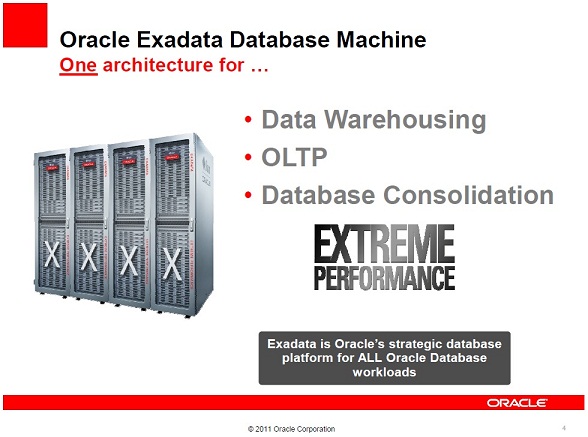
Oracle now say that Exadata is the strategic database platform for ALL database workloads. This did not used to be the case. If you read my History of Exadata piece you will see that when the original v1 HP Oracle Database Machine was released, “Exadata” was the name of the storage servers. And those storage servers were, in Oracle’s own words, “Designed for Oracle Data Warehouses“.
Upon the release of the v2 Sun Oracle Database Machine there came an epiphany at Oracle: the realisation that flash technology was essential for performance (don’t forget I’m biased). This was great news for Violin as back in those days (this was 2009) flash was still an emerging technology. However, the Sun F20 Accelerator cards that were added to the v2 were (in my biased opinion) pretty old tech and Oracle was only able to use them as a read cache. However, that didn’t stop Oracle’s marketing department (never one to hold back on a bold claim) from making the statement that the v2 was “The First Database Machine For OLTP“. We are now on the X2 model (really only a minor upgrade in CPU and RAM from the v2) and Oracle has now added Database Consolidation to the list of things that Exadata does. And of course the new bold claim has now appeared, as in the image above, “Exadata is Oracle’s strategic database platform for ALL database workloads“. Sure the X2 now came in two models, the X2-2 and the X2-8, but they weren’t actually different in terms of the features that you get above a normal Oracle database… you still get the same Exadata storage, Hybrid Columnar Compression and Exadata Flash Cache features regardless of the model.
So what’s my problem with this? Well first of all let’s just think about what a workload is. Essentially you can define the workload of a database by the behaviour of its users. There are two main types of workload in the database world, OnLine Transactional Processing (OLTP) and Data Warehousing (DW). OLTP systems tend to have highly transactional workloads, with many users concurrently querying and changing small amounts of data. Conversely, DW systems tend to have a smaller number of power users who query vast amounts of data performing sorts and aggregation. OLTP systems experience huge amounts of change throughout their working period (e.g. 9am-5pm for a national system, 24×7 for a global system). DW systems on the other hand tend to remain relatively static except during ETL windows when massive amounts of data are loaded or changed.
In fact, you can pretty much picture any workload as fitting somewhere on a scale between these two extremes:
Of course, this is a sweeping generalisation. In practice no system is purely OLTP or purely DW. Some systems have windows during which different types of workload occur. Consolidation systems make things even more complicated because you can have multiple concurrent workloads taking place.
There’s a point to all this though. Take a random selection of real life databases and look at their workloads. If you agree with my OLTP <> DW scale above then you will see that they all fit in different places. Maybe you don’t agree with it though and you think there are actually many more dimensions to consider… no matter. What we should all be able to agree on is this:
In the real world, different databases have different workloads.
And if we can agree on that then perhaps we can also agree on this:
Different workloads will have different requirements.
That’s simple logic. And to extend that simple logic just one more step:
One design cannot possibly be optimal for many different requirements.
And that’s my problem with Oracle’s strategy around selling Exadata. We all know that it was originally designed as a data warehouse solution. Although I defer to Kevin’s knowledge about the drawbacks of an asymmetric shared-nothing MPP design, I always thought that Exadata was an excellent DW product and something that (at the time) seemed like an evolutionary step forward (although I now believe that flash memory arrays are a revolutionary step forward that make that evolution obsolete – keep remembering that I’m biased though). But it simply cannot be the best solution for everything because that doesn’t make sense. You don’t need to be technical to get that, you don’t even need to be in IT.
Let’s say I wanted to drive from town A to town B as fast as I can. I’d choose a Ferrari right? That’s my OLTP requirement. Now let’s say I wanted to tow a caravan from A to B, I’d need a 4×4 or something with serious towing ability – definitely not a Ferrari. There’s my DW requirement. Now I need to transport 100 people from A to B. I guess I’d need a coach. That’s my Database Consolidation requirement. There is no single solution which is optimal for all requirements. Only a set of solutions which are better at some and worse at others.
A final note on this subject. The Microsoft event at which I spoke was about Redmond’s new set of database appliances: the Database Consolidation Appliance, the Parallel Data Warehouse, and the Business Decision Appliance. Microsoft have been lagging behind Oracle in the world of appliances but I believe that they have made a wise choice here in offering multiple solutions based on customer workload. And they are not the only ones to think this. Look at this document from Bloor comparing IBM and Exadata:
“Oracle’s view of these two sets of requirements is that a single solution, Oracle Exadata, is ideal to cover both of them; even though, in our view (and we don’t think Oracle would disagree), the demands of the two environments are very different. IBM’s attitude, by way of contrast, is that you need a different focus for each of these areas and thus it offers the IBM pureScale Application System for OLTP environments and IBM Smart Analytics Systems for data warehousing.”
Now… no matter how biased you think I am… Maybe it’s time to consider if this strategy of Oracle’s really makes sense?
A reader Alex asked if I could post a comparative set of tests from my previous 3000 series Infiniband testing but using the PCIe direct-attached method. I was actually very keen to test this myself as I wanted to see how close the Infiniband connectivity method could get to the PCIe latencies. Why? Well, PCIe offers the lowest overhead but also causes some HA problems.
When SSDs first came out they were just that, solid state disks – or at least they looked like them. They had the same form factor and plugged into existing disk controllers, but had no spinning magnetic parts. This offered performance benefits but those benefits were restricted to the performance of those very disk controllers, which were never designed for this sort of technology. We call this the first generation of flash.
To overcome this architectural limitation, flash vendors came out with a new solution – placing flash on PCIe cards which can then attached direct to the system board, reducing latency and providing extreme performance. This is what we call the second generation of flash. It is what vendors such as Fusion IO provide – and looking at FIO’s share price you would have to congratulate them on getting to market and making a success of this.
However, there are other architectural limitations to this PCIe approach. One is that you cannot physical share the storage provided by PCIe – sure you can run some sort of sharing software to make it available outside of the server it is plugged into, but that increases latency and defeats the object of having super-fast flash storage plugged right into the system board. Even worse, if the system goes down then that flash (and everything that was on it) is unavailable. This makes PCIe flash cards a non-starter for HA solutions. If you want HA then the best you can do with them is use them for caching data which is still available on shared storage elsewhere (the Oracle Database Smart Flash Cache being one possible solution).
At Violin we don’t like that though. We don’t believe in spending time and CPU resources (or even worse, human resources) managing a cache of data trying to improve the probability and predictability of cache hits. Not when flash is now available as a tier 1 storage medium, giving faster results whilst using less space, power and cooling.
Another problem with PCIe is that the number of slots on a system board will always be limited – for reasons of heat, power, space etc there will always be a limit beyond which you cannot expand.
And there’s another even more major problem with PCIe flash cards, which no PCIe flash vendor can overcome: you cannot replace a PCIe card without taking the server down. That’s hardly the sort of enterprise HA solution that most customers are looking for.
This is where we get to the third generation of flash storage, which is to place the flash memory into arrays which connect via storage fabrics such as fibre-channel or Infiniband. This allows for the flash storage to be shared, to be extended, to offer resilience (e.g. RAID) and to have high-availability features such as online patching and maintenance, hot-swappable components etc.
This is the approach that Violin Memory took when designing their flash memory arrays from the ground up. And it’s an approach which has resulted in both families of array having a host of connectivity features: PCIe (for those who don’t want HA), iSCSI, Fibre-Channel and now Infiniband.
But what does the addition of a fibre-channel gateway do to the latency? Well, it adds a few hundred microseconds to the latency… In the scheme of things, when legacy disk arrays deliver latencies of >5ms that’s nothing, but when we are talking about flash memory with latencies of <1ms that suddenly becomes a big deal. And that’s why the Infiniband connectivity is so important – because it ostensibly offers the latency of PCIe but with the HA and management features of FC.
So let’s have a look at the latencies of the 3000 series using PCIe direct attach to see how the latency measures up against the Infiniband testing in my previous post:
We can see that again the latency is pretty much scaling at a linear rate. And up to 16 readers (which is double the number of CPU cores I have available) the latency remains under 200us. This is very similar to the Infiniband results, where up to (and including) 16 readers I also had <200us latency.
A couple of points to note:
Again the lack of CPU capability in my Supermicro servers is prohibiting me from really pushing the arrays – causing the tests above 16 readers to get skewed. I have requested a new set of lab servers with ten-core Westmere-EX CPUs so I just need to sit back and wait for Father Christmas to visit
The database block size is 8k
To make matters even more complicated, this was actually a RAC system (although I ran the SLOB tests from a single instance)
That last point is worth expanding. I said that PCie does not allow for HA. That’s not strictly true for Violin however. In this system I have a pair of Supermicro servers, each connected via PCie to my single 3205 SLC array and presenting a single LUN, which I have partitioned and presented to ASM as a series of ASM disks.
Because ASM does not require SCSI-3 persistent reservations or any other such nastiness, I am able to use this as shared storage and run a 11.2.0.3 RAC and Grid Infrastructure system on it. I’ve run all the usual cable-pulling tests and not managed to break it yet, although I’m not convinced it is a design I would choose over Infiniband if I had to choose… mainly because the PCIe method does not incorporate the Violin Memory HA Gateway, which gives me the management GUI and an additional layer of protection from partial / unaligned IO.
I now need to go and beg for that bigger server so I can get some serious testing done on the 6000 series array which is currently laughing at me every time I tickle it with SLOB…

 Forget Big Data. Stop talking about Analytics. There is a trend taking place in the marketplace right now, one that is really happening rather than just being spoken about.
 It’s a given that Oracle supports its own products on Oracle VM. That includes Oracle Linux, the database and even RAC. But what about the other hypervisors? What about the VMware, the most prominent hypervisor product and the one that many companies are already using for their non-production environments? At the time of writing, Oracle’s support policy (as stated in My Oracle Support note 249212.1) says (the red highlighting has been added by me):




 Finally we come to CPU utilisation. It seems obvious that if you take all of your database environments and consolidate them onto one platform you will need a lot of CPU power to ensure they all coexist peacefully. This is where you really want to be able to overcommit, because CPUs are expensive. Maybe not as hardware components (although they certainly aren’t cheap), but as the major contributor to license cost. Oracle licenses most of its database software by the core, with a “multiplication factor” applied





 flashdba