

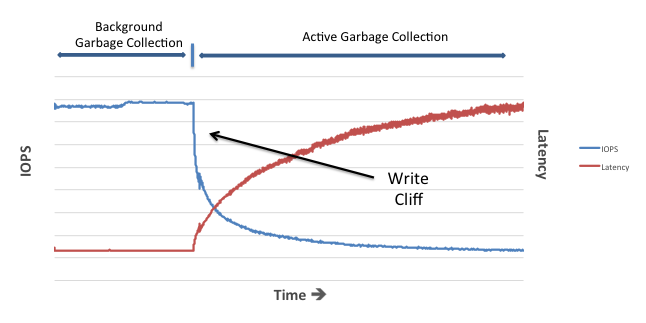
I’ve spent a lot of time in this blog series talking about the challenges involved in using flash, such as the way that pages have to be erased before they are written and the restriction that erase operations take place on a whole block. I also described the problem of erase operations being slow in comparison to reads and writes – and the resulting processes we have to put in place to manage that problem (i.e. garbage collection) . And most recently I covered the way that garbage collection can result in unpredictable performance.
But so far we’ve always worked under the assumption that reads and writes to NAND flash have the same predictably low latency. This post is all about bursting that particular bubble…
Programming NAND Flash: A Quick Recap
You might remember from my post on the subject of SLC, MLC and TLC that I used the analogy of electrons in a bucket to explain the programming of NAND flash cells:

I’d now like to change that analogy slightly, so I’m asking you to consider that you have an empty bucket and a powerful hose pipe. You can turn the hose on and off whenever you want to fill the bucket up, but you cannot empty water out of the bucket unless you completely empty it. Ok, now we’re ready.
For SLC we simply say that an empty bucket denotes a binary value of 1 and a full bucket denotes binary 0. Thus when you want to program an SLC bucket you simply let rip with your hose pipe until it’s full. No need to measure whether the water line is above or below the halfway point (the threshold), just go crazy. Blam! That was quick, wasn’t it?
For MLC however, we have three thresholds – and again we start with the bucket empty (denoting binary 11). Now, if I want to program the binary values of 01 or 10 in the above diagram I need to be careful, because if I overfill I cannot go backwards.  I therefore have to fill a little, test, fill some more, test and so on. It’s actually kind of tricky – and it’s one of the reasons that MLC is both slower than SLC and has a lower wear limit. But here’s the thing… if I want to program my MLC to have a value of binary 00 in the above diagram, I have no such problems because (as with SLC) I can just open the hose up on full power and hit it.
What we’ve demonstrated here is that programming a full charge value to an MLC cell is faster than programming any of the other available values. With a little more thought you can probably see that TLC has this problem to an even worse degree – imagine how accurate you need to be with that hose when you have seven thresholds to consider!
One final thought. We read and write (program) to NAND flash at the page level, which means we are accessing a large collection of cells as if they are one single unit. What are the chances that when we write a page we will want every cell to be programmed to full charge? I’d say extremely low. So even if some cells are programmed “the fast way”, just one “slow” program operation to a non-full-charge threshold will slow the whole program operation down. In other words, I can hardly ever take advantage of the faster latency experienced by full charge operations.
Fast Pages and Slow Pages
The majority of flash seen in the data centre today is MLC, which contains two bits per cell. Is there a way to program MLC in order that, at least sometimes, I can program at the faster speeds of a full-charge operation?
 Let’s take my MLC bucket diagram from above and remap the binary values like the diagram on the left. What have I changed? Well most importantly I’ve reordered the binary values that correspond to each voltage level; empty charge still represents 11 but now full charge represents 10. Why did I do that?
The clue is the dotted line separating the most significant bit (MSB) and the least significant bit (LSB) of each value. Let’s consider two NAND flash pages, each comprising many cells. Now, instead of having both bits from each MLC cell used for a single page, I will put all of the MSB values into one page and call that the slow page. Then I’ll take all of the LSB values and put that into the other page and call that the fast page.
Why did I do this? Well, consider what happens when I want to program my fast page: in the diagram you can see that it’s possible to turn the LSB value from one to zero by programming it to either of the two higher thresholds… including the full charge threshold. In fact, if you forget about the MSB side for a second, the LSB side very similar to an SLC cell – and therefore performs like one.
The slow page, meanwhile, has to be programmed just like we discussed previously and therefore sees no benefit from this configuration. What’s more, if I want to program the fast page in this way I can’t store data in the corresponding slow page (the one with the matching MSBs) because every time I program a full charge to this cell the MSB ends up with a value of one. Also, when I want to program the slow page I have to erase the whole block first and then program both pages together (slowly!).
It’s kind of complicated… but potentially we now have the option to program certain MLC pages using a faster operation, with the trade-off that other pages will be affected as a result.
Getting To The Point
I should point out here that this is pretty low-level stuff which requires direct access to NAND flash (rather than via an SSD for example). It may also require a working relationship with the flash manufacturer. So why am I mentioning it here?
Well first of all I want to show you that NAND flash is actually a difficult and unpredictable medium on which to store data – unless you truly understand how it works and make allowances for its behaviour.  This is one of the reasons why so many flash products exist on the market with completely differing performance characteristics.
When you look at the datasheet for an MLC flash product and you see write / program times shown as, for example, 1.4 milliseconds it’s important to realise that this is the average of its bi-modal behaviour. Fast (LSB) pages may well have program times of 300 microseconds, while slow (MSB) pages might take up to 2.5 milliseconds.
Secondly, I want to point out that direct access to the flash (instead of via an SSD) brings certain benefits. What if, in my all flash array, I send all inbound user writes to fast pages but then, later on during garbage collection, I move data to be stored in slow pages? If I could do that, I’d effectively be hiding much of the slower performance of MLC writes from my users. And that would be a wonderful thing…
…which is why, at Violin, we’ve been doing it for years 🙂











 In general I believe that choice (as long as it comes with advice) is a good thing.


 Without wear levelling it’s entirely possible that a subset of blocks could receive the majority of P/E cycles and thus wear out very quickly, reducing the available capacity of the system.






 flashdba
.png)