One of the features of WordPress is the ability to see search terms which are taking viewers to your blog. One of the all-time highest searches bringing traffic to my site is “This system is not registered with ULN”… and sure enough if I search for that phrase on Google my site is one of the top links, taking people to one of my Violin Memory array Installation Cookbooks.
So I guess it’s only fair that I give these passers by some sort of advice on what to do if you see this message…
1. Don’t Panic
Chances are you have built a new Linux system using Red Hat Enterprise Linux or its twin sister Oracle Linux. You are probably now trying to use yum to install software packages, but every time you do so you see something similar to this:
# yum install oracle-validated -y
Loaded plugins: rhnplugin, security
This system is not registered with ULN.
ULN support will be disabled.
ol5_u7_base | 1.1 kB 00:00
Setting up Install Process
Resolving Dependencies
--> Running transaction check
---> Package oracle-validated.x86_64 0:1.1.0-14.el5 set to be updated
...
This is the Oracle Linux variant. If it was Red Hat you would see:
This system is not registered with RHN
RHN support will be disabled.
The first thing to understand is that you can quite happily build and run a system in this state – in fact I’m willing to bet there are many systems out there exhibiting this message every time somebody calls yum.
The message simply means that you have not registered this build of your system with Oracle or Red Hat. Both companies have a paid support offering which allows you to register a system and do things like get software updates. Red Hat’s is call the Red Hat Network (RHN) and Oracle’s, with their marketing department’s usual sense of humour, is called the Oracle Unbreakable Linux Network (ULN). [I’ve been critical of some Oracle products in the past but I have to say that I love Oracle Linux, even if I do find the name “Unbreakable” a bit daft…]
You don’t have to register your system with the vendor’s support network in order to be able to use it. I’m not making any statements about your support contract, if you have one – I’m just saying that it will work quite normally without it.
2. Register Your System
If you have Oracle or Red Hat support then you might as well register your system so that it can take advantage of their yum channels.
In systems prior to RHEL6 / OL6 you used a utility called up2date to register:
# up2date --register
Or if you want to use the text-mode version:
# up2date-nox --register
You can find a good tutorial explaining the process here. In RH6 / OL6 the process changed, so now you call the relevant utility.
For Red Hat you need to use the rhn_register command (actually this also became available in RHEL5). You will need your Red Hat Network login and password.
For Oracle Linux you need to use the uln_register command. You will need your Oracle ULN login, password and Customer Service Identifier (CSI).
Once your registration is complete the message “This system is not registered” should leave you alone.
3. Don’t Have Support?
Of course, not everybody has a support contract with Red Hat or Oracle. Some people have one but can’t find the details. Others can’t be bothered to set it up. If any of these applies to you then there is another alternative, which is the Oracle Public Yum Server. [Fair play to Wim and the team for making this available, because it’s been making my life easier for years now…]
Oracle’s public yum server is a freely available source of Linux OS downloads. Simply point your browser here and follow the instructions: http://public-yum.oracle.com/
In essence, you use wget to download the Oracle repo file which relates to your system and then (optionally) edit it to choose the yum channel you want to subscribe to (otherwise it will use the latest publicly-available stuff). The versions of the Linux software on the public yum repositories are (I believe) not as up-to-date as those you would get if you subscribed to a support contract, but they are still very new.
And the best bit is you can also use it if you have Red Hat installed; it isn’t restricted to Oracle Linux users. Having said that, make sure you don’t do anything which invalidates your support contracts. By pointing a RHEL system at the Oracle public yum server and running an update you are effectively converting your system to become Oracle Linux.
Here’s an example of how to set it up for OL6:
# cd /etc/yum.repos.d
# wget http://public-yum.oracle.com/public-yum-ol6.repo
This gets yum working and so allows for the Oracle Validated / Oracle Preinstall RPM to be installed in order to setup the database…
Hopefully that will satisfy some of my wayward blog visitors!
It appears that one or two of my previous posts may have inadvertently annoyed some people at Oracle, so I would like to try and make amends today by posting something extremely positive about the company which, lest we forget, made the “world’s first commercial relational database“, backed Linux before it was a commercially viable option and – let’s face it – allowed me to have a career in IT rather than spend my life washing windows.
You can click through to see the details of the press release, but here is one of the main highlights describing the platform which was used to achieve this great result:
Oracle Database 11g Standard Edition One and Oracle Linux with the Unbreakable Enterprise Kernel Release 2, running on a Cisco UCS™ C240 M3 Rack Server with two Intel® Xeon® E5-2690 2.9 GHz processors achieved 1.6 Million transactions per minute (tpmC) with a price/performance of $0.47/tpmC.
Of course it seems only fair to point out that the server hardware used here was from Cisco rather than Oracle. That’s not a criticism of Oracle in anyway, merely a footnote to show that the glory needs to be shared a little bit. It doesn’t mention the storage either, but I’ll come back to that.
Also, it should be noted that the Oracle press release makes some comparisons with an IBM DB/2 benchmark – a comparison which some at IBM feel is somewhat disingenuous.
Whatever your thoughts on that, if you are like me you probably tend to overlook the marketing and press releases anyway and skip to the technical details, because they tend to be a lot more black and white. So allow me to point you to the executive summary and the full disclosure report both of which are available on the TPC.org website.
One thing you will notice if you dig down into the details is that the storage was actually two of these:
Violin Memory 6616 flash Memory Array
Yep, that’s right – I’m very pleased to say that in order to achieve new record levels of performance for the OLTP-based TPC-C benchmark, Oracle (and Cisco of course) used two Violin Memory flash Memory Arrays. Now that’s the kind of positive news we love to share…
It’s crazy time in the world of Oracle, because Oracle OpenWorld 2012 is only a week away. Which means that between now and then the world of Oracle blogging and tweeting will gradually reach fever pitch speculating on the various announcements that will be issued, products that will be launched and outrageous claims that will be made. The hype machine that is the Oracle Marketing department will be in overdrive, whilst partners and competitors clamour to get a piece of the action too. Such is life.
There was supposed to be one disappointment this year, i.e. that the much-longed-for new version of Oracle Database (12c) would not be released… we knew this because Larry told us back in June that it wouldn’t be out until December or January. Mind you, he also told us that it would’t be ported to Itanium, yet it appears that promise cannot be kept. And now it seems another of those claims back in June was incorrect, because yesterday we learnt (from Larry) that Oracle Database 12c would be released at OOW after all. How are we supposed to keep up with what’s accurate?
Also for OOW 2012 we have the prospect of new versions of the Oracle Exadata Database Machine, the Exadata X3, to replace the existing X2 models which have now been in service for two years. The new models (the X3-2 and the X3-8) don’t represent a huge change, more of an evolutionary step to keep up with current technology: Oracle partners have been told that the Westmere-based Xeon processors have been swapped for Sandy Bridge versions (see comments below), the amount of RAM has increased, the flash cards are switching from the ancient F20 models to the F40 models which have better performance characteristics as well as higher capacity (and my, don’t they look just like the LSI Nytro WarpDrive WLP4-200?)
One thing that doesn’t appear to be changing though is the disks in the storage servers, which remain the 12x 600GB high performance or 3TB high capacity spindles used in the X2-2 and X2-8. I’ve heard a lot of people suggest that Oracle might switch to using only SSDs in the storage servers, but I generally discount this idea because I am not sure it makes sense in the Exadata design. The Exadata Smart Flash Cache (i.e. the F20 / F40 cards) are there to try and handle the random I/O requests, as is the database buffer cache of course. The disks in an Exadata storage server are there to handle sequential I/O – and since all 12 of them can saturate the I/O controller there is no need to go increasing the available bandwidth with SSD… particularly if Oracle hasn’t got the technology to do SSD right (maybe they have, maybe they haven’t – I wouldn’t know… but working for a flash vendor I am aware that flash is a complicated technology and you need plenty of IP to manage it properly. My, those F40 cards really do look familiar…)
Exadata on Violin? No.
Of course what could have been really interesting is the idea of using the Violin Memory flash Memory Array as a storage server. Very much like an Exadata storage cell, the 6000 series array has intelligence in the form of its Memory Gateways, which are effectively a type of blade server built into the array. There are two in each 6000 series array and they have x86 processors, DRAM and network connectivity as you would expect. On a standard Violin Memory system you would find them running our own operating system with our vShare software, as well as the option to run Symantec Storage Foundation, but we have also used them to run other, extremely cool stuff:
Ok that last one was a trap… Exadata storage software is a closed technology that can only be run on Oracle’s Exadata Database Machine. But ’twas not always thus…
Open and Closed
The original plan for Exadata storage software was that it would have an open hardware stack, rather than the proprietary Oracle-only approach that we see today. We know this from various sources including none other than the CEO of Oracle himself. It would have been possible to build Exadata systems on multiple platforms and architectures – there was a port of iDB for HPUX under development, for example (evidence of this can be seen on page 101 of HP’s HPUX Release Notes). Given that Oracle’s success as a database company was founded on that openness and willingness to port onto multiple platforms, or to put it another way the freedom of choice, it came as a shock to many when the Sun acquisition put an end to this approach.
Now it seems that Oracle is going the other way. The Database Smart Flash Cache feature is only available on Solaris or Oracle Linux platforms. Hybrid Columnar Compression, an apparently generic feature, was only supported on Oracle Exadata systems when it was first released. Since then the list of supported storage for HCC has grown to encompass Oracle ZFS Storage Appliances and Oracle Pillar Axiom Storage Systems. Notice something these systems all have in common? The clue is in the name.
So what can we learn from this? Is Oracle using it’s advantage as the largest database vendor to make it’s less-successful hardware products more attractive? Will customers continue to see more goodies withheld unless they purchase the complete Oracle stack? Have a look at this and see what you think:
This is a marketing feature in which Oracle explains the “Top Five Reasons Oracle Storage is a Smarter Choice than EMC“. But hold on, what’s reason number five?
So Oracle storage is “smarter” than EMC because Oracle doesn’t let you use an apparently-generic software feature on EMC? That’s an interesting view. Maybe there’s more. What about reason number four?
Oracle storage is “smarter” than EMC because Exadata software – you remember, that software which was originally going to be available on multiple systems and architectures – only runs on Oracle storage. Well duh.
Life Goes on
So here we are in the modern world. Exadata is a closed platform solution. It’s still well-designed and very good at doing the thing it was designed for (data warehousing). It’s still sold by Oracle as the strategic platform for all workloads. Oracle still claims that Exadata is a solution for OLTP and Consolidation workloads, yet we don’t see TPC-C benchmarks for it (and that criticism has become boring now anyway). Next week we will hear all about the Exadata write-back cache and how it means that Exadata X3 is now the best machine for OLTP, even though that claim was already being made about the V2 back in 2009.
I am sure the announcements at OOW will come thick and fast, with many a 200x improvement seen here or a 4000% reduction claimed there. But amid all the hype and hyperbole, why not take a minute to think about how different it all could have been?
A long time ago (2003) in a galaxy far, far away (Denmark), a man wrote a white paper. However, this wasn’t an ordinary man – it was Mogens Nørgaard, OakTable founder, CEO of Miracle A/S and previously the head of RDBMS Support and then Premium Services at Oracle Support in Denmark. It’s fair to say that Mogens is one of the legends of the Oracle community and the truth is that if you haven’t heard of him you might have stumbled upon this blog by accident. Good luck.
The white paper was (somewhat provocatively) entitled, “You Probably Don’t Need RAC” and you can still find a copy of it here courtesy of my friends at iD Concept. If you haven’t read it, or you have but it was a long time ago, please read it again. It’s incredibly relevant – in fact I’m going to argue that it’s more relevant now than ever before. But before I do, I’m going to reprint the conclusions in their entirety:
If you have a system that needs to be up and running a few seconds after a crash, you probably need RAC.
If you cannot buy a big enough system to deliver the CPU power and or memory you crave, you probably need RAC.
If you need to cover your behind politically in your organisation, you can choose to buy clusters, Oracle, RAC and what have you, and then you can safely say: “We’ve bought the most expensive equipment known to man. It cannot possibly be our fault if something goes wrong or the system goes down”.
Otherwise, you probably don’t need RAC. Alternatives will usually be cheaper, easier to manage and quite sufficient.
Oracle Real Application Clusters (Oracle RAC) enables an Oracle database to run across a cluster of servers, providing fault tolerance, performance, and scalability with no application changes necessary. Oracle RAC provides high availability for applications by removing the single point of failure with a single server.
So from this we see that RAC is a technology designed to provide two major benefits: high availability and scalability. The HA features are derived from being able to run on multiple physical machines, therefore providing the ability to tolerate the failure of a complete server. The scalability features are based around the concept of horizontal scaling, adding (relatively) cheap commodity servers to a pool rather than having to buy an (allegedly) more expensive single server. We also see that there are “no application changes necessary”. I have serious doubts about that last statement, as it appears to contradict evidence from countless independent Oracle experts.
That’s the technology – but one thing that cannot ever be excluded from the conversation is price. Technical people (I’m including myself here) tend to get sidetracked by technical details (I’m including myself there too), but every technology has to justify its price or it is of no economic use. At the time of writing, the Oracle Enterprise Edition license is showing up in the Oracle Shop as US$47,500 per processor. The cost of a RAC license is showing as US$23,000 per processor. That’s a lot of money, both in real terms and also as a percentage of the main Enterprise Edition license – almost 50% as much again. To justify that price tag, RAC needs to deliver something which is a) essential, and b) cannot be obtained through any other less-expensive means.
High Availability
The theory behind RAC is that it provides higher availability by protecting against the failure of a server. Since the servers are nodes in a cluster, the cluster remains up as long as the number of failed nodes is less than the total number of nodes in that cluster.
It’s a great theory. However, there is a downside – and that downside is complexity. RAC systems are much more complex than single-instance systems, a fact which is obvious but still worth mentioning. In my previous role as a database product expert for Oracle Corporation I got to visit multiple Oracle customers and see a large number of Oracle installations, many of which were RAC. The RAC systems were always the most complicated to manage, to patch, to upgrade and to migrate. At no time do I ever remember visiting a customer who had implemented the various Transparent Application Failover (TAF) policies and Fast Application Notification (FAN) mechanisms necessary to provide continuous service to users of a RAC system where a node fails. The simple fact is that most users have to restart their middle tier processes when a node fails and as a result all of the users of that node are kicked off. However, because the cluster remained available they are able to call this a “partial outage” instead of taking the SLA hit of a “complete outage”.
This is just semantics. If your users experience a situation where their work is lost and they have to log back in to start again, that’s an outage. That’s the very antithesis of high availability to me. If the added complexity of RAC means that these service interruptions happen more frequently, then I question whether RAC is really the best solution for high availability. I’m not suggesting that there is anything wrong with the Oracle product (take note Oracle lawyers), simply that if you are not designing and implementing your applications and infrastructure to use TAF and FAN then I do not see how your availability really benefits.
Complexity is the enemy of high availability – and RAC, no matter how you look at it, adds complexity over a single-instance implementation of Oracle.
Scalability
The claim here is that RAC allows for platforms to scale horizontally, by adding nodes to a cluster as additional resources are required. According to the documentation quote above this is possible “with no application changes”. I assume this only applies to the case where nodes are added to an existing multi-node cluster, because going from single-instance to RAC very definitely requires application changes – or at least careful consideration of application code. People far more eloquent (and concise) than I have documented this before, but consider anything in the application schema which is a serialization point: sequences, inserts into tables using a sequential number as the primary key, that sort of thing. You cannot expect an application to perform if you just throw it at RAC.
To understand the scalability point of RAC, it’s important to take a step back and see what RAC actually does conceptually. The answer is all about abstraction. RAC takes the one-to-one database-to-instance relationship and changes it to a one-to-many, so that multiple instances serve one database. This allows for the newly-abstracted instance layer to be expanded (or contracted) without affecting the database layer.
This is exactly the same idea as virtualisation of course. In virtualisation you take the one-to-one physical-server-to-operating-system relationship and abstract it so that you can have many virtual OS’s to each physical server. In fact in most virtualisation products you can take this even further and have many physical servers supporting those virtual machines, but the point is the same – by adding that extra layer of abstraction the resources which used to be tied together now become dynamic.
This is where the concept of RAC fails for me. Firstly, modern servers are extremely powerful – and comparatively cheap. You don’t need to buy a mainframe-style supercomputer in order to run a business-critical application, not when 80 core x86 servers are available and chip performance is rocketing at the speed of Moore’s Law.
Database Virtualisation Is The Answer
Virtualisation technology, whether from VMware, Microsoft or one of the other players in that market, allows for a much better expansion model than RAC in my opinion. The reason for this is summed up perfectly by Dr. Bert Scalzo (NoCOUG journal page 23) when he says, “Hardware is simply a dynamic resource“. By abstracting hardware through a virtualisation layer, the number and type of physical servers can now be changed without having to change the applications running on top in virtual machines.
Equally, by using virtualisation, higher service levels can be achieved due to the reduced complexity of the database (no RAC) and the ability to move virtual machines across physical domains with limited or no interruption. VMware’s vMotion feature, for example, allows for the online migration of Oracle databases with minimal impact to applications. Flash technologies such as the flash memory arrays from Violin Memory allow for the I/O issues around virtualisation to be mitigated or removed entirely. Software exists for managing and monitoring virtualised Oracle environments, whilst leading players in the technology space tell the world about their successes in adopting this model.
What’s more, virtualisation allows for incredible benefits in terms of agility. New Oracle environments can be built simply by cloning existing ones, multiple copies and clones can be taken for use in dev / test / UAT environments with minimal administrative overhead. Self-service options can be automated to give the users ability to get what they want, when they want it. The term “private cloud” stops being marketing hype and starts being an achievable goal.
And finally there’s the cost. VMware licenses are not cheap either, but hardware savings start to become apparent when virtualising. With RAC, you would probably avoid consolidating multiple applications onto the same nodes – an ill-timed node eviction would take out all of your systems and leave you with a real headache. With the added protection of the VM layer that risk is mitigated, so databases can be consolidated and physical hardware shared. Think about what that does to your hardware costs, operational expenditure and database licensing costs.
Conclusion
Ok so the title of this post was deliberately straying into the realms of sensationalism. I know that RAC is not dead – people will be running RAC systems for years to come. But for new implementations, particularly for private-cloud, IT-as-a-service style consolidation environments, is it really a justifiable cost? What does it actually deliver that cannot be achieved using other products – products that actually provide additional benefits too?
Personally, I have my doubts – I think it’s in danger of becoming a technology without a use case. And considering the cost and complexity it brings…
It’s silly season. In the run up to Oracle Open World there are always rumours and whispers about what products will be announced – and this year is no different. I know this because I’m one of the people partaking in the spread of baseless and unfounded speculation.
Clearly the thing that most people are talking about is the almost certain release of a new Exadata generation called the X3. There appear to be both the X3-2 and X3-8 generations coming, as well as an interesting “Exadata X3-2 Eighth Rack” (that’s eighth as in 1/8 not as in 8th I presume). You don’t need me to tell you any of this, because Andy Colvin from those excellent guys at Enkitec has written a great article all about it right here.
And as if that wasn’t enough, Kevin Closson, the ex-Performance Architect of Exadata, has added his own speculative article in which he walks the fine line of legal requirement placed upon anyone who used to work in the Oracle Development organisation (because Oracle’s expensively assembled legal team often finds time to stretch its muscles about these things: to quote Kevin, “I’m only commenting about the rumors I’ve read and I will neither confirm nor deny even whether I *can* confirm or deny.” But did you notice how he didn’t confirm whether he could confirm that he could confirm it?)
Anyway, with Andy and Kevin on the case, there is little point in me trying to add anything there. So let’s look at some of the other rumours.
Sun F40 Accelerator Flash Cards
It appears that the X3 will finally ditch the unloved Sun F20 flash cards that have been present since the introduction of flash when the V2 model came out in 2009. Flash technology has advanced rapidly over recent years – and the F20 cards were hardly at the forefront of the technology even in 2009.
The F20 cards contained four flash modules known as DOMs, each with 24GB of SLC flash and 64MB of DRAM. In order to ensure that writes made it to flash in the event of power loss, they also had a dirty great big super-capacitors strapped to the back. I’m no fan of supercaps in general, they tend to have reliability issues and go bang in the night. I’m not saying that Oracle’s cards had this issue though (because I also have to consider that expensively-assembled legal team). However it’s interesting to note this quote in the F20 user guide: “Because high temperatures can have negative impact on life expectancy, it is best to locate the Sun Flash Accelerator F20 PCIe Card in PCIe slots that offer maximum airflow“.
The new F40 cards have now switched to using MLC flash and again contain four DOMs. This time they are 100GB in size, giving a total of 400GB usable (512GB raw). There is no mention of DRAM, but of course it must be there. The manual also offers no insight into whether there are any supercaps (unlike the F20 manual which had a lovely section on “Super Capacitors versus Batteries”) but I can see some fat little nodules on the picture up above which tell me that capacitance is still essential. The result of these changes (probably mainly the switch to MLC) is that the published mean time between failure has dropped by 50% from 2m hours to 1m hours. That’s taken 114 years off of the lifetime of the cards!
The power draw appears to have risen, because the F20 used around 16.5W during normal operation, whereas the F40 is described as using 25W max and 11.5W even when idle. On the other hand maybe they just picked a value in the middle and called that “normal”.
What will be interesting is to see how Oracle handles the flash write cliff. Flash media is very fast for reads; in the case of the F40 the latency is 251 microseconds (not impressive against the 90 microseconds on a Violin system, but still better than disk). Flash is even faster for writes, with the F40 having a 95 microsecond latency (25 microseconds on Violin 🙂 ). The area to watch out for though is erasing. On flash you can only write to an empty block, so once the block is used it has to be erased again before you issue another write to it. Violin has all sorts of patented technology to ensure this doesn’t affect performance (but as I’ve already plugged Violin twice I’ll shut up about it). Oracle doesn’t – at least, nothing that any of the flash vendors would be worried about.
[Disclosure: In the comments section below, Alex asked a question about the block size which made me realise that the F40 datasheet numbers are showing latency figures for 8k, whereas I am quoting Violin latency figures for 4k blocks. Even so, it’s still obvious that there are some big differences there.]
That’s never really been a problem for Oracle before, because the Exadata flash was used as a write-through cache, where the write performance of the flash cards was not an issue. This time, with the new “flash for all writes” capabilities of the flash cache, write performance is going to matter – particularly for sustained writes, such as ETL jobs, batch loads, data imports etc. Unless Oracle has some way to avoid it, once the capacity of the cards is used and all of the flash cells have been written to, there will be a big drop-off in performance whilst the garbage collection takes place in the background to try and erase free cells. It will be interesting to see how the X3 behaves during this type of load.
Database Virtualisation
This is the other hot topic for me, since I am an avid believer that we are seeing a major trend in the industry towards the virtualisation of production Oracle databases. Oracle, it has to be said, has not had a massive amount of success with its Oracle VM product. I actually quite like it, but I appear to be in a minority. It’s not got anything like the market penetration of Hyper-V, whilst VMware is in a different league altogether.
History tells us that when Oracle has a product with which it wants to drive (or rather, enforce) more adoption, it uses “interesting” strategies. The addition of OVM to Exadata is, for me, almost certain. In this way, Oracle gets to push its own virtualisation product as something that a) is “engineered to work with Exadata”, b) is a “one throat to choke” support solution, and c) is the *only* choice you can have.
Expect to see lots of announcements around this, with particular hype over the features such as online migration and integration with OEM, as well as lots of talk about how the Infiniband network makes it all a million times faster than some unspecified alternative.
Update 10 September 2012
It’s come to my attention that the Sun F40 cards look incredibly similar to the LSI Nytro WarpDrive WLP4-200 flash cards. Just take a look at the pictures. I don’t know this for a fact, but the similarity is plain to see. Surely Oracle must be OEMing these?
A note for Oracle’s legal team: please note that this is all wild speculation and that I am in no way using any knowledge gained whilst an employee of Oracle. In fact the main thing I learned whilst an employee was that people on the outside who aren’t supposed to know get to have a lot more fun speculating than the people on the inside who are supposed to know but don’t.
Why is it so hard in Oracle to get a decent answer to the question of how many seconds elapsed between two timestamps?
I’m looking at DBA_HIST_SNAPSHOT and wondering how many seconds each snapshot spans, because later on I want to use this to generate metrics like Redo Size per Second, etc.
SQL> desc dba_hist_snapshot
 Name                                Null?    Type
 ----------------------------------- -------- ------------------------
 SNAP_ID                             NOT NULL NUMBER
 DBID                                NOT NULL NUMBER
 INSTANCE_NUMBER                     NOT NULL NUMBER
 STARTUP_TIME                        NOT NULL TIMESTAMP(3)
 BEGIN_INTERVAL_TIME                 NOT NULL TIMESTAMP(3)
 END_INTERVAL_TIME                   NOT NULL TIMESTAMP(3)
So surely I can just subtract the begin time from the end time, right?
SQL> select SNAP_ID, END_INTERVAL_TIME - BEGIN_INTERVAL_TIME as elapsed
  2  from DBA_HIST_SNAPSHOT
  3  where SNAP_ID < 6
  4 order by 1;
Gaaaah…. It’s given me one of those stupid interval datatypes! I’ve never been a fan of these. I just want to know the value in seconds.
Luckily I can cast a timestamp (the datatype in DBA_HIST_SNAPSHOT) as a good old fashioned DATE. We love dates, you can treat them as numbers and add, subtract etc. The integer values represent days, so you just need to multiply by 24 x 60 x 60 = 86400 to get seconds:
SQL> select SNAP_ID, END_INTERVAL_TIME - BEGIN_INTERVAL_TIME as elapsed,
  2  (cast(END_INTERVAL_TIME as date) - cast(BEGIN_INTERVAL_TIME as date))
  3    *86400 as elapsed2
  4  from dba_hist_snapshot
  5  where snap_id < 6
  6  order by 1;
That’s much better. But I notice that, in snapshot 1 for example, the elapsed time was 44.281 seconds and in my CAST version it’s only 44 seconds. In casting to the DATA datatype there has been some rounding. Maybe that isn’t an issue, but surely there’s a way to keep that extra accuracy?
Here’s the answer I came up with – using EXTRACT:
SQL> select SNAP_ID, END_INTERVAL_TIME - BEGIN_INTERVAL_TIME as elapsed,
  2  (cast(END_INTERVAL_TIME as date) - cast(BEGIN_INTERVAL_TIME as date))
  3    *86400 as elapsed2,
  4  (extract(day from END_INTERVAL_TIME)-extract(day from BEGIN_INTERVAL_TIME))*86400 +
  5  (extract(hour from END_INTERVAL_TIME)-extract(hour from BEGIN_INTERVAL_TIME))*3600 +
  6  (extract(minute from END_INTERVAL_TIME)-extract(minute from BEGIN_INTERVAL_TIME))*60 +
  7  (extract(second from END_INTERVAL_TIME)-extract(second from BEGIN_INTERVAL_TIME)) as elapsed3
  8  from dba_hist_snapshot
  9  where snap_id < 6
 10  order by 1;
Not particularly simple, but at least accurate. I’m happy to be told that there’s an easier way?
Why?
Why am I doing this? Because I am trying to look at the performance of some benchmarks I am working on. The load generation tool creates regular AWR snapshots so I want to look at the peak IO rates for each snapshot to save myself generating a million AWR reports.
I am specifically interested in the statistics redo size, physical reads, and physical writes from DBA_HIST_SYSSTAT. The tests aim to push each of these metrics (independently though, not all at the same time… yet!)
With that in mind, and with thanks to Ludovico Caldara for some code on which to build, here is the SQL that I am using to view the performance in each snapshot. First the output though, truncated to save some space on the screen:
I’m currently running redo generation tests so I’m only interested in the redo size metric and the calculation of redo per second, i.e. column 3. I can use the graph at column 4 to instantly see which snapshot I need to look at: 243. That’s the one where redo was being generated at over 1.2Gb/sec – not bad for a two-socket machine attached to a single Violin 6616 array.
Now for the SQL… I warn you now, it’s a bit dense!
-- for educational use only - use at your own risk!
-- display physical IO statistics from DBA_HIST_SYSSTAT
-- specifically redo size, physical reads and physical writes

set lines 140 pages 45
accept num_days prompt 'Enter the number of days to report on [default is 0.5]: '
set verify off

SELECT redo_hist.snap_id AS SnapshotID
,      TO_CHAR(redo_hist.snaptime, 'DD-MON HH24:MI:SS') as SnapshotTime
,      ROUND(redo_hist.statval/elapsed_time/1048576,2) AS Redo_MBsec
,      SUBSTR(RPAD('*', 20 * ROUND ((redo_hist.statval/elapsed_time) / MAX (redo_hist.statval/elapsed_time) OVER (), 2), '*'), 1, 20) AS Redo_Graph
,      ROUND(physical_read_hist.statval/elapsed_time/1048576,2) AS Read_MBsec
,      SUBSTR(RPAD('*', 20 * ROUND ((physical_read_hist.statval/elapsed_time) / MAX (physical_read_hist.statval/elapsed_time) OVER (), 2), '*'), 1, 20) AS Read_Graph
,      ROUND(physical_write_hist.statval/elapsed_time/1048576,2) AS Write_MBsec
,      SUBSTR(RPAD('*', 20 * ROUND ((physical_write_hist.statval/elapsed_time) / MAX (physical_write_hist.statval/elapsed_time) OVER (), 2), '*'), 1, 20) AS Write_Graph
FROM (SELECT s.snap_id
            ,g.value AS stattot
            ,s.end_interval_time AS snaptime
            ,NVL(DECODE(GREATEST(VALUE, NVL(lag (VALUE) OVER (PARTITION BY s.dbid, s.instance_number, g.stat_name
                 ORDER BY s.snap_id), 0)), VALUE, VALUE - LAG (VALUE) OVER (PARTITION BY s.dbid, s.instance_number, g.stat_name
                     ORDER BY s.snap_id), VALUE), 0) AS statval
            ,(EXTRACT(day FROM s.end_interval_time)-EXTRACT(day FROM s.begin_interval_time))*86400 +
             (EXTRACT(hour FROM s.end_interval_time)-EXTRACT(hour FROM s.begin_interval_time))*3600 +
             (EXTRACT(minute FROM s.end_interval_time)-EXTRACT(minute FROM s.begin_interval_time))*60 +
             (EXTRACT(second FROM s.end_interval_time)-EXTRACT(second FROM s.begin_interval_time)) as elapsed_time
        FROM dba_hist_snapshot s,
             dba_hist_sysstat g,
             v$instance i
       WHERE s.snap_id = g.snap_id
         AND s.begin_interval_time >= sysdate-NVL('&num_days', 0.5)
         AND s.instance_number = i.instance_number
         AND s.instance_number = g.instance_number
         AND g.stat_name = 'redo size') redo_hist,
     (SELECT s.snap_id
            ,g.value AS stattot
            ,NVL(DECODE(GREATEST(VALUE, NVL(lag (VALUE) OVER (PARTITION BY s.dbid, s.instance_number, g.stat_name
                 ORDER BY s.snap_id), 0)), VALUE, VALUE - LAG (VALUE) OVER (PARTITION BY s.dbid, s.instance_number, g.stat_name
                     ORDER BY s.snap_id), VALUE), 0) AS statval
        FROM dba_hist_snapshot s,
             dba_hist_sysstat g,
             v$instance i
       WHERE s.snap_id = g.snap_id
         AND s.begin_interval_time >= sysdate-NVL('&num_days', 0.5)
         AND s.instance_number = i.instance_number
         AND s.instance_number = g.instance_number
         AND g.stat_name = 'physical read total bytes') physical_read_hist,
     (SELECT s.snap_id
            ,g.value AS stattot
            ,NVL(DECODE(GREATEST(VALUE, NVL(lag (VALUE) OVER (PARTITION BY s.dbid, s.instance_number, g.stat_name
                 ORDER BY s.snap_id), 0)), VALUE, VALUE - LAG (VALUE) OVER (PARTITION BY s.dbid, s.instance_number, g.stat_name
                     ORDER BY s.snap_id), VALUE), 0) AS statval
        FROM dba_hist_snapshot s,
             dba_hist_sysstat g,
             v$instance i
       WHERE s.snap_id = g.snap_id
         AND s.begin_interval_time >= sysdate-NVL('&num_days', 0.5)
         AND s.instance_number = i.instance_number
         AND s.instance_number = g.instance_number
         AND g.stat_name = 'physical write total bytes') physical_write_hist
WHERE redo_hist.snap_id = physical_read_hist.snap_id
  AND redo_hist.snap_id = physical_write_hist.snap_id
ORDER BY 1;
Last week, Andrew Mendelsohn gave a talk at the Enkitec Extreme Exadata Expo (“E4”) run in Texas by those excellent guys at Enkitec. Andrew is the SVP of Oracle’s Database Server Technologies group, so it’s fair to say he has his finger on the pulse of the Oracle roadmap for Exadata.
Big thanks to Frits Hoogland for tweeting a picture of the roadmap slide. As you can see there are some interesting things on there… I’m told that Andrew described these features as “coming within the next 12 months”. Of course, that could mean they arrive at the next Oracle Open World in a month’s time, or they could be 365 days away. I suspect some are coming sooner than others, but as usual it is all wild speculation. Never mind though, if there’s one thing I’m quite good at it’s wild(ly inaccurate) speculation.
The first one to consider is the in-memory optimized compression. Why is this important? Well, for Exadata, one reason is that no compression functionality can be offloaded to the storage cells, with their 168 cores (in a full rack). Instead it has to take place on the far-less processor-heavy compute nodes (only 96 cores on a full rack X2-2). Of course, it may be that the cells are busy and the compute nodes are idle, in which case this is a happy coincidence and there would be plenty of resource available for compression (although actually if the cells are really busy they may be performing “passthrough“, where work is offloaded back to the compute nodes!). But the fact remains that since the Exadata design is asymmetrical, you are still limited to only using the CPUs in the compute nodes. If you want to know what that means, you really need to be watching thesevideos by Kevin Closson. It seems like everyone wants to do everything in memory these days, but then I guess that’s not surprising when the alternative is doing it on disk.
The second important feature is the “flash for all writes” write-back flash cache, enabling the database writer to use some of the 5.3TB of flash available in a full rack. Of course, this is effectively a cache, albeit a persistent one. The writes still have to be de-staged back to disk at some point. Andrew is claiming a 10x improvement here on the slide, but it will be interesting to see how that plays out – particularly if those writes are sustained and the area allocated on the flash cards starts to run out. Kevin posted some views about this on his site, although being Kevin he likes to stick to the facts rather than throw about the armfuls of wildly inaccurate speculation that you’ll find here.
Finally, the feature that caught my eye the most was “Virtualization of database servers”. Regular readers will know my absolute faith in the meeting of databases with virtualization technology, so for me this appears to be yet another clear sign (if you look for them hard enough you can always find them 🙂 ). I wonder if this means the introduction of Oracle VM onto the compute nodes. The x86 hardware is there, the Infiniband network is there, so this could pave the way for OVM on Exadata with all of the resultant Live Migration technology… it’s a thought.
Let’s face it, Oracle is getting spanked in the virtualisation arena by VMware, so they need to do something big to get people to notice OVM. With the release of EMC’s vFabric Data Director 2.0 it’s now time to fight or give up. And we all know Oracle likes a fight.
For my money OVM is actually a great product, but then so is VMware. And for all Larry’s words on virtualization being the best security model, it’s a technology that has been noticeably lacking on what is, after all, Oracle’s strategic platform for all database workloads…
Comments welcome… and feel free to call me out on what is clearly an obvious lack of insider knowledge.
In part one of this article I talked about Database Virtualisation and how I believe that it is the next trend in our industry. Databases – particularly Oracle databases – have held out against the rise of virtualisation for a long time, but as virtualisation products have matured and the drive to consumerise and consolidate IT services has increased, the idea of running production databases inside virtual machines has started to make real business sense. And to complete the perfect storm of conditions that make this not just a viable solution but a seriously attractive one, flash memory now enters the picture.
Why has it taken so long for virtualisation to be adopted with production databases? Oracle’s support policy is a factor, of course, along with their license policy (discussed later). But the primary reason I’ll wager is risk. And the risk is all around performance – how can you be sure that the addition of a hypervisor will not affect system performance? In particular, how can you ensure that performance remains predictable. It’s primarily a latency thing, you do not want to be adding extra code paths to the application calls where speed is of the essence. You cannot afford to be adding nanoseconds to your CPU calls and milliseconds to your I/O operations, because it’s all wait time – and it all adds up.
This is compounded because one of the most obvious goals in virtualisation is to run multiple different virtual databases on top of the same physical infrastructure. In the virtualisation world (whether looking at databases or not), each virtualised guest has its own workload pattern which includes the pattern of I/O it performs. However, as you overlay each different guest onto the same physical host, something interesting happens: the I/O pattern tends towards randomness.
Latency Matters
Latency is measured in units of time: nanoseconds for CPU cycles, microseconds for flash memory arrays, milliseconds for disk arrays, seconds for networks, but always units of time. And it’s lost time, it’s time spent waiting instead of doing the thing we want to do. We care about latency because the operations for which latency is measured (e.g. reads and writes) happen frequently, perhaps thousands of times per second. Although those units of time may appear quite small, when you multiply them by their frequency you discover that they turn out to be significant portions of the total available time. And time is what we care about most, it’s the reason we upgrade computer equipment to faster models, why we drive too fast or complain bitterly about the UK’s slow progress in adopting LTE (or is that just me?)
Disk arrays have horrible latency figures. If a CPU cycle takes only a nanosecond and accessing DRAM takes 100ns, waiting 10ms (so that’s 10,000,000ns) for a single block to be read from disk is like waiting a lifetime. Disk manufacturers can do little about this because somewhere a little metal arm has to move over a little spinning disk (seek time) and wait for it to rotate to the right place (rotational latency) before you can have your data. They have done their best to make that disk move as fast as possible (which is why it uses so much power and creates so much heat), but there are laws of physics which cannot be broken. Of course, one thing that disk does have in its favour is that once the disk head is in the correct place to read or write that data to or from the platter, it can access the following block really quickly. This is sequential I/O and it’s something that disks do much better than random I/O, for the obvious reason that every subsequent block read in a sequential I/O avoids the seek time and rotational latency thereby reducing the total average read or write time.
But hang on, what did we say before about virtualisation? The more virtual databases you fit onto the physical infrastructure (i.e. the density), the more random the I/O becomes. So as you increase the density, you get increasingly bad performance. Yet increasing the density is exactly what you want to do in order to achieve the cost savings associated with virtualising your databases… it’s one of the primary drivers of the whole exercise. Doesn’t that mean that disks are completely the wrong technology for virtualisation?
Luckily we have our new friend flash technology to help us, with its ultra-low latency. Flash doesn’t care whether I/O is random or sequential because it does not have any seek time or rotational latency – why would it, there are no moving parts. A Violin Memory flash array can read a 4k block in under 100 microseconds. Even if you add a fibre-channel layer that still won’t take you much over 300 microseconds – and if you care that much about latency then Infiniband is here to help, bringing the figure back down to 100ms again. Only flash memory has the ultra-low latency necessary for database virtualisation.
IOPS – The Upper Limit of Storage
One thing you do not want to happen when you virtualise your databases onto a consolidated physical platform is to find the ceiling of your I/O capabilities. Every storage system has an upper limit of the number of I/O operations that it can perform per second (known as IOPS) and when that ceiling is reached (known as saturation) things can get painful.
Why is this relevant to database virtualisation? Because when you virtualise, you overlay virtual images of databases onto a single physical host system. It’s like taking a load of pictures of your databases and superimposing them on top of each other. Your underlying infrastructure has to be able to deliver the sum of all of that demand, or everything on it will suffer.
Worse still, the latency you experience from an underutilised storage system will not be the same latency you will experience when pushing it to its peak capacity. As the number of IOPS increases, so will the latency of each operation. Disk systems saturate far quicker than flash systems because of the cost of all that seek time and rotational latency discussed earlier. However, disk array vendors know a few tricks to try and avoid this – the most obvious being overprovisioning (using far more physical disks / spindles than are required for the usable capacity) and short stroking (only using the outer edge of each disk’s platter in order to reduce seek time and increase the throughput – the outer edge of the platter has a larger circumference and has a greater bit density meaning more data can be delivered per rotation). They are great tricks to increase the number of IOPS a disk array can deliver… great, that is, if you are the vendor, because it means you get to sell more disks. For the customer though, this means a bigger disk array using more power, requiring more cooling, taking up more valuable data centre space and – here’s the punchline – costing more but wasting huge amounts of raw capacity.
This is why flash memory makes the ideal solution for virtualisation. For a start the maximum IOPS figures for disks versus flash are in different neighbourhoods: a single 15k RPM SAS disk can deliver around 175 to 210 IOPS. Admittedly you would expect to see more than one disk in an array, but let’s face it there would have to be a lot of those disks to get up to the 1,000,000 IOPS that a Violin Memory 6616 memory array can deliver (around 5,000 disks assuming a figure of 200 for the HDD). The Violin array is only 3U high and uses a fraction of the power that you would need from the equivalent monster of a disk array.
Surely that makes flash a default choice, but there’s an additional consideration – the predictable latency. At high levels of IOPS flash performs exactly as predicted – latency rises in a linear fashion. But with a disk array latency rises exponentially, resulting in a “hockey-stick” style graph. Let’s have a look at the recent disk array vendor’s SPC1 benchmark for an example of this (and remember this set a world-record SPC benchmark so it’s a top of the range system):
[I’ll post more on this subject in a separate series as I want to share some more in-depth information on it, but I am kind of stuck at the moment waiting for more powerful lab gear… the servers I have had up until just aren’t powerful enough to make my Violin arrays break into a sweat…]
So flash memory gives you the IOPS capabilities you need for virtualisation – with the additional advantage of protecting you against unpredictable latency when running at high utilisation.
Oracle Licensing
The other major topic to talk about with database virtualisation is Oracle licensing. As everyone who has ever bought one will testify, Oracle licenses are very expensive. Since Oracle licenses by the CPU core and then applies a multiplication factor based on the CPU architecture (e.g. 0.5 for most x86 processors) you can quickly rack up a massive license bill (plus ongoing support) for some of the larger multi-core processors available on the market today. By virtualising, can you tie VMs containing Oracle databases to just a specific set of CPUs (Oracle calls this server partitioning), thus reducing cost?
The complicated answer is that it depends on the hypervisor. The simple answer is almost always no. In the world of Oracle there are two methods of server partitioning: soft and hard. Oracle’s list of approved hard partitioning technologies includes Solaris 10 Containers, IBM LPARs and Fujitsu PPARs – these are the ones where you license only a subset of your processors. Everything that’s not on the approved hard partitioning list requires every processor core to be licensed. And guess what’s on the list of soft partitioning products? VMware. You can read VMware’s own take on that here. The case of Oracle VM is a more complex one. In general OVM is considered soft partitioning and so a full compliment of licenses is required, but there are methods for configuring hard partitioning (both for OVM on SPARC and OVM on X86) so that this license saving can be achieved.
Flash memory has an angle here as well though. As I have discussed on my previous database consolidation posts, flash memory allows for a greater utilisation of your CPUs (because of the reduction in IOWAIT time), which means you can do more with the same resources. So by using flash you can either resist the need for more CPUs (and therefore more Oracle licenses) or actually reduce them.
Virtualisation Means Consolidation
There are some other challenges faced around virtualising databases. Many of them are the same as the challenges faced when consolidating databases: namely how to achieve a better density of databases per physical infrastructure (thereby realising more cost savings). One of the most important of these is memory (as in DRAM), which can often be the limiting factor when squeezing multiple virtualised databases into a confined physical space.
I’m not going to recycle the whole consolidation subject again here, since I (hopefully) covered all of these points in my series of articles on database consolidation. In this sense, you could consider database virtualisation a subset of database consolidation; effectively one of the methods for delivering it, although database virtualisation offers more than a simple consolidation platform.
I could probably write a whole load more on that subject, but as this blog entry is already long enough I’m going to just hand it over to my friends at Delphix instead.
Forget Big Data. Stop talking about Analytics. There is a trend taking place in the marketplace right now, one that is really happening rather than just being spoken about.
That trend is Database Virtualisation. Or, as my U.S. cousins would spell it, Database Virtualization. (And whilst I am loath to drop the Queen’s English in favour of American spelling, years of typing “ANALYZE TABLE …” have worn me down to the point that I can forgive the odd Z here and there…)
So why am I making this sweeping statement? What evidence is there that this is happening? For years, virtualisation and tier one databases were like oil and water. Is this now changing, and if so then why?
The answer comes from a number of factors:
Maturity and adoption of virtualisation products
Oracle’s support policy on virtualised databases
The drive for consolidation and consumerisation of databases
One of the main constraints around the virtualisation of databases is I/O – in particular the latency (required for application performance) and IOPS (required for application scalability). Flash memory has arrived in the data centre at the perfect time to offer an advantage to this new trend. In fact, since the two primary markets for flash memory right now are database applications and VDI (virtualised desktop infrastructure), it seems like the logical conclusion to bring them together.
Maturity and Adoption of Virtualisation Products
Let’s face it, if you work for a medium to large organisation you probably already have virtualisation in place somewhere in the enterprise. In my role at Violin Memory I get to speak to a lot of different companies and they almost always have virtualisation technology in place for VDI, with quite a lot of them virtualising their SQL Server estates too. Oracle development and test databases are being virtualised more and more. But the production Oracle databases… the big ones with the tier one application on them… they are holding out until the bitter end. They are, as Don Bergal calls it, the last bastion of virtualization.
This is all changing now. Hypervisor products are mature, with VMware leading the pack. Oracle has its own virtualisation product, Oracle VM, which I happen to really like… not least because you can perform an online migration of a database, including RAC. It’s actually supported to move a RAC database that’s within a VM from one physical server to another whilst it is online. I never thought I would see the day. Microsoft has Hyper-V, Citrix has XenServer… the list goes on.
But it’s not just the hypervisors themselves that are maturing. There is a growing portfolio of software aimed at managing and monitoring virtualised databases. A great example is Delphix who make agile data management software which allows you to virtualise all of your “long tail” of development, test, integration and UAT environments. Delphix allows you to automatically clone your production database and create multiple virtualised copies of it, all using excellent compression algorithms to reduce the footprint required. If you look at the engineering team that Delphix have built up you can’t help but be impressed: Adam Leventhal, Kyle Hailey, Frank Sanchez (who pretty much wrote RMAN)…
Another example is Confio, who make software which allows you to accurately monitor database performance in virtualised environments. This is critical because one of the issues with virtualisation is that the new layer of abstraction added by the hypervisor can shield any resource monitoring tools running within the guest from a “true” view of resource utilisation on the host. [Kyle put a great write up of Confio on his blog here]
It’s not just newcomers that are playing the tune either. EMC (80% shareholder of VMware) recently announced the release of vFabric Data Director 2.0, their product for producing, managing and consuming virtualised Oracle databases. The trend is there for everyone to see.
Oracle’s Support Policy On Virtualised Databases
It’s a given that Oracle supports its own products on Oracle VM. That includes Oracle Linux, the database and even RAC. But what about the other hypervisors? What about the VMware, the most prominent hypervisor product and the one that many companies are already using for their non-production environments? At the time of writing, Oracle’s support policy (as stated in My Oracle Support note 249212.1) says (the red highlighting has been added by me):
Oracle has not certified any of its products on VMware virtualized environments. Oracle Support will assist customers running Oracle products on VMware in the following manner: Oracle will only provide support for issues that either are known to occur on the native OS, or can be demonstrated not to be as a result of running on VMware.
If a problem is a known Oracle issue, Oracle support will recommend the appropriate solution on the native OS. If that solution does not work in the VMware virtualized environment, the customer will be referred to VMware for support. When the customer can demonstrate that the Oracle solution does not work when running on the native OS, Oracle will resume support, including logging a bug with Oracle Development for investigation if required.
At first glance that seems a bit harsh – effectively Oracle is saying that they may decide to withdraw support unless you can prove any issue is not caused by VMware. However, the statement that Oracle does not certify its products on VMware is probably not that unfair, after all the process of certifying each Oracle product is very complex and time-consuming. And if Oracle spent all of those cycles certifying their massive software portfolio on VMware then they would probably have to do the same for Hyper-V (also not certified by Oracle) and every other hypervisor. You decide, but personally I think it’s reasonable. Don’t forget that there is a world of difference between something not being certified and not being supported though.
Actually, Oracle has softened its position on support regarding VMware. Until 11.2.0.2 came out in November 2010, it was unsupported to run RAC on VMware. This change is therefore quite significant – and in my view points to Oracle acknowledging that the shift to virtualisation is inevitable.
The bit about withdrawing support until “the customer can demonstrate” that the problem is still present without VMware is the thorny issue. Anyone considering using virtualisation on their production environment has to be a bit concerned by that. My experience is that Oracle Support will always work to resolve any issue and not use the “Sorry, it’s on a VM” excuse to leave you stranded… but the risk has to be registered all the same. VMware have their own support service which will wrap around that provided by Oracle and offer “total ownership”. And the truth is, as with all things related to Oracle Support (and any enterprise support organisation), the bigger you are as a customer, the more power you have to bend, bypass or just downright break the rules and still get what you want.
Drive for Consolidation and Consumerisation
Consolidation and consumerisation are two related trends which I have already discussed in some depth before. Consolidation is all about reducing complexity and cost through the use of standardised environments. There are some significant resource challenges around consolidation, but flash memory allows for many of them to be removed, or at least controlled. In fact, once you look at the arguments, flash memory is the only sensible storage option on which to build a consolidation platform.
Consumerisation is about the agility angle, about turning database into a service which is consumed by its users. That means automatic or self-service provisioning, defined service levels, maybe even cross-charging. If I could bring myself to say it, it means creating a private cloud.
Virtualisation is the ideal solution for consolidating and consumerising databases. It already has the provisioning and cloning technologies required to create a Database-as-a-Service platform. The independent nature of each operating system in a VM allows for a certain amount of protection, particularly during Oracle upgrades. And there are HA benefits to being able to migrate the entire VM off of the physical host when maintenance is required (ever seen what happens when a bit of planned hardware maintenance goes horribly wrong?).
No matter which way you look at it, virtualised databases are coming. You need to be ready for them.
In part 2 of this blog series I will discuss the challenges of database virtualisation. In case you can’t wait, they are: 1) Oracle licensing, 2) Latency (the bit where I say that you need flash), 3) I/O (the other bit where I say that you need flash), and 4) whether to spell it with an S or a Z.
[This is part four of a series of articles about database consolidation. Part one addressed the business drivers and technical challenges, with part two focussing on design choices. Part three was about capacity planning and the concept of overcommitting resources. This section will now look at each resource and see how flash memory helps achieve a better density of databases per consolidation platform.]
Finally we are at the bit where I talk about flash… If you made it this far then you have my unending respect. In this section let’s have a look at the different resources to consider when consolidating databases, focussing particularly on I/O, Memory and CPU. For the I/O piece we need to think about what the requirements are here – and the answer is that we need to have enough space to store our physical data, we need to be able to service the number of I/O requests coming in at any specific time (measured in I/Os Per Second or “IOPS”) and we need to ensure that each I/O request is serviced in a reasonable amount of time (the “latency”). So for clarity let’s list those issues and then address them one by one:
I/O – Storage Footprint
I/O – IOPS
I/O – latency
Memory
CPU
I/O – Storage Footprint
Is this the easiest requirement to plan for? Not necessarily, but I would argue that in most cases it is the easiest to change once you are in production (unless you include the process of justifying any extra unplanned cost!). Presenting additional storage (or indeed removing existing storage) is bread and butter for most Operations teams, so whilst it is always better to plan for these things in advance, it isn’t necessarily going to result in downtime or increased risk. Of course, there are exceptions to this – for example with the use of PCIe flash cards expansion is not a trivial exercise (as opposed to the array-based solution preferred by my company Violin Memory, where additional storage can be presented simply by adding arrays as building blocks).
It’s worth keeping in mind that a consolidation environment will expand in two different dimensions, swallowing up your storage quicker than you might imagine. The individual databases will grow, as all databases inevitably do – but if you are building a true Database-as-a-Service model the number of databases will also grow over time. This is exacerbated by the two-dimensional growth of what I’m going to call the “container”. In a multi-tenancy environment the container will be the software home, plus the diagnostic destination where all those pesky tracefiles reside. In a virtualised environment the container is the VM, with its operating system and swapfile.
So before you know it all of your space predictions have been smashed. What can you do? Compression and de-duplication techniques can be used to reduce the storage footprint, although it’s worth keeping in mind that compression is essentially a trade-off where CPU resources and latency are sacrificed in order to gain more space. Given that CPU is also on our list of endangered resources, this might not be a great idea. De-duplication isn’t especially effective for databases, but it is very good for backups and virtualised environments. The best answer is to tightly control what goes in to your environement and make sure that storage can be added in a simple and modular manner.
On this line of thought, three important words are housekeeping, ILM and decommissioning (ok ILM isn’t really a word). Houskeeping, because you do not want to find that your system is out of space after some Oracle process (I’m looking at you DIAG) has been spooling massive tracefiles since day one. Running out of space, or indeed any resource, is bad news on a consolidation platform because there is a chance every hosted service will get dragged down as a result. Information Lifecycle Management is important because without a good ILM policy databases quickly turn into dumping grounds for data that refuses to die (we’ve all seen it). And decommissioning, because if your consolidation or DaaS platform is as successful as you hope, everyone will want to be on it… and nobody will want to leave. You have to clear out the dead wood, or those cost savings will never materialise.
What’s the flash angle here? Look at the operational costs of running all of this storage, particularly if you are having to overprovision and/or short-stroke to achieve the required IOPS (see below). How much does it cost to fill your data centre with racks of magnetic disks which have to be spun round at 15k RPM? How much power does that use? How much extra cooling do you need? What’s the price per square foot in your data centre? And most importantly, once you have taken into account all the extra disks you need to achieve the IOPS and latency requirements, what are you really paying for the usable storage?
I/O – IOPS
The term IOPS means I/Os Per Second. The “I/O” part of course means Inputs / Outputs, which we usually assume to mean from storage. In the storage industry people love talking about IOPS, although in the world of DBAs the term is far less prevalent. Another word that the storage industry loves is throughput (also known as bandwidth), which is the volume of data that can be transferred per unit of time, e.g. in megabytes per second. It’s important to understand that there is a simple relationship between IOPS and throughput:
Throughput = IOPS * block size
This means that if you were to perform 1024 IOPS and each operation was on a single 8k database block, the throughput would be 1024 * 8k = 8 MB/sec. (And by the way, if you aren’t used to looking at throughput figures then 8 MB/sec is not a lot… a Violin 6616 array can deliver 4 GB/sec from a single 3U unit). Where things get complicated is when your I/Os are of varying sizes.
When an Oracle database performs a full table scan it performs a db file scattered read which results in I/Os larger than the database block size (in fact usually a multiple of the database block size, with the multiplier being the value of the parameter DB_FILE_MULTIBLOCK_READ_COUNT). At the storage level this means reading sequential blocks – and if you are using rotational media (i.e. spinning magnetic disks) this is good news because you only have to suffer the seek time and rotational latency for the first block. After that point the disk head and spinning platter are in the correct place to read the remaining blocks. So if your system performs a lot of sequential I/O (such as in data warehousing) the storage characteristic you need to think about is probably throughput.
The alternative, lots of random I/O (such as that performed by db file sequential reads during index lookups), is terrible news for rotational media because that means for each block read there will be a seek time and some rotational latency. This reduces the total number of IOPS the system can perform, so if your system performs lots of random I/O (such as in an OLTP environment), the storage characteristic you need to concentrate on is probably IOPS.
Why does that matter here? Well because there is an extremely important observation to be made about the I/O generated by consolidation environments. So important that I’m going to put it on it’s own line:
As you consolidate more databases on to the same storage platform, the I/O will become more random.
This is not new to the world of virtualisation, where it has been known for some time that as you load VMs onto a physical system the underlying I/O becomes increasingly random. It also applies to databases, whether they are virtualised or not.
Since rotational media is so poor with random I/O, the conclusion we can come to is that as you increase the density of your consolidation environment, a disk-based storage system will become increasingly inefficient. Flash memory however has no such issues, because it is non-mechanical. There are no moving parts, no spinning disks and actuator heads to move, so no seek time and no rotational latency. Just lightening-fast I/O. As a result, a flash memory array can deliver a massive rate of IOPS compared to rotating disk array.
Why is this important? Resource limits for one thing – if you consolidate your databases onto a single storage platform then you need to be able to cope with the peak I/O demand of each system – or face performance issues. Worse still, if one database starts performing a lot of I/O you cannot guarantee any quality of service for the other databases… one system could compromise the entire platform.
A 3.5 inch 15k rpm SAS drive can deliver around 175 IOPS. Put that in a tray of 24 drives (such as a NetApp DS4243) and it will take up 4U and give you around 4,200 IOPS for 14TB of raw capacity. A Violin Memory 6616 flash memory array takes up 3U and gives you 16TB of raw capacity, but is capable of 1,000,000 IOPS. That’s one million versus a little over four thousand…
Of course disk array vendors have been around for a long time and so have come up with various coping strategies to mitigate these issues. The most basic strategy is to increase the number of spindles (i.e. the number of drives) therefore increasing the number of available IOPS. This means the number of drives is now based on the IOPS requirement rather than the capacity requirement – we call this overprovisioning. An obvious consequence of this is that you end up paying for far more capacity (as in disk space) than you need, which ruins the price you pay in terms of $ per usable GB. However, since you are buying far more disks, the price you pay in $ per raw GB will probably come down. Guess which one of those prices your disk array vendor will want you to look at? You can’t blame them, it’s just business… but keep your eyes open for the $ per usable GB value. Maybe even look at alternative metrics, like the $ per IOP.
Another coping strategy employed by disk array vendors is short-stroking. If you thought that overprovisioning sounded inefficient, think again. Consider a disk drive – let’s take the Seagate Cheetah 15K 600GB SAS drive as a fine example of modern rotating disk technology. This thing spins its platter round 15,000 times per minute, which is 250 times per second and as fast as any disk on the market can spin. That means each rotation takes 1/250th of a second, which is 4 milliseconds. So at the point when you want to read your data the disk will need to rotate anything from zero degrees (if you are fortunate and it’s in the right place) to 359.9 degrees (bad luck). Converting that to time, that’s anything from 0ms to 4ms, which is why the spec sheet says the average latency is 2ms (half-way between the best and worst case). Add to that the seek time, i.e. the time taken for the actuator head to move across the disk – which is an average of 3.4 / 3.9 ms for reads / writes – and you have a lot of wasted time. So to compensate for this, in short-stroking only the outer part of the disk is used to store data. This has two key advantages in performance: firstly the average seek time is reduced because the head never needs to move to the inner part of the disk; secondly the average throughput is increased because the outer part of the disk contains more sectors, so more data can be read or written per rotation. To achieve better latency and throughput from short-stroking, typically only 25% of the disk is usable although this can reduce further – 10% usable is not uncommon.
Now, for the flash angle, think about all of those disk drives. With overprovisioning and short-stroking in place to achieve the required number of IOPS, you probably have many orders of magnitude the amount of space that you need. That might not be a problem in itself, but all of those disk drives have to be powered, they all produce heat and noise, they all take up expensive physical rack space in the data centre. To fulfil a requirement for one million IOPS you may have to buy and run many racks of disks, whole floor tiles dedicated to spinning round those little metal platters 21.6 million times per day, every day. Or you could buy a single 6616 flash memory array which uses a fraction of the power, generates a fraction of the heat and takes up just 3U. That’s the flash angle – it’s a no brainer.
I/O – Latency
Latency is like the application stealth tax. Every I/O on your system has to suffer this time penalty, so whilst it might look like a small price to pay when you consider a single I/O, it soon stacks up. When you look at your whole system over a period measured in hours you will be shocked to find out how much time you are losing to I/O. Look at this AWR report from the busy CRM system behind a European insurance company’s call centre:
The AWR report was for a 15 minute snapshot and the database was running on a server with 96 cores. The average latency of 10ms meant that in total there were 52,200 seconds lost waiting on db file sequential read (i.e. index lookups, which means random I/O). That’s 870 minutes of CPU time for every minute of elapsed time. To put that another way, for every hour on the wall clock, 58 hours are lost waiting on I/O.
That in itself is a good reason to switch to flash memory and reap the benefits of a sub-millisecond latency. Even if the flash memory array could only deliver 1ms latency (and it will easily deliver lower than that) that’s a tenfold improvement, saving around 52 hours of wait time per hour of elapsed time.
But that’s the standard story of how flash accelerates database applications. Where is the relevance to consolidation? The answer lies in the predictable nature of latency on flash memory – and Violin in particular.
On a disk storage system latency will go through the roof when you reach near-capacity. Flash systems have predictable latency with near-linear increase. Violin is particularly good at this due to the nature of the vRAID technology which protects against the write-cliff (an interesting subject, but this post is long enough without me delving into that). Using SLOB I can generate a latency versus IOPS graph for the 6232 MLC array I currently have in my lab to prove this very point:
Even when I completely max out the server (I only have limited CPU power here – if I had more the array would easily keep going) I can’t push that latency up over 300 microseconds – and the performance is totally predictable. And that’s the value to a consolidation environment – no matter what the individual systems are doing they cannot compromise the storage system. Flash gives me better performance, but it also reduces the impact of problems. To put it in the language of CIOs, flash both increases my agility and reduces my risk.
Memory
If you have never experienced a database consolidation environment before it won’t necessarily be obvious, but memory is often the biggest resourcing problem. DRAM prices are more stable than they used to be, but it is still an expensive resource if you want to use it by the terabyte. It also adds considerably to the cost of the server in which it is placed, requiring more power and producing more heat. In part three of this series I talked about the practice of overcommitting resources, which assumes that your individual databases won’t all require their maximum resource utilisation at the same time. For a virtualised environment you can overcommit the memory of the VM operating systems, in fact this is a practice that has been around for years. But how to you overcommit the memory used by the database instances?
As every DBA knows, the Oracle database instance has two main memory structures, the SGA and the PGA. The SGA always used to be a fixed size, but recent versions of Oracle allowed it to vary based on requirement up to a predefined maximum size. The current version of Oracle now allows the same thing to happen with the PGA as well, meaning a predefined limit can now be set for the total of SGA + PGA, with the individual components varying in size based on workload – but never exceeding the limit.
Here’s a simple question for anyone who has worked with database products in the past… no, in fact, anyone who has worked with any software product at all. Do you want to trust your availability and service levels to a whole host of automatic memory management systems? I don’t. That’s not a criticism about software quality, just a simple statement of risk – I cannot afford the risk of not being in control.
There is an alternative though – the flash angle. The majority of most SGAs will be dedicated to database buffer cache – a portion of memory holding cached copies of data blocks. Database performance, as a science (or occasionally as an art) has been built around the fact that reads from memory (logical reads) are faster than reads from disk (physical reads). What happens if you replace the disk with flash? What happens if the physical read time reduces by orders of magnitude?
Disk access times are measured in milliseconds. Flash access times are measured in microseconds. Ok so DRAM access times are measured in nanoseconds, we aren’t going to throw away the buffer cache entirely – plus we have to acknowledge that when Oracle performs a physical read it has to take out latches, manipulate a whole load of doubly-linked lists, pin blocks and do many other things only very clever people understand (but you can be one of them by reading this excellent book) – all of which adds to response time. But the fundamental point remains, if flash allows for a significantly better response time, some of the stuff in that buffer cache can probably now afford to be “dropped” down to the storage layer. (Or as an alternative consideration, a second level of buffer cache could be created on flash using Oracle Database Smart Flash Cache.)
What about the PGA? It’s a similar story, one of the sets of components of the PGA are the SQL Work Areas which includes the sort area, hash area and bitmap merge area. Memory intensive operations such as sorts use this dedicated memory, but if the area size is exceeded they have to spill over to disk (e.g. the temporary tablespace). I am not suggesting that flash is fast enough so that this overspill can now be tolerated for all workloads; it will still be faster to perform sorts, for example, in memory. But when sizing these areas it is normal to pick a value that will encompass most tasks and then accept that there will be a few outliers which spill over to disk. With flash, the penalty paid for that overspill is much lower, which means that more outliers can be tolerated.
While we are on the subject of resources let me ask you a question. Why do you have DRAM in your server? You have CPUs to do the work, you have storage to keep persistent data, you have a network to allow remote entities (e.g. users) to drive the CPUs and access that data, maybe modify it too. But why is the DRAM there? After all, nothing stored in DRAM is persistent, so why bother with it in the first place? The answer relates to the processors – the workers that are responsible for making your system more than just a lump of dead electronics. You have DRAM to increase the utilisation of your processors. If you had no DRAM then your processors would be under-utilised because they would be constantly waiting on the high latencies associated with accessing data on storage. That’s a fact worth considering when you ask yourself what you would do differently with a ultra-low latency flash system. I’m not suggesting that you ditch DRAM entirely, but it’s a simple fact that the larger your memory structures, the more processing overhead has to go into managing them. Maybe the need for multi-terabyte database servers isn’t quite a strong as some of your hardware vendors would have you believe?
Flash memory gives you the ability to condense the memory footprint of a database instance beyond the point at which a disk-based database would start to exhibit performance issues. The consequence of this is that by using flash memory you can achieve a greater density of database instances per physical server without having to use additional DRAM.
CPU
Finally we come to CPU utilisation. It seems obvious that if you take all of your database environments and consolidate them onto one platform you will need a lot of CPU power to ensure they all coexist peacefully. This is where you really want to be able to overcommit, because CPUs are expensive. Maybe not as hardware components (although they certainly aren’t cheap), but as the major contributor to license cost. Oracle licenses most of its database software by the core, with a “multiplication factor” applied based on the type of processor. If you add more cores then you will probably need to buy more licenses for Oracle Database Enterprise Edition, more licenses for Oracle RAC, more tuning and diagnostic pack licenses, perhaps more Partitioning licenses… and any other of the options that you might be using. Active Data Guard, Advanced Compression, Advanced Security, Spatial… it all adds up! On the other hand, if you do not have enough cores then your databases will start fighting each other for resource and you will suffer all sorts of performance problems. It’s a difficult balance. Virtualisation is one possibility because you can soft partition to limit the CPU usage of each VM, but that doesn’t help with the licensing. Oracle does not recognise soft partitioning as a means for limiting the number of software licenses required, so although you can use Oracle VM with hard partitioning you are not going to be able to reduce license cost with VMware.
But there’s a flash angle here. What if you could increase the efficiency with which you utilise your CPUs? What if your system could use the same processors to do more real work? Flash memory allows this, because it can be used to reduce the amount of time processes spend waiting on I/O.
%iowait: the percentage of time that the CPU or CPUs were idle during which the system had an outstanding disk I/O request
This is interesting because in this definition the CPUs are otherwise idle. However, don’t be fooled – because this idle state is down to the fact that no more work can be done until the outstanding I/O request has been completed. A good example of this would be a database process waiting on db file sequential read (an index read, manifesting as a random I/O request on the storage system). If the database process is performing an index lookup then the next step is to manipulate the block into the buffer cache, so it cannot continue until the index data block has been retrieved from storage. Asynchronous I/O will not help here, there is nothing more that can be done until the index information has been retrieved.
Maybe this is easier to look at from a database wait interface perspective. Go back to the I/O Latency section above where I showed the AWR report waiting on db file sequential reads. That wait time is lost application time, it’s time that could have been spent doing real work if it wasn’t waiting on I/O.
Time… that’s what this is really about. If you think about it at a high level, the maximum amount of work that can be done on any system in a given time is dependant on the number of CPUs, since they are the entities performing the work. If you have 16 CPUs then you can perform a maximum of 16 hours of work in one hour of elapsed (wall clock) time. A proportion of that time will be spent waiting on I/O – and that is the time which is lost to the application. Replacing disk with flash memory means reducing the time spent waiting on I/O, which in turn means that a higher proportion of the maximum available time can be spent working.
Summary
So, database consolidation on flash memory – whether it be through a shared-platform or by use of virtualisation technologies – allows for more efficient utilisation of resources. Specifically it:
Provides the necessary storage capacity without having to overprovision expensive disk arrays, therefore reducing operational expenditures such as power, cooling and data centre footprint
Allows for more I/O operations to be performed per second, allowing for more databases to be consolidated per platform
Provides not only better latency but also protection from unpredictable latency when experiencing peak loads
Allows for a reduction in memory requirements, meaning that more instances can fit in the same amount of physical memory
Increases the utilisation of a system’s CPUs by reducing the amount of time spend waiting on I/O
The conclusion therefore is that consolidating on flash memory increases agility by allowing for a greater density of databases to be achieved on the underlying infrastructure; it reduces risk by offering better protection against peak capacity issues; and it reduces cost in comparison to disk by requiring less power, less cooling and less of that valuable space in the data centre.
More agility, less risk, lower cost. Now who wouldn’t want that?

 One of the features of WordPress is the ability to see search terms which are taking viewers to your blog. One of the all-time highest searches bringing traffic to my site is “This system is not registered with ULN”… and sure enough if I search for that phrase on Google my site is one of the top links, taking people to one of my Violin Memory array Installation Cookbooks.
 Of course, not everybody has a support contract with Red Hat or Oracle. Some people have one but can’t find the details. Others can’t be bothered to set it up. If any of these applies to you then there is another alternative, which is the Oracle Public Yum Server. [Fair play to Wim and the team for making this available, because it’s been making my life easier for years now…]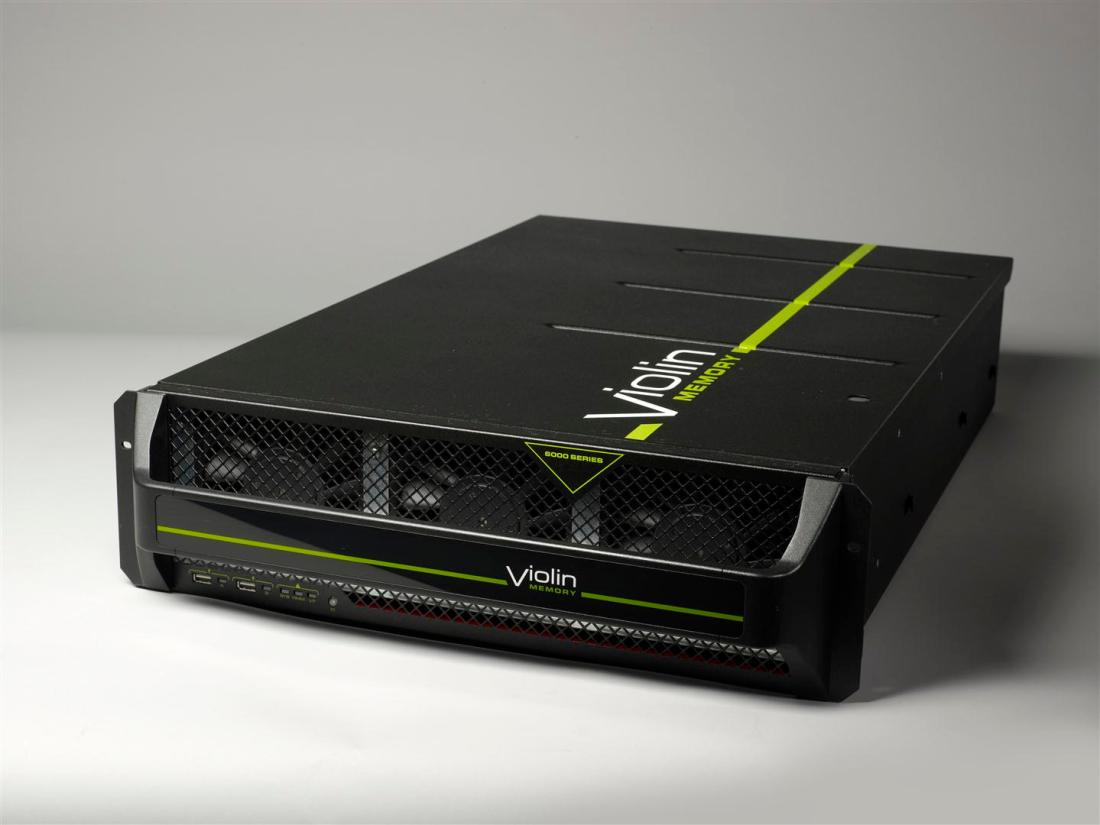










 In
In 

 One thing you do not want to happen when you virtualise your databases onto a consolidated physical platform is to find the ceiling of your I/O capabilities. Every storage system has an upper limit of the number of I/O operations that it can perform per second (known as IOPS) and when that ceiling is reached (known as saturation) things can get painful.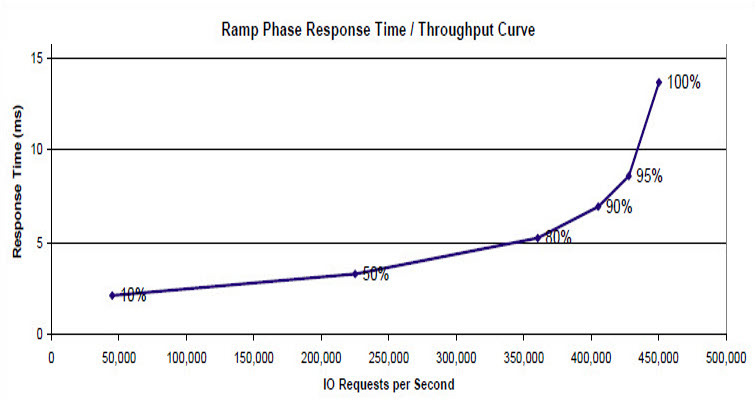
 Forget Big Data. Stop talking about Analytics. There is a trend taking place in the marketplace right now, one that is really happening rather than just being spoken about.

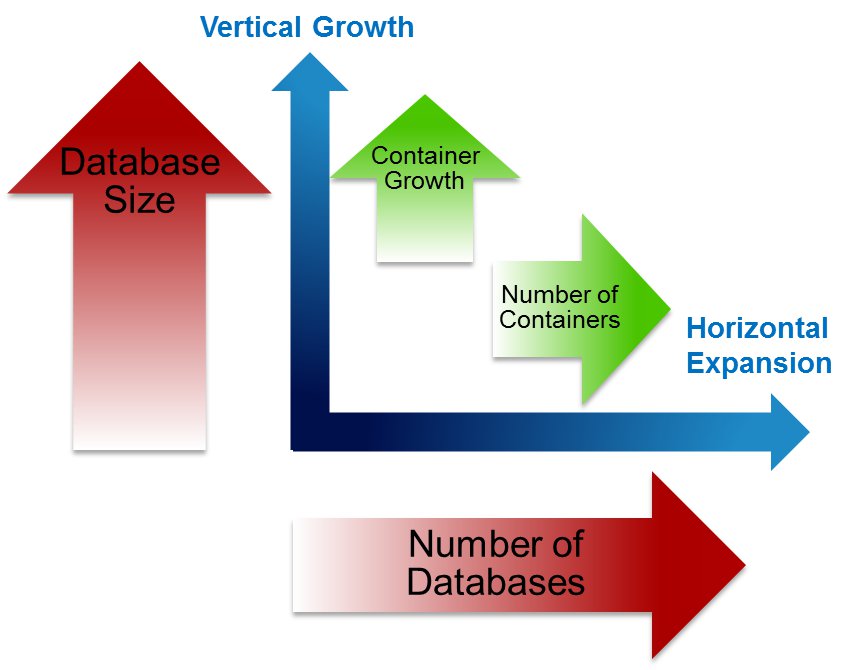

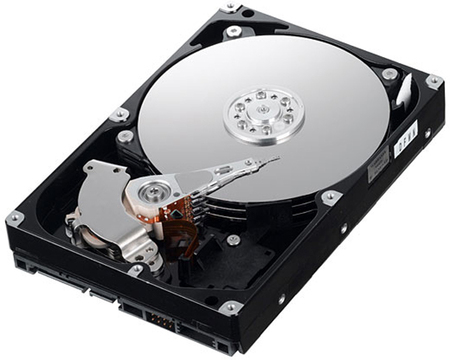

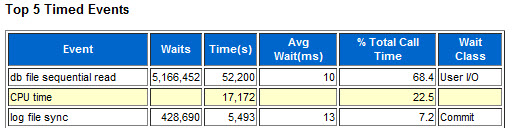
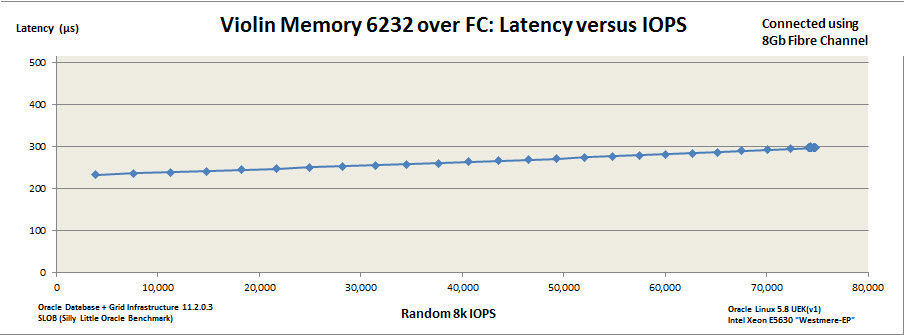


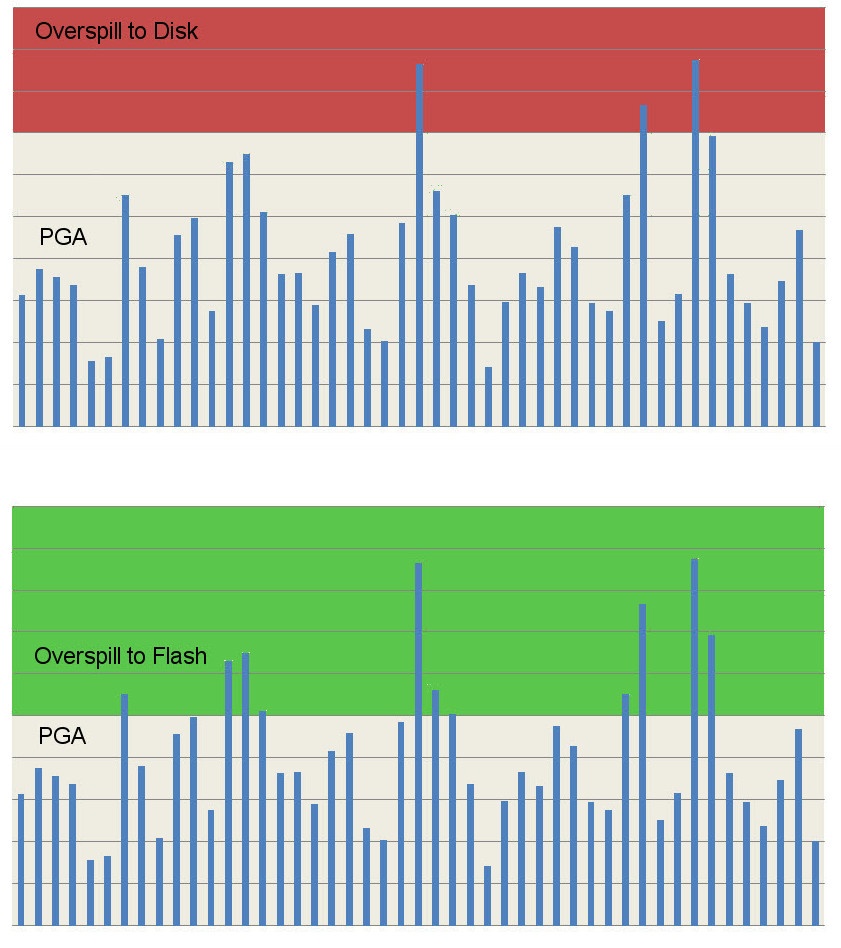
 Finally we come to CPU utilisation. It seems obvious that if you take all of your database environments and consolidate them onto one platform you will need a lot of CPU power to ensure they all coexist peacefully. This is where you really want to be able to overcommit, because CPUs are expensive. Maybe not as hardware components (although they certainly aren’t cheap), but as the major contributor to license cost. Oracle licenses most of its database software by the core, with a “multiplication factor” applied
 flashdba