New Blog Series: Storage For DBAs

slow-storageWhen I joined Violin I suddenly realised that I was going to be in a minority… a DBA in a world of storage people. DBAs don’t always think about storage – in fact I think it’s fair to say that many DBAs would prefer to keep storage at arm’s length. It’s just disk, right?

Of course all that changed back in 2007 when Oracle released 10g along with the new feature Automatic Storage Management. I confess that when I first heard about ASM I thought “Naah, I won’t be using that”. I couldn’t have been more wrong… before I knew it Oracle had me travelling all round Britain delivering the “ASM Roadshow” to DBA teams who listened with the all the interest of a dog that’s been shown a card trick*. [On one particular low point I found myself trying so hard to explain RAID to a group of stoic, unblinking Welshmen that I suffered some sort of mental breakdown and had to go and stand in the car park for a minute while my co-presenter leapt to my assistance. This was not a good day.]

These days DBAs are becoming more and more involved in storage, which means they have to spend more time talking to their Storage Administrator cousins (unless they have Exadata of course, in which the DBAs are the storage administrators).

During my time working with Exadata at Oracle I began to learn more and more about disk concepts such as Mean Time Between Failure and Annualised Failure Rates… but when I joined Violin I was plunged into a murky new world of terminology such as IOPS, bandwidth, latency and various other terms that probably should have been more familiar to me but weren’t.

I quickly came to the conclusion that people in the database world and people in the storage industry speak different languages. So now that I’ve been working at Violin for a year I thought it was time to try and bridge the divide and offer some translations of what all these crazy storage people are really talking about.

I’ll start with the basics and then get progressively more detailed until either a) I no longer know what I’m talking about, or b) nobody is reading anymore. So that should see me through until about the middle of next week then…

* I confess I stole this line from Bill Hicks. But it describes the scene perfectly and is funnier than anything I could think of…

Using SLOB to Test Physical I/O

slob ghostFor some time now I’ve been using the Silly Little Oracle Benchmark (SLOB) tool to drive physical I/O against the various high performance flash memory arrays I have in my lab (one of the benefits of working for Violin Memory is a lab stuffed with flash arrays!)

I wrote a number of little scripts and tools to automate this process and always intended to publish some of them to the community. However, time flies and I never seem to get around to finishing them off or making them presentable. I’ve come to the conclusion now that this will probably never happen, so I’ve published them in all their nasty, badly-written and uncommented glory. I can only apologise in advance.

You can find them here.

AWR Generator

tools

As part of my role at Violin I spend a lot of time profiling customer’s databases to see how their performance varies over time. The easiest way to do this (since I often don’t have remote access) is to ask for lots of AWR reports. One single report covering a large span of time is useless, because all peaks and troughs are averaged out into a meaningless hum of noise, so I always ask for one report per snapshot period (usually an hour) covering many hours or days. And I always ask for text instead of HTML because then I can process them automatically.

That’s all well and good, but generating a hundred AWR reports is a laborious and mind-numbingly dull task. So to make things easier I’ve written a SQL script to do it. I know there are many other scripts out there to do this, but none of them met the criteria I needed – mainly that they were SQL not shell (for portability) and that they didn’t create temporary objects (such as directories).

If it is of use to anyone then I offer it up here:

https://flashdba.com/database/useful-scripts/awr-generator/

Likewise if you manage to break it, please let me know! Thanks to Paul for confirming that it works on RAC and Windows systems (you know you love testing my SQL…)

Engineered Systems – An Alternative View

engineered-systemHave you seen the press recently? Or passed through an airport and seen the massive billboards advertising IT companies? I have – and I’ve learnt something from them: Engineered Systems are the best thing ever. I also know this because I read it on the Oracle website… and on the IBM website, although IBM likes to call them different names like “Workload Optimized Systems”. HP has its Converged Infrastructure, which is what Engineered Systems look like if you don’t make software. And even Microsoft, that notoriously hardware-free zone where software exists in a utopia unconstrained by nuts and bolts, has a SQL Server Appliance solution which it built with HP.

[I’m going to argue about this for a while, because that’s what I do. There is a summary section further down if you are pressed for time]

So clearly Engineered Systems are the future. Why? Well let’s have a look at the benefits:

Pre-Integration

It doesn’t make sense to buy all of the components of a solution and then integrate them yourself, stumbling across all sorts of issues and compatibility problems, when you can buy the complete solution from a single vendor. Integrating the solution yourself is the best of breed approach, something which seems to have fallout out of favour with marketing people in the IT industry. The Engineered Systems solution is pre-integrated, i.e. it’s already been assembled, tested and validated. It works. Other customers are using it. There is safety in the herd.

Optimization

In Oracle Marketing’s parlance, “Hardware and software, engineered to work together“. If the same vendor makes everything in the stack then there are more opportunities to optimize the design, the code, the integration… assumptions no longer need to be made, so the best possible performance can be squeezed out of the complete package.

terms-and-conditions-applyFaster Deployment

Well… it’s already been built, right? See the Pre-Integration section above and think about all that time saved: you just need to wheel it in, connect up the power and turn it on. Simples.

Of course this isn’t completely the case if you also have to change the way your entire support organisation works in order to support the incoming technology, perhaps by retraining whole groups of operations staff and creating an entirely new specialised role to manage your new purchase. In fact, you could argue that the initial adoption of a technology like Exadata is so disruptive that it is much more complicated and resource-draining than building those best of breed solutions your teams have been integrating for decades. But once you’ve retrained all your staff, changed all your procedures, amended your security guidelines (so the DataBase Machine Administrator has access to all areas) and fended off the poachers (DBMAs get paid more than DBAs) you are undoubtedly in the perfect position to start benefiting from that faster deployment. Well done you.

And then there’s the migration from your existing platform, where (to continue with Exadata as an example) you have to upgrade your database to 11.2, migrate to Linux, convert to ASM, potentially change the endianness of your data and perhaps strip out some application hints in order to take advantage of features like Smart Scan. That work will probably take many times longer than the time saved by the pre-integration…

Single-Vendor Benefits

The great thing about having one vendor is that it simplifies the procurement process and makes support easier too – the infamous “One Throat To Choke” cliché.

Marketing Overdrive

If you believe the hype, the engineered system is the future of I.T. and anyone foolish enough to ignore this “new” concept is going to be left behind. So many of the vendors are pushing hard on that message, but of course there is one particular company with an ultra-aggressive marketing department who stands out above the rest: the one that bet the farm on the idea. Let’s have a look at an example of their marketing material:

Video hosted by YouTube under Standard Terms of Service. Content owner: Oracle Corporation

Now this is all very well, but I have an issue with Engineered Systems in general and this video in particular. Oracle says that if you want a car you do not go and buy all the different parts from multiple, disparate vendors and then set about putting them together yourself. Leaving aside the fact that some brave / crazy people do just that, let’s take a second to consider this. It’s certainly true that most people do not buy their cars in part form and then integrate them, but there is an important difference between cars and the components of Oracle’s Engineered Systems range: variety.

If we pick a typical motor vehicle manufacturer such as Ford or BMW, how many ranges of vehicle do they sell? Compact, family, sports, SUV, luxury, van, truck… then in each range there are many models, each model comes in many variants with a huge list of options that can be added or taken away. Why is there such a massive variety in the car industry? Because choice and flexibility are key – people have different requirements and will choose the product most suitable to their needs.

Looking at Oracle’s engineered systems range, there are six appliances – of which three are designed to run databases: the Exadata Database Machine, the SuperCluster and the ODA. So let’s consider Exadata: it comes in two variants, the X3-2 and the X3-8. The storage for both is identical: a full rack contains 14x Exadata storage servers each with a standard configuration of CPUs, memory, flash cards and hard disk drives. You can choose between high performance or high capacity disk drives but everything else is static (and the choice of disk type affects the whole rack, not just the individual server). What else can you change? Not a lot really – you can upgrade the DRAM in the database servers and choose between Linux or Solaris, but other than that the only option is the size of the rack.

The Exadata X3-2 comes in four possible rack sizes: eighth, quarter, half and full; the X3-8 comes only as a full rack. These rack sizes take into account both the database servers and the storage servers, meaning the balance of storage to compute power is fixed. This is a critical point to understand, because this ratio of compute to storage will vary for each different real-world database. Not only that, but it will vary through time as data volumes grow and usage patterns change. In fact, it might even vary through temporal changes such as holiday periods, weekends or simply just the end of the day when users log off and batch jobs kick in.

storage-or-computeFlexibility

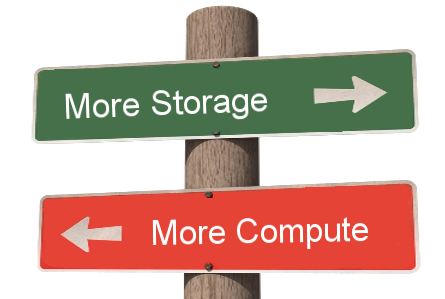
And there’s the problem with the appliance-based solution. By definition it cannot be as flexible as the bespoke alternative. Sure I don’t want to construct my own car, but I don’t need to because there are so many options and varieties on the market. If the only pre-integrated cars available were the compact, the van and the truck I might be more tempted to test out my car-building skills. To continue using Exadata as the example, it is possible to increase storage capacity independent of the database node compute capacity by purchasing a storage expansion rack, but this is not simply storage; it’s another set of servers each containing two CPU sockets, DRAM, flash cards, an operating system and software, hard disks… and of course a requirement to purchase more Exadata licenses. You cannot properly describe this as flexibility if, as you increase the capacity of one resource, you lose control of many other resources. In the car example, what if every time I wanted to add some horsepower to the engine I was also forced to add another row of seats? It would be ridiculous.

Summary: Two Sides To Every Coin

Engineered Systems are a design choice. Like all choices they have pros and cons. There are alternatives – and those alternatives also have pros and cons. For me, the Engineered System is one end of a sliding scale where hardware and software are tightly integrated. This brings benefits in terms of deployment time and performance optimization, but at the expense of flexibility and with potential vendor-lockin. The opposite end of that same scale is the Software Defined Data Centre (SDDC), where hardware and software are completely independent: hardware is nothing more than a flexible resource which can be added or removed, controlled and managed, aggregated and pooled… The properties and characteristics of the hardware matter, but the vendor does not. In this concept, data centres will simply contain elastic resources such as compute, storage and networking – which is really just an extension of the cloud paradigm that everyone has been banging on about for some time now.

engineered-systems-or-software-defined-data-centreIt’s going to be interesting to see how the engineered system concept evolves: whether it will adapt to embrace ideas such as the SDDC or whether your large, monolithic engineered system will simply become another tombstone in the corner of your data centre. It’s hard to say, but whatever you do I recommend a healthy dose of scepticism when you read the marketing brochure…

New Installation Cookbook

cookbookShort post to mention that I’ve added another installation cookbook to the set published here. This one falls into the Advanced Cookbook section and covers installation on Oracle Linux 6.3 with Oracle 11.2.0.3 single-instance and 4k ASM, paying special attention to the configuration of UDEV and the multipathing software.

The blog posts haven’t been coming thick and fast recently as I have been concentrating on Violin’s (excellent) end of year but I hope to resume soon. I have one more piece to publish concerning subjects like Exadata and VMware, then a new blog series on “Storage for DBAs” to mark the combined anniversaries of my joining Violin and starting this blog.

In the meantime I’d like to recommend this short but very interesting blog series on Exadata Hybrid Columnar Compression over at ofirm.wordpress.com – part one starts here

Database Workload Theory

equations

In the scientific world, theoretical physicists postulate theories and ideas, for example the Higgs Boson. After this, experimental physicists design and implement experiments, such as the Large Hadron Collider, to prove or disprove these theories. In this post I’m going to try and do the same thing with databases, except on a smaller budget, with less glamour and zero chance of winning a Nobel prize. On the plus side though, my power bills will be a lot lower.

That last paragraph was really just a grandiose way of saying that I have an idea, but haven’t yet thought of a way to prove it. I’m open to suggestions, feedback and data which prove or disprove it… but for now let’s just look at the theory.

Visualising Database Server I/O Workload

If you look at a database server running a real life workload, you will generally see a pattern in the behaviour of the I/O. If you plot a graph of the two extremes of purely sequential I/O and purely random I/O most workloads will fit somewhere along this sliding scale :

IO-scale

Now of course workloads change all the time, so this is an approximation or average, but it makes sense. After all, we do this in the world of storage, because if the workload is highly random the storage requirements will be very different to if the workload is highly sequential.

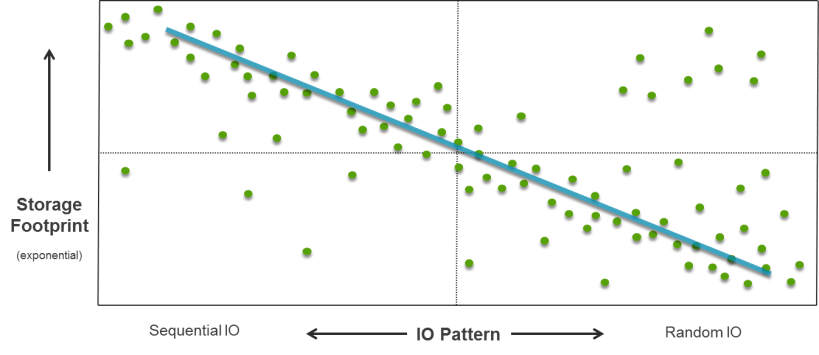
What I am going to do now is plot a graph with this as the horizontal axis. The vertical axis will be an exponential representation of the storage footprint used by the database server, i.e. the amount of space used. I can then plot different database server workloads on the graph to see where they fall.

But first, two clarifications. I am at pains to say “database server” instead of “database” because in many environments there are multiple database instances generating I/O on the same server. What we are interested in here is how the storage system is being driven, not how each individual database is behaving. Remember this point and I’ll come back to it soon. The other clarification is regarding workload – because many systems have different windows where I/O patterns change. The classic (and very common) example is the OLTP database where users log off at the end of the day and then batch jobs are run. Let’s plot the OLTP and batch workloads as separate points on our graph.

Here’s what I expect to see:
database-io-workload

There are data points in various places but a correlation is visible which I’ve highlighted with the blue line. Unfortunately this line is nothing new or exciting, it’s just a graphical representation of the fact that large databases tend to perform lots of sequential I/O whereas small databases tend to perform lots of random I/O.

Why is that? Well because in most cases large databases tend to be data warehouses, decision support systems, business intelligence or analytics systems… places where data is bulk loaded through ETL jobs and then scanned to create summary information or spot trends and patterns. Full table scans are the order of the day, hence sequential I/O. On the other hand, smaller databases with lots of random I/O tend to be OLTP-based, highly transactional systems running CRM, ERM or e-Commerce platforms, for example.

Still, it’s a start – and we can visualise this by dividing the graph up into quadrants and calling them zones, like this:
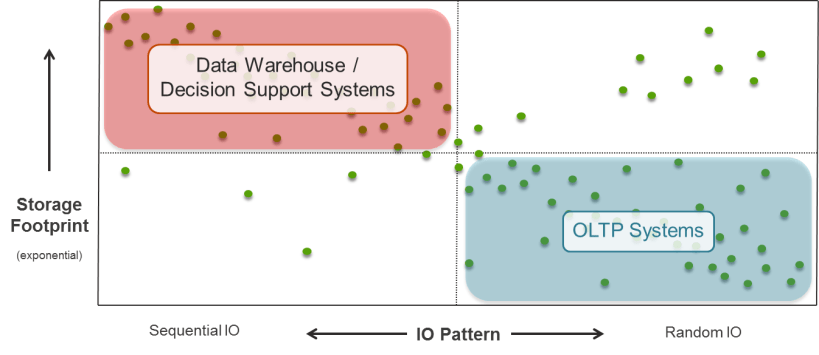
database-io-workload-zonesThis is only an approximation, but it does help with visualising the type of I/O workload generated by database servers. However, there are two more quadrants looking conspicuously un-labelled, so let’s now turn our attention to them.

Database Consolidation I/O Workload

The bottom left quadrant is not very exciting, because small database systems which generate highly-sequential workloads are rare. I have worked on one or two, but none that I ever felt should actually have been designed to work that way. (One was an indexing system which got scrapped and replaced with Lucene, the other I am still not sure actually existed or if it was just a bad dream that I once had…)

The top right quadrant is much more interesting, because this is the world of database consolidation. I said I would come back to the idea that we are interested not in the workload of the database but of the database server.  The reason for this is that as more databases are run on the same server and storage infrastructure, the I/O will usually become increasingly random. If you think about multiple sets of disparate users working on completely different applications and databases, you realise that it quickly becomes impossible to predict any pattern in the behaviour of the I/O. We already know this from the world of VDI, where increasing the number of seats results in an increasingly random I/O requirement.

The top right quadrant requires lots of random I/O and yet is large in capacity. Let’s label it the consolidation zone on our graph:

database-io-workload-consolidation-zone

We now have a graphical representation of three broad areas of I/O workload. If we believe in the trend of database consolidation, as described by the likes of Gartner and IDC, then over time the dots in the DW and OLTP zones will migrate to the consolidation zone. I have already blogged my thoughts on the benefits of database consolidation, bringing with it increased agility and massive savings in operational costs (especially Oracle licenses) – and many of the customers I have been speaking to both at Violin and in my previous role are already on this journey, even if some are still in the planning stages. I therefore expect to see this quadrant become increasingly populated with workloads, particularly as flash storage technologies take away the barriers to entry.

I/O Workload Zone Requirements

The final step in this process is to look at the generic requirements of each of our three workload zones.

database-io-workload-requirements

The data warehouse zone is relatively straightforward, because what these systems need more than anything is bandwidth. Also known as throughput, this is the ability of the storage to pump large volumes of data in and out. There is competition here, because whilst flash memory systems can offer excellent throughput, so can disk systems. So can Exadata of course, it’s what it was designed for. Mind you, flash should enable a lower operational cost, but this isn’t a sales pitch so let’s move on to the next zone.

The OLTP zone is all about latency. To run a highly-transactional system and get good performance and end-user experience, you need consistently low latency. This is where flash memory excels – and disk sucks. We all (hopefully) know why – disk simply cannot overcome the seek time and rotational latency inherent in its design.

The consolidation zone however is particularly interesting, because it has a subtly different set of requirements. For consolidation you need two things: the ability to offer sustained high levels of IOPS, plus predictable latency. Obviously when I say that I mean predictably low, because predictably high latency isn’t going to cut it (after all, that’s what disk systems deliver). If you are running multiple, disparate applications and databases on the same infrastructure (as is the case with consolidation) it is crucial that each does not affect the performance of the other. One system cannot be allowed to impact the others if it misbehaves.

Now obviously disk isn’t in with a hope here – highly random I/O driving massive and sustained levels of IOPS is the worst nightmare for a disk system. For flash it’s a different story – but it’s not plain sailing. Not every flash vendor can truly sustain their performance levels or keep their latency spike-free. Additionally, not every flash vendor has the full set of enterprise features which allow their products to become a complete tier of storage in a consolidation environment.

As database consolidation increases – and in fact accelerates with the continued onset of virtualisation – these are going to be the requirements which truly differentiate the winners from the contenders in the flash market.

It’s going to be fun…

Disclaimer

What Do You Think?These are my thoughts and ideas – I’m not claiming them as facts. The data here is not real – it is my attempt at visualising my opinions based on experience and interaction with customers. I’m quite happy to argue my points and concede them in the face of contrary evidence. Of course I’d prefer to substantiate them with proof, but until I (or someone else) can devise a way of doing that, this is all I have. Feel free to add your voice one way or the other… and yes, I am aware that I suck at graphics.

Auto DOP with High Performance Storage

Guest Post

Nate Fuzi is my friend and collegue, based out in the US fulfilling the same role that I perform in EMEA. He is also the person with which I have drunk more sake jello shots than I ever thought probable / sensible / acceptable. Nate recently wrote this note regarding the use of Oracle’s Automatic Degree of Parallelism with Violin Memory flash storage – and I liked it so much I asked him if I could re-blog it for the Internet community. I suspect I will have to offer him some sort of sake jello shot-based payment, but I am prepared to suffer this so that you, the reader, do not have to. My pain is your gain. Over to you Nate…

wizard_hatWho among us is not a fan of Auto DOP (Automatic Degree of Parallelism) in Oracle 11gR2?  This easy button was supposed to take all the stress out of handling parallelism inside the database: no more setting non-default degrees on tables, no need to put parallel hints in SQL, etc.  According to so many blogs, all you had to do was set PARALLEL_DEGREE_POLICY to AUTO, and the parallelism fairy sprinkled her dust in just the right places to make your multi-threaded dreams come true.

[If you don’t care to read ALL about my pain and suffering, skip down to #MEAT]

But she vexed me time and again—in multiple POCs where high core count systems failed to launch more than a couple oracle processes at a time and where I finally resorted back to the old ways to achieve what I knew the Violin array was capable of delivering in terms of IOPS/bandwidth, but more importantly application elapsed times.  And so it was with this customer, a POC where we had to deliver a new platform for their QA system comprised of a large 80-core x86 server and a single 3000 series Violin Memory flash memory array.  Full table scans (single-threaded) could drive the array over 1300 MB/s, so the basic plumbing seemed to be in order.  Yet having loaded a copy of their production database onto the array and run standard application reports against it, it actually yielded worse results than the production system, an older Solaris box with fewer processors, less RAM (and less SGA/PGA to Oracle), and a spinning-disk based SAN behind it.  What the…?  In the mix also were lots of small and not-so-small differences:  parameter values derived from such physical differences as the core count, the processes setting, the size of the PGA, etc.; the fact that they wanted to test 11.2.0.3 as part of the overall testing (production was still on 11.2.0.1); “system stats” being a term their DBAs had never heard; all kinds of differences in object stats; the list went on.  So the new system isn’t keeping up with prod, let alone beating it, you say?  Where do I start?

I arrived on site Monday morning with 2 days scheduled to determine the problem and get this engine cranking the kind of horsepower we knew it could.  The owner of the POC made it clear his concern was getting maximum performance out of the rig without touching the application code.  Standard reports were showing spotty improvements: some were down to 5 minutes from 17 minutes, others were unchanged at 12 minutes, and still others had worsened from 18 minutes to 22 minutes.  A batch job that ran 2 hours in production twice a day (more times would be lovely, of course) had run out of TEMP space after 5 hours on the test system.  Clearly something was afoot.  He had already tried everything I could suggest over email:  turning OPTIMIZER_FEATURES_ENABLE back to 11.2.0.1, gathering object stats, gathering workload system stats, trying auto DOP, enabling and then disabling hyper-threading, and more.  The only consistent result was an increase in his frustration level.

question-mark-diceI asked how he wanted to run this rig, assuming there were no inhibitors.  He wanted most of the memory allocated to Oracle, taking advantage of 11.2.0.3’s features and fixes.  OK, then let’s set those and start diagnosing from there; no sense fixing a system running in a config you don’t want—especially since efforts to make the test system look and act like prod only with faster storage had all failed.  A quick run through of the report test battery showed results similar to what they’d seen before.  We broke it down to the smallest granule we could:  run a single report, see the SQL it generates on the test system, compare its explain plan there to what production would do with it.  This being my first run-in with MicroStrategy reports, I had the fun of discovering every report run generates a “temporary” table with a unique name, inserts its result set into that table, and then returns that result set to the report server.  Good luck trending performance of a single SQL ID while making your tuning changes.  Well, let’s just compare the SELECT parts for each report’s CTAS and subsequent INSERTs then.  What we saw was that the test system was consistently doing more work—a lot more work—to satisfy the same query.  More buffer gets, more looping, more complicated plans.  Worse, watching it run from the top utility, one oracle process had a single processor at about a trot and was driving unimpressive IO.  Here we have this fleet of Porsches to throw at the problem, and we’re leaving all but one parked—and that one we’re driving like we feel guilty for not buying a Prius.

New object stats, workload system stats, optimizer features, hyper-threading—all make negligible difference.  Histogram bucket counts and values are too close to be a factor.  Let’s try hinting some parallelism.  BANG.  2 minutes goes down to 15 seconds.  Awesome.  But we can’t make changes to the code, and certainly not when the SQL is generated by the report server each time.  This also means no SQL profiles or baselines.  And setting degrees on their tables might open floodgates I don’t want to open.  Plus I have DOP set to AUTO.  Why isn’t that thing doing anything when it clearly helps the SQL to run in parallel?!  Enter the Google.

#MEAT

Ah, the rave reviews of auto DOP.  Oh, the ease with which it operates.  My, the results you’ll get.  But we aren’t getting it.  Auto DOP isn’t doing anything for us.  How can we make it see parallel execution as a more viable option?  Turns out there are several knobs for turning “auto” parallelism up or down, and I was unaware of the combination all them.

puzzleSure there’s your PARALLEL_DEGREE_LIMIT, possibly affected by your core count and PARALLEL_THREADS_PER_CPU, and of course your options for PARALLEL_DEGREE_POLICY, plus PARALLEL_MAX_SERVERS which is derived from some unspecified mix of CPU_COUNT, PARALLEL_THREADS_PER_CPU and the PGA_AGGREGATE_TARGET.  But have you run DBMS_RESOURCE_MANAGER.CALIBRATE_IO?  Have a look over Automatic Degree of Parallelism in 11.2.0.2 [ID 1269321.1] to see if you might be limiting yourself parallel-wise because the database has no idea what your IO subsystem is capable of.  Note that they do not mention workload system stats in this context.  I couldn’t find verification that these play no part in DOP, but this note seems to suggest the values in DBA_RSRC_IO_CALIBRATE play a much more significant role now.  Following a link about a bug (10180307) in 11.2.0.2 and below, older versions of the CALIBRATE_IO procedure could produce unpredictable results.  But more important was the comment that “The per process maximum throughput (MAX_PMBPS) value [might be] too large, resulting in a low DOP while running AutoDOP.”  We confirmed this by allowing CALIBRATE_IO to run for about 10 minutes and checking the results.  What we saw was 31K IOPS, 328 MB/s total, 334 MB/s per process, and a latency of 0.  Interesting numbers, but the explain plan still said the computed DOP was 1.  So what does Oracle suggest you do if you don’t like the parallelism?  Cheat and set the values manually.  According to the same note, start with:

delete from resource_io_calibrate$;
insert into resource_io_calibrate$ values(current_timestamp, current_timestamp, 0, 0, 200, 0, 0);
commit;

This tells the database a single process can drive at most 200 MB/s from the storage system.  If you want more parallelism, tell Oracle each process drives less IO, and the database suggests creating more processes to go after that data.  I had already seen a single process driving the array to maximum bandwidth, so ~330 MB/s seemed low, but still it was hindering our parallelism efforts.  Even the 200 MB/s setting drove no parallelism in our test.  We dropped the value to 50 MB/s and finally parallelism picked itself up off the floor, suggesting a degree of 8.  We cranked that puppy down to 5 MB/s and suddenly Oracle wanted to throw all 80 cores at our little query.  Booya.  We fell back to 50 MB/s, and ran the tests again.  We hit a record time of 49s on a report that took 21 minutes in prod.  28 minutes went to 59s for another report.  22 minutes went to 44s.  Not everything was <1m.  Some only went from 17m to 5m, but this was still enough to make the testers ask if something was wrong.  And the 2 hour report that wasn’t finishing in 5 hours completed in 28 minutes.

Maybe you already knew all this, and you’ve loved auto DOP long time.  But if you didn’t, I thought I would share my experience in hopes you won’t lose as much time or hair on it.  I find potential customers frequently ask whether tuning is required with a flash memory solution, and my honest answer is “sometimes”.  This was one of those sometimes.

Addendum: Here are the final results from the tuning by Nate – with the report names removed to protect confidentiality:

tuning-results

The Ultimate Guide To Oracle Support

In an effort to provide useful content rather than just blathering on about stuff I’ve written an article on how to work with and understand Oracle Support.

The idea is that if you know the way the organisation works, you can get the best out of your experiences with them. Nothing in the article is confidential, it’s all public domain or located in the myriad support notes on My Oracle Support.

You probably don’t want to know how it works. You certainly don’t need to. Maybe you just drive them, you don’t know how they work. But if you want to understand the processes that drive your service requests click here – it might make the difference:

https://flashdba.com/database/the-ultimate-guide-to-oracle-support/

Why In-Memory Computing Needs Flash

You might be tempted to think that In-Memory technologies and flash are concepts which have no common ground. After all, if you can run everything in memory, why worry about the performance of your storage? However, the truth is very different: In-Memory needs flash to reach its true potential. Here I will discuss why and look at how flash memory systems can both enable In-Memory technologies as well as alleviate some of the need for them.

Note: This is an article I wrote for a different publication recently. The brief was to discuss at a high level the concepts of In-Memory Computing. It doesn’t delve into the level of technical detail I would usually use here – and the article is more Violin marketing-orientated than those I would usually publish on my personal blog, so consider yourself warned… but In-Memory is an interesting subject so I believe the concepts are worth posting about.

In-Memory Computing (IMC) is a high-level term used to describe a number of techniques where data is processed in computer memory in order to achieve better performance. Examples of IMC include In-Memory Databases (which I’ve written about previously here and here), In-Memory Analytics and In-Memory Application Servers, all of which have been named by Gartner as technologies which are being increasingly adopted throughout the enterprise.

To understand why these trends are so significant, consider the volume of data being consumed by enterprises today: in addition to traditional application data, companies have an increasing exposure to – and demand for – data from Gartner’s “Nexus of Forces”: mobile, social, cloud and big data. As more and more data becomes available, competitive advantages can be won or lost through the ability to serve customers, process metrics, analyze trends and compute results. The time taken to convert source data to business-valuable output is the single most important differentiator, with the ultimate (and in my view unattainable – but that’s the subject for another blog post) goal being output that is delivered in real-time.

But with data volumes increasing exponentially, the goal of performance must also be delivered with a solution which is highly scalable. The control of costs is equally important – a competitive advantage can only be gained if the solution adds more value than it subtracts through its total cost of ownership.

How does In-Memory Computing Deliver Faster Performance?

The basic premise of In-Memory Computing is that data processed in memory is faster than data processed using storage. To understand what this means, first consider the basic elements in any computer system: CPU (Central Processing Unit), Memory, Storage and Networking. The CPU is responsible for carrying out instructions, whilst memory and storage are locations where data can be stored and retrieved. Along similar lines, networking devices allow for data to be sent or received from remote destinations.

Memory is used as a volatile location for storing data, meaning that the data only remains in this location while power is supplied to the memory module. Storage, in contrast, is used as a persistent location for storing data i.e. once written data will remain even if power is interrupted. The question of why these two differing locations are used together in a computer system is the single most important factor to understand about In-Memory Computing: memory is used to drive up processor utilization.

Modern CPUs can perform many billions of instructions per second. However, if data must be stored or retrieved from traditional (i.e. disk) storage this results in a delay known as a “wait”. A modern disk storage system performs an input/output (I/O) operation in a time measured in milliseconds. While this may not initially seem long, when considered in the perspective of the CPU clock cycle where operations are measured in nanoseconds or less, it is clear that time spend waiting on storage will have a significant negative impact on the total time required to complete a task. In effect, the CPU is unable to continue working on the task at hand until the storage system completes the I/O, potentially resulting in periods of inactivity for the CPU. If the CPU is forced to spend time waiting rather than working then it can be considered that the efficiency of the CPU is reduced.

Unlike disk storage, which is based on mechanical rotating magnetic disks, memory consists of semiconductor electronics with no moving parts – and for this reason access times are orders of magnitude faster. Modern computer systems use Dynamic Random Access Memory (DRAM) to store volatile copies of data in a location where they can be accessed with wait times of approximately 100 nanoseconds. The simple conclusion is therefore that memory allows CPUs to spend less time waiting and more time working, which can be considered as an increase in CPU efficiency.

In-Memory Computing techniques seek to extract the maximum advantage out of this conclusion by increasing the efficiency of the CPU to its limit. By removing waits for storage where possible, the CPU can execute instructions and complete tasks with the minimum of time spent waiting on I/O.

While IMC technologies can offer significant performance gains through this efficient use of CPU, the obvious drawback is that data is entirely contained in volatile memory, leading to the potential for data loss in the event of an interruption to power. Two solutions exist to this problem: the acceptance that all data can be lost or the addition of a “persistence layer” where all data changes must be recorded in order that data may be reconstructed in the event of an outage. Since only the latter option guarantees business continuity the reality of most IMC systems is that data must still be written to storage, limiting the potential gains and introducing additional complexity as high availability and disaster recovery solutions are added.

What are the Barriers to Success with In-Memory Computing?

The main barriers to success in IMC are the maturity of IMC technologies, the cost of adoption and the performance impact associated with adding a persistence layer on storage. Gartner reports that IMC-enabling application infrastructure is still relatively expensive, while additional factors such as the complexity of design and implementation, as well as the new challenges associated with high availability and disaster recovery, are limiting adoption. Another significant challenge is the misperception from users that data stored using an In-Memory technology is not safe due to the volatility of DRAM. It must also be considered that as many IMC products are new to the market, many popular BI and data-manipulation tools are yet to add support for their use.

However, as IMC products mature and the demand for performance and scalability increases, Gartner expects the continuing success of the NAND flash industry to be a significant factor in the adoption of IMC as a mainstream solution, with flash memory allowing customers to build IMC systems that are more affordable and have a greater impact. 

NAND Flash Allows for New Possibilities


The introduction of NAND flash memory as a storage medium has caused a revolution in the storage industry and is now allowing for new opportunities to be considered in realms such as database and analytics. NAND flash is a persistent form of semiconductor memory which combines the speed of memory with the persistence capabilities of traditional storage. By offering speeds which are orders of magnitude faster than traditional disk systems, Violin Memory flash memory arrays allow for new possibilities. Here are just two examples:

First of all, In-Memory Computing technologies such as In-Memory Databases no longer need to be held back by the performance of the persistence layer. By providing sustained ultra-low latency storage Violin Memory is able to facilitate customers in achieving previously unattainable levels of CPU efficiency when using In-Memory Computing.

Secondly, for customers who are reticent in adopting In-Memory Computing technologies for their business-critical applications, the opportunity now exists to remove the storage bottleneck which initiated the original drive to adopt In-Memory techniques. If IMC is the concept of storing entire sets of data in memory to achieve higher processor utilization, it can be considered equally beneficial to retain the data on the storage layer if that storage can now perform at the speed of flash memory. Violin Memory flash memory arrays are able to harness the full potential of NAND flash memory and allow users of existing non-IMC technologies to experience the same performance benefits without the cost, risk and disruption of adopting an entirely new approach.