New My Oracle Support note on Advanced Format (4k) storage

advanced-format-logo

In the past I have been a little critical of Oracle’s support notes and documentation regarding the use of Advanced Format 4k storage devices. I must now take that back, as my new friends in Oracle ASM Development and Product Management very kindly offered to let me write a new support note, which they have just published on My Oracle Support. It’s only supposed to be high level, but it does confirm that the _DISK_SECTOR_SIZE_OVERRIDE parameter can be safely set in database instances when using 512e storage and attempting to create 4k online redo logs.

The new support note is:

Using 4k Redo Logs on Flash and SSD-based Storage (Doc ID 1681266.1)

Don’t forget that you can read all about the basics of using Oracle with 4k sector storage here. And if you really feel up to it, I have a 4k deep dive page here.

Understanding Flash: What Is NAND Flash?

circuit-board

In the early 1980s, before we ever had such wondrous things as cell phones, tablets or digital cameras, a scientist named Dr Fujio Masuoka was working for Toshiba in Japan on the limitations of EPROM and EEPROM chips. An EPROM (Erasable Programmable Read Only Memory) is a type of memory chip that, unlike RAM for example, does not lose its data when the power supply is lost – in the technical jargon it is non-volatile. It does this by storing data in “cells” comprising of floating-gate transistors. I could start talking about Fowler-Nordheim tunnelling and hot-carrier injection at this point, but I’m going to stop here in case one of us loses the will to live. (But if you are the sort of person who wants to know more though, I can highly recommend this page accompanied by some strong coffee.)

Anyway, EPROMs could have data loaded into them (known as programming), but this data could also be erased through the use of ultra-violet light so that new data could be written. This cycle of programming and erasing is known as the program erase cycle (or PE Cycle) and is important because it can only happen a limited number of times per device… but that’s a topic for another post. However, while the reprogrammable nature of EPROMS was useful in laboratories, it was not a solution for packaging into consumer electronics – after all, including an ultra-violet light source into a device would make it cumbersome and commercially non-viable.

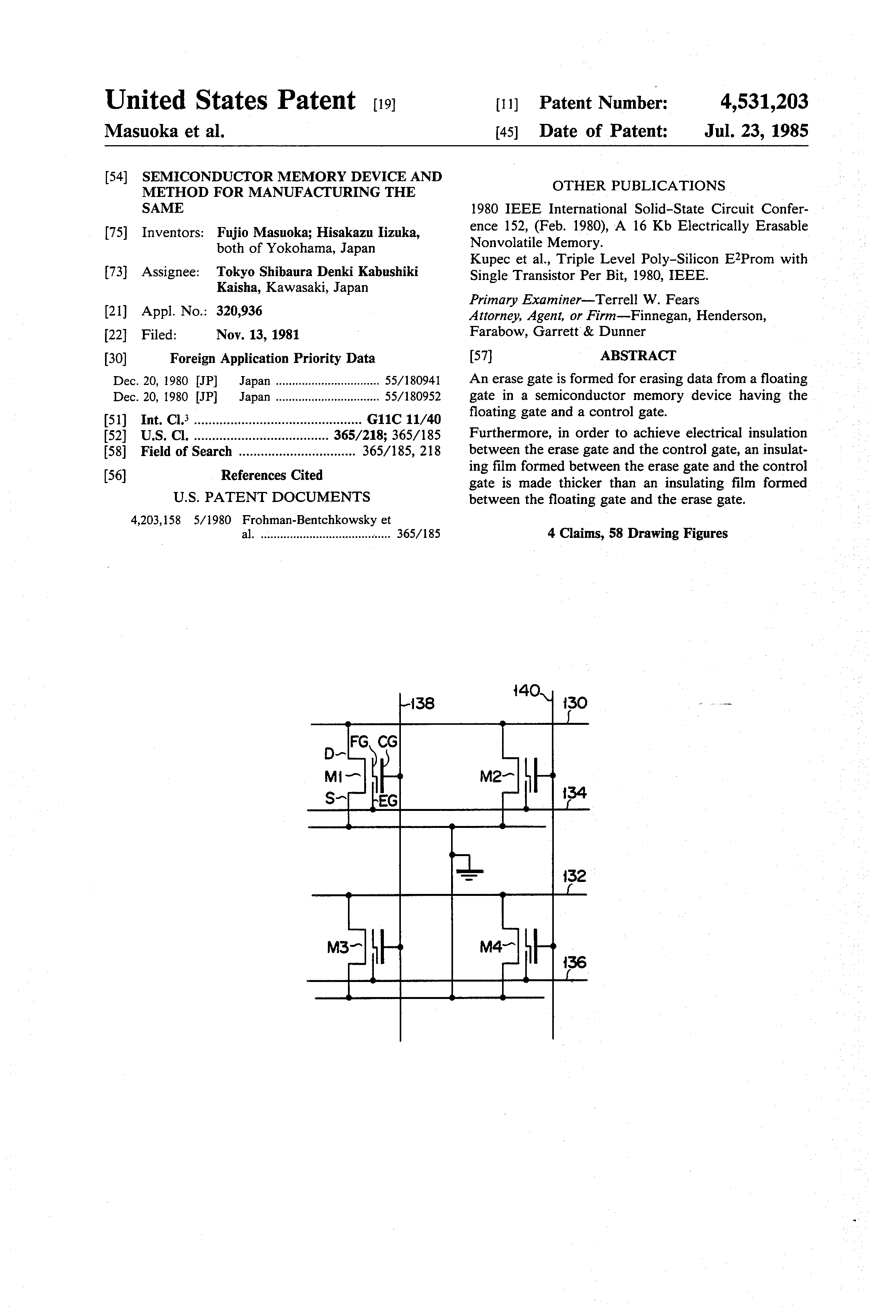
US Patent US4531203: Semiconductor memory device and method for manufacturing the same

US Patent US4531203: Semiconductor memory device and method for manufacturing the same

A subsequent development, known as the EEPROM, could be erased through the application of an electric field, rather than through the use of light, which was clearly advantageous as this could now easily take place inside a packaged product. Unlike EPROMs, EEPROMs could also erase and program individual bytes rather than the entire chip. However, the EEPROMs came with a disadvantage too: every cell required at least two transistors instead of the single transistor required in an EPROM. In other words, they stored less data: they had lower density.

The Arrival of Flash

So EPROMs had better density while EEPROMs had the ability to electrically reprogram cells. What if a new method could be found to incorporate both benefits without their associated weaknesses? Dr Masuoka’s idea, submitted as US patent 4612212 in 1981 and granted four years later, did exactly that. It used only one transistor per cell (increasing density, i.e. the amount of data it could store) and still allowed for electrical reprogramming.

If you made it this far, here’s the important bit. The new design achieved this goal by only allowing multiple cells to be erased and programmed instead of individual cells. This not only gives the density benefits of EPROM and the electrically-reprogrammable benefits of EEPROM, it also results in faster access times: it takes less time to issue a single command for programming or erasing a large number of cells than it does to issue one per cell.

However, the number of cells that are affected by a single erase operation is different – and much larger – than the number of cells affected by a single program operation. And it is this fact that, above all else, that results in the behaviour we see from devices built on flash memory. In the next post we will look at exactly what happens when program and erase operations take place, before moving on to look at the types of flash available (SLC, MLC etc) and their behaviour.

NAND and NOR

To try and keep this post manageable I’ve chosen to completely bypass the whole topic of NOR flash and just tell you that from this moment on we are talking about NAND flash, which is what you will find in SSDs, flash cards and arrays. It’s a cop out, I know – but if you really want to understand the difference then other people can describe it better than me.

In the meantime, we all have our good friend Dr Masuoka to thank for the flash memory that allows us to carry around the phones and tablets in our pockets and the SD cards in our digital cameras. Incidentally, popular legend has it that the name “flash” came from one of Dr Masuoka’s colleagues because the process of erasing data reminded him of the flash of a camera. flash-chipPresumably it was an analogue camera because digital cameras only became popular in the 1990s after the commoditisation of a new, solid-state storage technology called …


The Ultimate Guide To Oracle with Advanced Format 4k

fud

It’s a brave thing, calling something the “Ultimate Guide To …” as it can leave you open to criticism that it’s anything but. However, this topic – of how Oracle runs on Advanced Format storage systems and which choices have which consequences – is one I’ve been learning for two years now, so this really is everything I know. And from my desperate searching of the internet, plus discussions with people who are usually much knowledgeable than me, I’ve come to the conclusion that nobody else really understands it.

In fact, you could say that it’s a topic full of confusion – and if you browsed the support notes on My Oracle Support you’d definitely come to that conclusion. Part of that confusion is unfortunately FUD, spread by storage vendors who do not (yet) support Advanced Format and therefore benefit from scaring customers away from it. Be under no illusions, with the likes of Western DigitalHGST and Seagate all signed up to Advanced Format, plus Violin Memory and EMC’s XtremIO both using it, it’s something you should embrace rather than avoid.

However, to try and lessen the opportunity for those competitors to point and say “Look how complicated it is!”, I’ve split my previous knowledge repository into two: a high-level page and an Oracle on 4k deep dive. It’s taken me years to work all this stuff out – and days to write it all down, so I sincerely hope it saves someone else a lot of time and effort…!

Advanced Format with 4k Sectors

Advanced Format: Oracle on 4k Deep Dive

Postcards from Storageland: Two Years Flash By

calendar

The start of March means I have been working at Violin Memory for exactly two years. This also corresponds to exactly two years of the flashdba blog, so I thought I’d take stock and look at what’s happened since I embarked on my journey into the world of storage. Quite a lot, as it happens…

Flash Is No Longer The Future

The single biggest difference between now and the world of storage I entered two years ago is that flash memory is no longer an unknown. In early 2012 I used to visit customers and talk about one thing: disk. I would tell them about the mechanical limitations of disk, about random versus sequential I/O, about how disk was holding them back. Sure I would discuss flash too – I’d attempt to illustrate the enormous benefits it brings in terms of performance, cost and environmental benefits (power, cooling, real estate etc)… but it was all described in relation to disk. Flash was a future technology and I was attempting to bring it into the present.

Today, we hardly ever talk disk. Everyone knows the limitations of mechanical storage and very few customers ever compare us against disk-based solutions. These days customers are buying flash systems and the only choice they want to make is over which vendor to use.

Violin Memory 2.0

The storage industry is awash with people who use “personal” blogs as a corporate marketing mouthpiece to trumpet their products and trash the competition. I always avoid that, because I think it’s insulting to the reader’s intelligence; the point of blogging is to share knowledge and personal opinion. I also try to avoid talking about corporate topics such as roadmap, financial performance, management changes etc. But if I wrote an article looking back at two years of Violin Memory and didn’t even mention the IPO, all credibility would be gone.

So let me be honest [please note the disclaimer, these are my personal opinions], the Violin Memory journey over the last couple of years has been pretty crazy. We have such a great product – and the flash market is such a great opportunity – that the wave of negative press last year came as a surprise to me. I guess that shows some naivety on my part for forgetting that product and opportunity are only two pieces of the puzzle, but all the same what I read in the news didn’t seem to correspond to what I saw in my day job as we successfully competed for business around Europe. I had customers who had not just improved but transformed their businesses by using Violin. That had to be a good sign, right?

Now here we are in 2014 and, despite some changes, Violin continues to develop as a company under the guidance of an experienced new CEO. I’m still doing what I love, which is travelling around Europe (in the last month alone I’ve been in the UK, France, Switzerland, Turkey and Germany) meeting exciting new customers and competing against the biggest names in storage (see below). In a world where things change all the time, I’m happy to say this is one thing that remains constant.

The Competition

Now for the juicy bit. Part of the reason I was invited to join Violin was to compete against my former employer’s Exadata product – something I have been doing ever since. However, in those heady days of 2011 it also appeared that Fusion IO would be the big competitor in the flash space. Meanwhile, at that time, none of the big boys had flash array products of note. EMC, IBM, NetApp, Cisco, Dell… nothing. The only one who did was HP, who were busy reselling a product called VMA – yes that’s right, the Violin Memory Array – despite having recently paid $2.4b for 3PAR.

Then everything seemed to happen at once. EMC paid an astonishing amount of money for the “pre-product” XtremIO, which took 18 months to achieve general availability. IBM bought the struggling Texas Memory Systems. HP decided to focus on 3PAR over Violin. Cisco surprised everyone by buying Whiptail (including themselves, apparently). And NetApp finally admitted that their strategy of ignoring flash arrays may not have been such a good idea.

That’s the market, but what have I seen? I regularly compete against other flash vendors in the EMEA region – and don’t forget, I only get involved if it’s an Oracle database solution under consideration. The Oracle deals tend to be the largest by size and occupy a space which you could clearly describe as “enterprise class” – I rarely get involved in midrange or small business-sized deals.

The truth is I see the same thing pretty much every time: I compete against EMC and IBM, or I compete against Oracle Exadata. I’ve never seen Fusion IO in a deal – which is not surprising because their cards and our arrays tend to be solutions for different problems. However, I’ve also never – ever – seen Pure Storage in a competitive situation on one of my accounts, nor Nimbus, Nimble, SolidFire, Kaminario or Skyera. I’ve seen Whiptail, HDS and Huawei maybe once each; HP probably a few more times. But when it comes down to the final bake off, it’s EMC, IBM or Exadata. I claim that my experience is representative of the market, but it is real.

Who is the biggest threat? That’s an easy one to answer: it’s always the incumbent storage supplier. No matter how great a solution you have, or how low a price, it’s always easier for a customer to do nothing than to make a change. Inertia is our biggest competitor. Yet at the same time the incumbent has the biggest problem: so much to lose.

And how am I doing in these competitions? Well, that would be telling. But look at it this way – two years on and I’m still trusted to do this.

I wonder what the next two years will bring?

Update (Spring 2014): I’ve finally had my first ever competitive POC against Pure Storage at a customer in Germany. It would be inappropriate for me to say who won. 🙂

Oracle AWR Reports: Understanding I/O Statistics

truth

One consequence of my job is that I spend a lot of time looking at Oracle Automatic Workload Repository reports, specifically at information about I/O. I really do mean a lot of time (honestly, I’m not kidding, I have had dreams about AWR reports). One thing that comes up very frequently is the confusion relating to how the measurements of IOPS and throughput are displayed in the AWR report Load Profile section. The answer, is that they aren’t. Well, not exactly… let me explain.

Physical Read and Write I/O

Right at the top of an AWR report, just after the Database and Host details, you’ll find the familiar Load Profile section. Until recently, it had changed very little through the releases of Oracle since its introduction in 10g. Here’s a sample from 11g Release 2:

Load Profile              Per Second    Per Transaction   Per Exec   Per Call
~~~~~~~~~~~~         ---------------    --------------- ---------- ----------
      DB Time(s):               44.1                0.4       0.07       1.56
       DB CPU(s):                1.6                0.0       0.00       0.06
       Redo size:      154,034,644.3        1,544,561.0
    Logical read:          154,436.1            1,548.6
   Block changes:           82,491.9              827.2
  Physical reads:              150.6                1.5
 Physical writes:           18,135.2              181.9
      User calls:               28.3                0.3
          Parses:              142.7                1.4
     Hard parses:                7.5                0.1
W/A MB processed:                2.1                0.0
          Logons:                0.1                0.0
        Executes:              607.7                6.1
       Rollbacks:                0.0                0.0
    Transactions:               99.7

In my role I have to look at the amount of I/O being driven by a database, so I can size a solution based on flash memory. This means knowing two specific metrics: the number of I/Os per second (IOPS) and the throughput (typically measured in MB/sec). I need to know these values for both read and write I/O so that I can understand the ratio. I also want to understand things like the amount of random versus sequential I/O, but that’s beyond the scope of this post.

The first thing to understand is that none of this information is shown above. There are values for Physical reads and Physical writes but these are actually measured in database blocks. Even if we knew the block size (which we don’t because Oracle databases can have multiple block sizes) we do not know how many I/Os were required. Ten Oracle blocks could be written in one sequential I/O or ten individual “random” I/Os, completely changing the IOPS measurement. To find any of this information we have to descend into the depths of the AWR report to find the Instance Activity Stats section.

In Oracle 12c, the format of the AWR report changed, especially the AWR Load Profile section, which was modified to show the units that each measurement uses. It also includes some new lines such as Read/Write IO Requests and Read/Write IO. Here’s a sample from a 12c database (taken during a 30 second run of SLOB):

Load Profile                    Per Second   Per Transaction  Per Exec  Per Call
~~~~~~~~~~~~~~~            ---------------   --------------- --------- ---------
             DB Time(s):              44.1               0.4      0.07      1.56
              DB CPU(s):               1.6               0.0      0.00      0.06
      Redo size (bytes):     154,034,644.3       1,544,561.0
  Logical read (blocks):         154,436.1           1,548.6
          Block changes:          82,491.9             827.2
 Physical read (blocks):             150.6               1.5
Physical write (blocks):          18,135.2             181.9
       Read IO requests:             150.3               1.5
      Write IO requests:          15,096.9             151.4
           Read IO (MB):               1.2               0.0
          Write IO (MB):             141.7               1.4
             User calls:              28.3               0.3
           Parses (SQL):             142.7               1.4
      Hard parses (SQL):               7.5               0.1
     SQL Work Area (MB):               2.1               0.0
                 Logons:               0.1               0.0
         Executes (SQL):             607.7               6.1
              Rollbacks:               0.0               0.0
           Transactions:              99.7

Now, you might be forgiven for thinking that the values highlighted in red and blue above tell me the very IOPS and throughput information I need. If this were the case, we could say that this system performed 150 physical read IOPS and 15k write IOPS, with throughput of 1.2 MB/sec reads and 141.7 MB/sec writes. Right?

But that isn’t the case – and to understand why, we need to page down five thousand times through the increasingly-verbose AWR report until we eventually find the Other Instance Activity Stats section (or just Instance Activity Stats in pre-12c reports) and see this information (edited for brevity):

Other Instance Activity Stats                  DB/Inst: ORCL/orcl  Snaps: 7-8
-> Ordered by statistic name

Statistic                                     Total     per Second     per Trans
-------------------------------- ------------------ -------------- -------------
physical read IO requests                     5,123          150.3           1.5
physical read bytes                      42,049,536    1,233,739.3      12,371.2
physical read total IO requests              37,162        1,090.3          10.9
physical read total bytes            23,001,900,544  674,878,987.9   6,767,255.2
physical read total multi block              21,741          637.9           6.4
....
physical write IO requests                  514,547       15,096.9         151.4
physical write bytes                  5,063,483,392  148,563,312.9   1,489,698.0
physical write total IO requests            537,251       15,763.0         158.1
physical write total bytes           18,251,309,056  535,495,967.4   5,369,611.4
physical write total multi block             18,152          532.6           5.3

The numbers in red and blue match up with those above, albeit with the throughput values using different units of bytes/sec instead of MB/sec. But the problem is, these aren’t the “total” values – which are highlighted in green. So what are those total values showing us?

Over to the Oracle Database 12c Reference Guide:

physical read IO requests:  Number of read requests for application activity (mainly buffer cache and direct load operation) which read one or more database blocks per request. This is a subset of “physical read total IO requests” statistic.

physical read total IO requests: Number of read requests which read one or more database blocks for all instance activity including application, backup and recovery, and other utilities. The difference between this value and “physical read total multi block requests” gives the total number of single block read requests.

The values that don’t have the word total in them, i.e. the values shown in the AWR Profile section at the start of a report, are only showing what Oracle describes as “application activity“. That’s all very well, but it’s meaningless if you want to know how much your database is driving your storage. This is why the values with total in the name are the ones you should consider. And in the case of my sample report above, there is a massive discrepancy between the two: for example, the read throughput value for application activity is just 1.2 MB/sec while the total value is actually 644 MB/sec – over 500x higher! That extra non-application activity is definitely worth knowing about. (In fact, I was running a highly parallelised RMAN backup during the test just to make the point…)

[Note: There was another section here detailing how to find and include the I/O generated by redo into the totals, but after consultation with guru and legend Tanel Poder it’s come to my attention that this is incorrect. In fact, reads and writes to redo logs are included in the physical read/write total statistics…]

Oracle 12c IO Profile Section

Luckily, Oracle 12c now has a new section which presents all the information in one table. Here’s a sample extracted from the same report as above:

IO Profile                  Read+Write/Second     Read/Second    Write/Second
~~~~~~~~~~                  ----------------- --------------- ---------------
            Total Requests:          16,853.4         1,090.3        15,763.0
         Database Requests:          15,247.2           150.3        15,096.9
        Optimized Requests:               0.1             0.0             0.0
             Redo Requests:             517.5             1.2           516.3
                Total (MB):           1,154.3           643.6           510.7
             Database (MB):             142.9             1.2           141.7
      Optimized Total (MB):               0.0             0.0             0.0
                 Redo (MB):             295.7             0.0           295.7
         Database (blocks):          18,285.8           150.6        18,135.2
 Via Buffer Cache (blocks):          18,282.1           150.0        18,132.0
           Direct (blocks):               3.7             0.6             3.1

Suddenly life is more simple. You want to know the total IOPS and throughput? It’s all in one place. You want to calculate the ratio of reads to writes? Just compare the read and write columns. Happy days.

One word of warning though: there are other database processes driving I/O which may not be tracked in these statistics. I see no evidence for control file reads and writes being shown, although these are insignificant in magnitude. More significant would be I/O from the archiver process for databases running in archive log mode, as each redo log must be sequentially read and re-written out as an archive log. Are these included? Yet another possibility would be the Recovery Writer (RVWR) process which is responsible for writing flashback logs when database flashback logging is enabled. [Discussions with Jonathan Lewis suggest these stats are all included – and let’s face it, he wrote the book on the subject…!]  It all adds up… Oracle really needs to provide better clarity on what these statistics are measuring.

Conclusion

If you want to know how much I/O is being driven by your database, do not use the information in the Load Profile section of an AWR report. Use the I/O Profile section if available, or otherwise skip to the Instance Activity Stats section and look at the total values for physical reads and writes (and redo). Everything else is just lies, damned lies and (I/O) statistics.

Oracle Exadata X4 (Part 2): The All Flash Database Machine?

This article looks at the new Oracle Exadata X4-2 Database Machine from Big Red. In part one I looked at the changes made from the X3 model (more stuff) as well as the implications (more license bills). I also covered some of the confusing and bewildering descriptions Oracle has used to describe the flash capacity of the X4. To recap, here are some of the quotes made in various Oracle literature:

Source

Quote

Oracle Exadata X4-2 datasheet

44.8 TB of raw physical flash memory”

Oracle Exadata X4 Press Release

logical flash cache capacity to 88 TB

Oracle X3 to X4 Changes slide deck

“flash cache compression expands capacity to 88TB (raw)”

Oracle Exadata X4-2 datasheet

effective flash capacity of 440 TB

The source of this confusion appears to be the claim that a new feature called Exadata Smart Flash Cache Compression will allow more data to fit into flash. Noticeably absent from the press release and datasheet is the information that this new feature apparently requires the Advanced Compression license, potentially adding over $1m to the list price of a full rack (see slide 22 of this Oracle presentation).

This second part of the article will look at the implications of these changes, but to make things more interesting there’s one specific change I haven’t mentioned until now. And it’s the change that I think gives the biggest insight into Oracle’s thinking.

The Hybrid Database Machine

Picture courtesy of Dennis van Zuijlekom

Picture courtesy of Dennis van Zuijlekom

Right now, in the storage industry, there is a paradigm shift taking place as primary data moves from rusty old spinning disks to semiconductor-based NAND flash storage. Most storage vendors now offer all-flash arrays as part of their product lineup, although one or two still insist on the hybrid approach where data is located on disk but flash is used as a tiering or caching layer to improve performance.

Oracle, despite being one of the early adopters of flash with its Sun Oracle Database Machine (i.e. the Exadata v2), still uses the hybrid approach in Exadata. Each full rack contains 14 storage cells, with each cell containing 12 rotating magnetic disks as well as four PCIe flash cards (made by LSI and then rebranded as Sun). The disks can be bought in two options: high performance or high capacity (known as HP and HC respectively). It’s fair to say that the majority of customers buy the high performance version (* see comments below) – after all, Exadata is a very expensive solution aimed at solving performance problems, so performance is generally high up on a customer’s list of requirements.

Upgrading to Slower Performance?

See if you can spot the most important change to be made since the introduction of flash back in the Sun Oracle v2 (second generation) machine:

Product

Raw Flash

High Performance Disks

HP Disk Capacity

Sun Oracle Database Machine (v2)

5.3 TB

600GB 15,000 RPM

100 TB

Exadata Database Machine X2-2

5.3 TB

600GB 15,000 RPM

100 TB

Exadata Database Machine X3-2

22.4 TB

600GB 15,000 RPM

100 TB

Exadata Database Machine X4-2

44.8 TB

1.2TB 10,000 RPM

200 TB

Did you notice? In the X4 model storage cells, the HP disks have now doubled in capacity. That’s not the important bit though, it’s the sacrifice that Oracle had to make to do this: 10k RPM disk drives instead of 15k RPM. In Exadata X4, the high performance disks are slower than in Exadata X3.

How much slower are we talking? Well, the average rotational latency of a 15k RPM drive is 4ms. The average rotational latency for a 10k RPM drive is 6ms. That’s an extra 50% average rotational latency. Why on Earth would Oracle make that change? If customers wanted more capacity, couldn’t they just buy the storage expansion racks?

Design Dilemmas

The answer lies in two of Oracle’s fundamental design choices for the Exadata architecture:

  • the reliance on ASM software mirroring (meaning all data is stored either twice or three times), and
  • the use of flash as cache only (meaning all data in flash is eventually destaged to disk) rather than a tier of storage.

Remember that Oracle claims the Exadata Smart Flash Cache can now contain 88TB of data? But if all data on disk must be mirrored, then with ASM “normal redundancy” (i.e. double mirroring) the usable disk capacity with HP disks is just 90TB, according to the datasheet. If you want to perform zero-downtime upgrades then you need “high redundancy” (i.e. triple mirroring) which means even less capacity. What is the point of having less disk capacity than you have flash cache capacity? Clue: there is no point.

Which is where I finally get to my point. Oracle has taken the decision, almost by stealth, to make the Exadata X4 into an all-flash database machine. Except you still have to pay for the disks…

The All Flash Database Machine

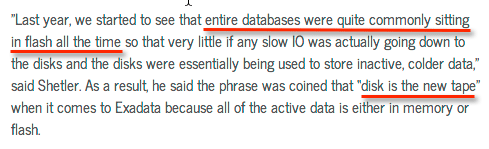
Before we go any further, here’s a quote from Oracle’s Vice President of Product Management, Tim Shetler, discussing the increased flash capacity in Exadata X4:

exadata-disk-is-the-new-tape

Yes, that’s right: on Exadata X4, your entire database is now likely to be in flash. Yet in Exadata flash is only ever used as a cache, so the database in question is also going to be located on disk. And because ASM mirroring is required, it will actually be on disk twice – or, if you need zero-downtime upgrades, three times. Three copies on disk and one on flash? That doesn’t seem like the most efficient way to utilise what is, after all, extremely expensive storage.

What about the “inactive, colder data” that remains solely on disk? Well ok… let’s think about that for a minute. The flash cache, according to the sources in the first table above, holds between 88TB and 440TB of data – but, since it’s a cache, that data must be read from a persistent source somewhere. That source is the disks. If your disks contain “inactive, colder data” which doesn’t enter the cache, exactly how is that cache going to be efficiently populated? Keeping inactive data on Exadata’s disks is not only financially ruinous, it impacts the effect of having such an increased flash cache capacity.

Money Talks

dollarsWhat if Oracle ditched the disks and went for an all-flash architecture, as many storage vendors are now doing? Would that be a win for Oracle and it’s customers alike?

Whether it would be a win for customers is something that can be debated. What is undeniable though is the commercial problem Oracle would face if it made a technical decision to ditch the disks. Customers buying Oracle Exadata have to pay for Oracle Exadata Storage Software licenses… and guess what the licensing unit is? You license by the disk. Each storage cell has 12 disks and each full rack has 14 cells, meaning a full rack requires 168 storage licenses. These are currently listing at $10,000 per disk, bringing the total list price to $1.68m per rack.

Hmm. Admitting that the disks are no longer necessary could be an expensive problem, couldn’t it?

Predictions for 2014: DataBase-as-a-Service

fireworks

It’s that time of year again where lots of people write articles which begin with the words “It’s that time of year again…” and make endless references to crystal balls, tea leaves and the benefits of hindsight. But not me, I’m not descending into cliché. Apart from that first sentence, which with the benefit of hindsight could have been reworded.

Anyway, as 2013 draws to a close it’s time to look forward into 2014 and make some suitably vague predictions about cloud computing, big data 2.0 and the internet of things. But the thing is, my focus is on enterprise applications that use enterprise database software such as Oracle or Microsoft SQL Server. The people I meet in my day job – and to some extent the people that are kind enough to read my blog – tend to work in this field too. Cloud computing will definitely affect us all in the long term, but I’m not sure it will drastically change our lives in 2014. Likewise, the only way I see the internet of things affecting us next year is the possibility of more data in our data warehouses… and if I made the prediction that your data warehouses would get bigger, you would be pretty unimpressed.

What about the raft of technologies that come under the heading big data? (By the way, I only said “big data 2.0” to tease Gwen Shapira) Will we see SQL-on-Hadoop threatening the Oracle ecosystem? Maybe even being adopted for OLTP workloads? Maybe some day, but it won’t be mainstream in 2014. And that kinda makes all of the usual predictions a bit … well, irrelevant to us.

So with that in mind, it’s time to gaze into the crystal ball, read the tea leaves and abandon any cliché-avoidance claims I made in the first paragraph.

A Lesson From Intel

There is a theory that Intel is suffering from the rise of the what is called the mobile/cloud era. Instead of users sat behind desktop computers accessing application servers (and the database servers behind them) it’s now very common to find users with smart devices (i.e. phones and tablets) accessing applications which run in (public) cloud data centres. This shouldn’t be a surprise to anyone who has noticed the savage decline in PC sales. But what does it mean for Intel?

CPUIn general it’s bad news. Firstly and most obviously it’s bad because Intel has the desktop PC market sown up but is struggling against ARM in the mobile device market (so much so that it now even makes ARM processors in its own fabs). But the second reason is more interesting: cloud computing is allowing data centres to run Intel enterprise-class processors at higher utilisations. The nature of cloud computing, i.e. shared and consolidated resources running flexible, virtualised workloads, means better value for money can be extracted from compute resources. Cloud computing means better efficiency, which is good for customers but bad for Intel.

Why am I talking about this? Because this is a problem based around the cost of CPUs. And as you may remember, the CPUs in your database server are the most expensive CPUs you own because they are tied to your database software licenses.

Moore’s Law: Diminishing Returns

Moores-LawWe all know that Moore’s Law is bringing us more transistors on a circuit every couple of years, meaning increasing amounts of compute power in your servers. But there is a catch: average CPU utilisation in most private data centres remains the same, with industry reports claiming the average is between 4% and 15% (and I personally know of a global financial organisation with an average of 4% so these are realistic estimates). Considering the cost of server resources (including power, cooling, real estate, people to maintain them) that makes for uncomfortable reading; but if you add on top the price of database software licenses (licensed by the core) it becomes prohibitively expensive. The knock-on effect of Moore’s Law is that as compute resource increases, so does the money you are wasting. But the good news is, it’s also a massive potential for saving money: just like Intel’s mobile/cloud problem above, driving more compute from your CPUs means more efficiency for you and less money for Oracle.

DataBase-as-a-Service

The way to increase CPU utilisation is to virtualise and consolidate databases: regular readers will know that I’ve been banging on about this for ages. As part of my day job, I’ve been travelling around Europe for the last 18 months talking about DBaaS (but under various other names such as Database Virtualisation or Private Cloud) to customers big and small – and I know a number of large enterprises who are actively planning or building such solutions, so it came as no surprise to me when 451 Research issued this report in August 2013. This is my prediction for 2014: the adoption of database-as-a-service solutions will enter the mainstream. The benefits are too hard to ignore: increased agility, reduced operational costs and better utilisation of compute resources (meaning lower total cost of ownership). It also acts as an on-ramp to running your databases in the (public) cloud at some point in the future.

At one end there will be hyperscale customers such as the telcos and financial organisations that I have already seen embark on this journey. But at the other end, even smaller customers can benefit from a simple VMware, Hyper-V or OVM-based solution to drive up CPU utilisation. And it’s not just me who thinks this either. Just don’t forget to build your solution on flash.

Oracle Wants Its Piece Of The Action

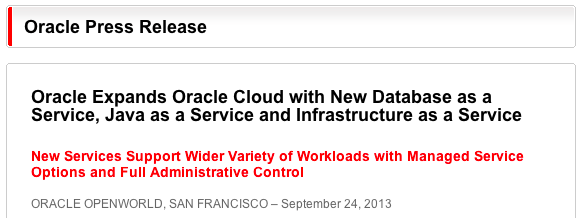
Of course, this could be bad news for Oracle, since customers who use their compute resources more efficiently will require less Oracle licenses, along with less support and maintenance contracts. What does Oracle do to avoid this situation? Well… if you can’t beat them, join them:

oracle-database-as-a-service-press-release

Yes, Oracle wants (more of) your money and it’s prepared to use its mighty marketing machine to get it. This means:

Personally I see DBaaS as an opportunity to embrace open systems and build flexible architectures. But, unsurprisingly, Oracle’s viewpoint is that you can build your DBaaS to use any solution as long as it’s red.

Conclusion

So there you have it. In a stunning leap into the unknown I’ve predicted that DBaaS will be widely adopted (even though this has already started happening), that your data warehouses will grow larger and that Oracle wants more of your money. And with that hat-trick in the bag, I’m taking the rest of the year off. See you in 2014…

Oracle Exadata X4 (Part 1): Bigger Than It Looks?

One of the results of my employment history is that I tend to take particular interest in the goings on at a certain enterprise software (and hardware!) company based in Redwood Shores. I love watching Oracle’s announcements, press releases, product releases and financial statements to see what they are up to – and I am never more intrigued than when they release a new version of one of their Engineered Systems.

In part this is because I used to work with Exadata a lot and still know many people who do. But the main reason I like Engineered Systems releases is because I believe there is no better indicator of Oracle’s future strategy. Sifting through the deluge of marketing clod, product collateral, datasheets and press releases is like reading the tea leaves – and I’ve been doing it for a long time.

A few weeks ago Oracle released the new “fifth-generation” Exadata Database Machine X4-2, along with the usual avalanche of marketing. Over the last couple of weeks I’ve been throwing it all up in the air to see what lands. Part one of this post will look at the changes, while part two will look at the underlying message.

Database as a Service

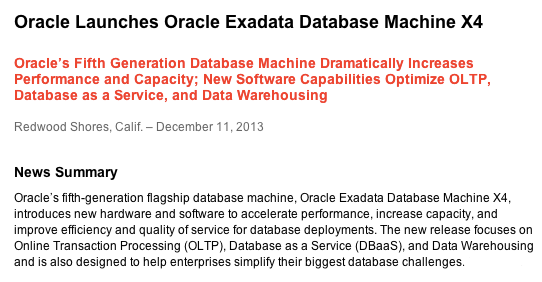
The first thing to notice about Exadata X4 is that Oracle Marketing has fallen in love with a new term: database as a service. Previous versions of Exadata were described as being suitable for database consolidation, but in the X4 launch this phrase has been superseded:

oracle-x4-database-machine-press-release

Personally I see little difference between consolidation and DBaaS, but I assume the latter has more connotations of cloud computing and so is more fitting for a company attempting to build its own cloud empire. The idea is presumably that you buy Exadata for use in private clouds and use Oracle Cloud for your public cloud service. That’s all very well, but what I find somewhat surprising is the claim that X4 is optimized for OLTP, data warehousing and database-as-a-service. Surely those three workloads encompass everything? Claiming that you have built a solution which is optimized for everything is … shall we say bold?

More Processor Cores = More Licenses

As with previous releases, Oracle has frozen the price of both the Exadata hardware and the Exadata Storage Software licenses (see price lists). This seems like a great result for customers given that the X4 contains significantly faster hardware (see comments section). For example, the Exadata compute nodes change from having 8-core Sandy Bridge versions of the Intel Xeon processor to 12-core Ivy Bridge models. What never ceases to amaze me is the number of people who do not immediately see the consequence of this change: 50% more cores means 50% more database software licenses are required to run the equivalent X4 machine. So while the Exadata storage license cost remains unchanged, the cost of running Oracle Database Enterprise Edition increases by 50%, as does the cost of options such as Oracle RAC, Partitioning, Advanced Compression, the Diagnostic and Tuning Packs, etc etc. And it just so happens that the bits which increase by 50% happen to form the majority of the cost (and don’t forget that the 22% annual fee for support and maintenance will also be going up for them):

Prices are estimates - contact Oracle for correct pricing

Prices are estimates – contact Oracle for correct pricing

So far so boring. Nobody expected something for nothing, despite some of the altruistic statements made to the press. But there’s something much more interesting going on if you look at the X4’s use of flash memory…

Ever-Increasing Capacity

The new Exadata X4 model now contains 44.8TB of raw flash in the form of rebranded LSI Nytro PCIe cards placed in the storage cells. The term “raw“, as always in the storage industry, is used to denote the total amount of flash available prior to any overhead such as RAID, formatting, areas kept aside for garbage collection, etc. Once all of these overheads are added, you end up with a new figure known as “usable” – and it is this amount which describes the area where you can store data.

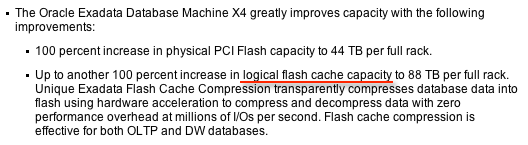
But hold on, what’s this new term “logical flash capacity” in the press release promising “88 TB per full rack”?

oracle-x4-database-machine-press-release-flash-claims

That’s twice the raw capacity! This is an incredible statement, because this so-called “logical” capacity is in fact a complete guess based on compression ratios – which are entirely dependant on your data. And it gets worse when you read the datasheet, which makes the following claim: an “effective flash capacity” of “Up to 448TB“! This is now ten times the raw capacity!

But what is an “effective flash capacity”? Let’s read the small print of the datasheet to find out… Apparently this is the size of the data files that can often be stored in Exadata and be accessed at the speed of flash memory.  No guarantees then, you just might get that, if you’re lucky. I thought datasheets where supposed to be about facts?

I am very uncomfortable about this sort of claim, partly because it carries no guarantees, but mainly because it often confuses customers. It’s not inconceivable that a potential customer will mistakenly think they are buying more raw flash capacity than they are actually are. You think not? Then take a look at  slide 21 of this Oracle presentation and consider the use of the word “raw”:

oracle-x4-database-machine-marketing-flash-claims

Maybe someone can explain to me how that statement can possibly be valid, because to me it looks utterly bewildering.

Exadata Smart Flash Cache Compression

The Exadata Smart Flash Cache has been a stalwart of the Exadata machine for many generations, so it is no surprise to see its feature set continually expanding. For the Exadata X4 release, the big feature appears to be Exadata Smart Flash Cache Compression (read more about it here), which allows Oracle to transparently compress data and store it on the PCIe flash cards. It is this feature which Oracle is describing when it claims a “logical flash cache capacity” of 88TB in the press release and the datasheet. Yet according to slide 22 of this Oracle presentation it is a feature which requires the Advanced Compression Option:

oracle-x4-database-machine-advanced-compression-required

As you can see, the author of this slide deck makes the rather brave assumption that most Exadata customers already have licenses for Advanced Compression (something I strongly contest). But either way, does it not seem reasonable that the press release and/or the datasheet should include this statement if they are going to promise such enlarged flash capacities? I’ve looked and looked, but I cannot see this mentioned – even in the infamous small print.

The thing is, right now on the Oracle Store, the Advanced Compression Option is retailing at $11,500 per core. Given that the new Exadata X4 machine now has 192 cores in a full rack (and taking into account the core multiplication factor of 0.5 for Intel Xeon), I calculate the list price of this option as being over $1.1m. Personally, I think that’s a large enough add-on that it ought to be mentioned up front.

Conclusion

As always with Oracle’s Exadata products, there is much to read between the lines. In the second part of this article I’ll be drawing my own conclusions about what the X4 means… stay tuned.

The Most Expensive CPUs You Own

CPU-gold

Storage for DBAs: Take a look in your data centre at all those humming boxes and flashing lights. Ignore the storage and networking gear for now and just concentrate on the servers. You probably have many different models, with different types and numbers of CPUs and DRAM inside. My question is, which CPUs are the most expensive? Almost without exception, the answer will be the CPUs inside your database servers…

In the last couple of posts I talked about the real cost of enterprise database software in general and Oracle RAC in particular. The point I was making was that database software, which is traditionally licensed by the CPU core, is expensive in comparison to the cost of the hardware on which it runs. But since the hardware fundamentally affects the performance – and therefore value for money – of the software, it’s important to make the right choices when building a database system. And yes, predictably, I believe that this means using flash memory instead of disk – but don’t worry, that’s not the main message behind post.

Lawn Mower Tax

OLYMPUS DIGITAL CAMERAThink of any consumer item which comes in multiple sizes and price brackets. I don’t know, let’s say a lawn mower. To simplify, let’s assume you can buy three different types of mower: small ($250), medium ($500) and large ($1000). The small one is cheaper but less powerful, so it takes longer to cut your grass, while the large one is the most expensive but requires the shortest amount of time. Which would you pick?

There’s no right answer because it depends on your requirements. But let’s introduce an unexpected complication into the mix: lawn mower tax. The government, in their wisdom, imposes a $50,000 tax on the purchase of any new lawn mower regardless of size. You still need a mower so you are forced to pay the tax, but is your choice influenced? The chances are you would buy the larger model, because a) the percentage difference in overall price is much less, and b) it avoids the risk of needing to upgrade in the future and having to pay the tax again. The $51,000 large mower represents better value for money than the two smaller models.

CPU Tax

You can think of database software in the same way. There are countless types of CPU available on the market right now: Intel, AMD, ARM, IBM Power, Oracle / Fujitsu SPARC, etc. Each vendor has many models and architectures, clock speeds and power ratings, yet they all share one important property: core count. And that core count is subject to the massive “CPU tax” that is the database software license. I’m sticking to the Oracle Database in this post but the same applies to Microsoft SQL Server (where licenses are core-based from SQL2012 onwards), Sybase and so on.

Picture Courtesy of 401(K) 2013 (Flickr)

Take a standard two-socket sixteen-core Intel Xeon-based server as an example: there are a multitude of CPU models fitting that description. Even if we restrict ourselves to the Sandy Bridge-EP range Wikipedia shows there are 11 different models fitting the description of “8 cores per socket”. Yet not all CPUs are equal. Wouldn’t it make sense, given the massive cost associated with core-based licensing, so ensure you are using the processor which gives you the best performance, i.e. value for money, per license?

Performance Per Licenseable Core

The problem of determining which CPUs provide the best value for money was one I struggled with for a while. Looking at benchmarks like SPECint and the datasheets from Intel and co, it’s hard not to be overwhelmed by data – and if I’m honest I probably don’t have the systems-level knowledge to interpret it accurately. Ironically, the solution came from someone who does have that knowledge, but showed me that it isn’t required because there’s a much simpler way. More importantly, benchmarks like SPECint don’t take into account what we want these CPUs to do, which is to run the Oracle Database.

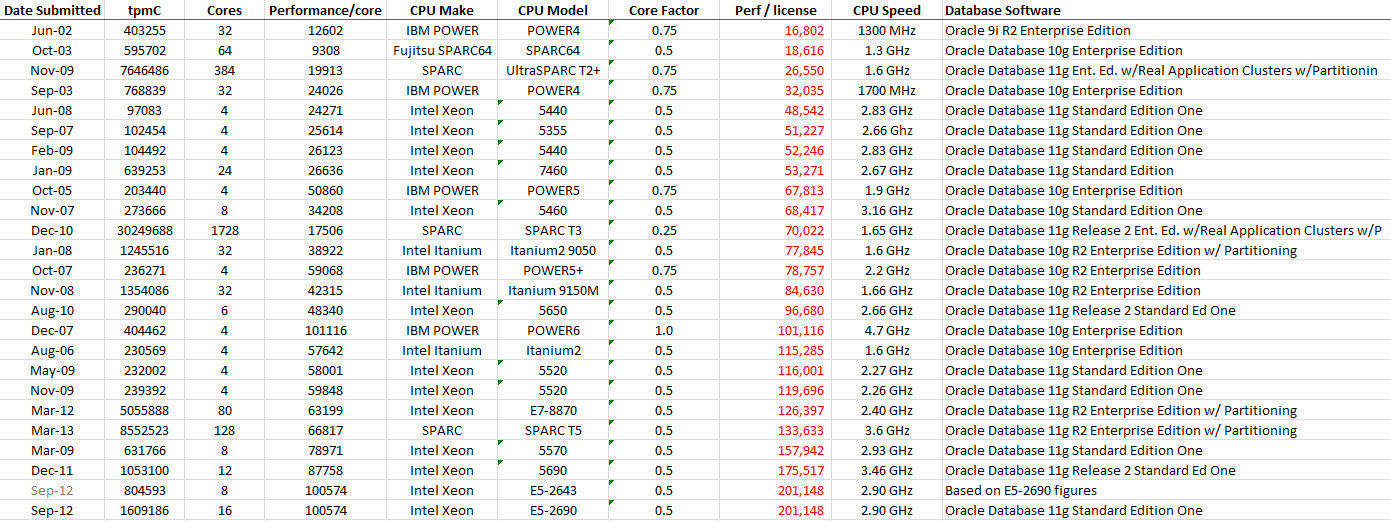
Kevin Closson‘s elegant and annoyingly simple solution was to use TPC benchmarks – specifically the transactional TPC-C benchmark from Oracle databases, results from which are freely available here. All we need to do then is simply download the spreadsheet, filter out the non-Oracle workloads and then divide the value of tpmC (the number of orders that can be fully processed per minute) by the number of CPU cores to get the performance per core.

Since this is an Oracle-specific calculation we also then need to multiply this by Oracle’s Processor Core Factor (see link on this page) to get the ultimate figure we need to know, the performance per license. Here’s my working copy of the spreadsheet, but I make no claims to its accuracy and will not keep this screenshot up-to-date. You should recalculate every time you want to make a judgement on which servers to use, it’s a very simple exercise.

Click to enlarge

Performance per licensable core (based on published TPC-C benchmark results using Oracle) – click to enlarge

The red column is the performance per licenseable core, marked “Perf / license“. Hopefully it’s obvious that this is just a re-work of Kevin’s ideas, many of which he posted in this blog article, which I highly recommend reading. As such I can claim no credit, except for any mistakes.

The Flash Angle

Of course, this wouldn’t be a flashdba article without some mention of flash memory. As discussed above there are many different types and models of CPU, but there is one great leveller: CPUs are all equally good at doing nothing. If your processors are waiting on I/O then they are not working – and that has a direct negative effect on the value you are realising from them.

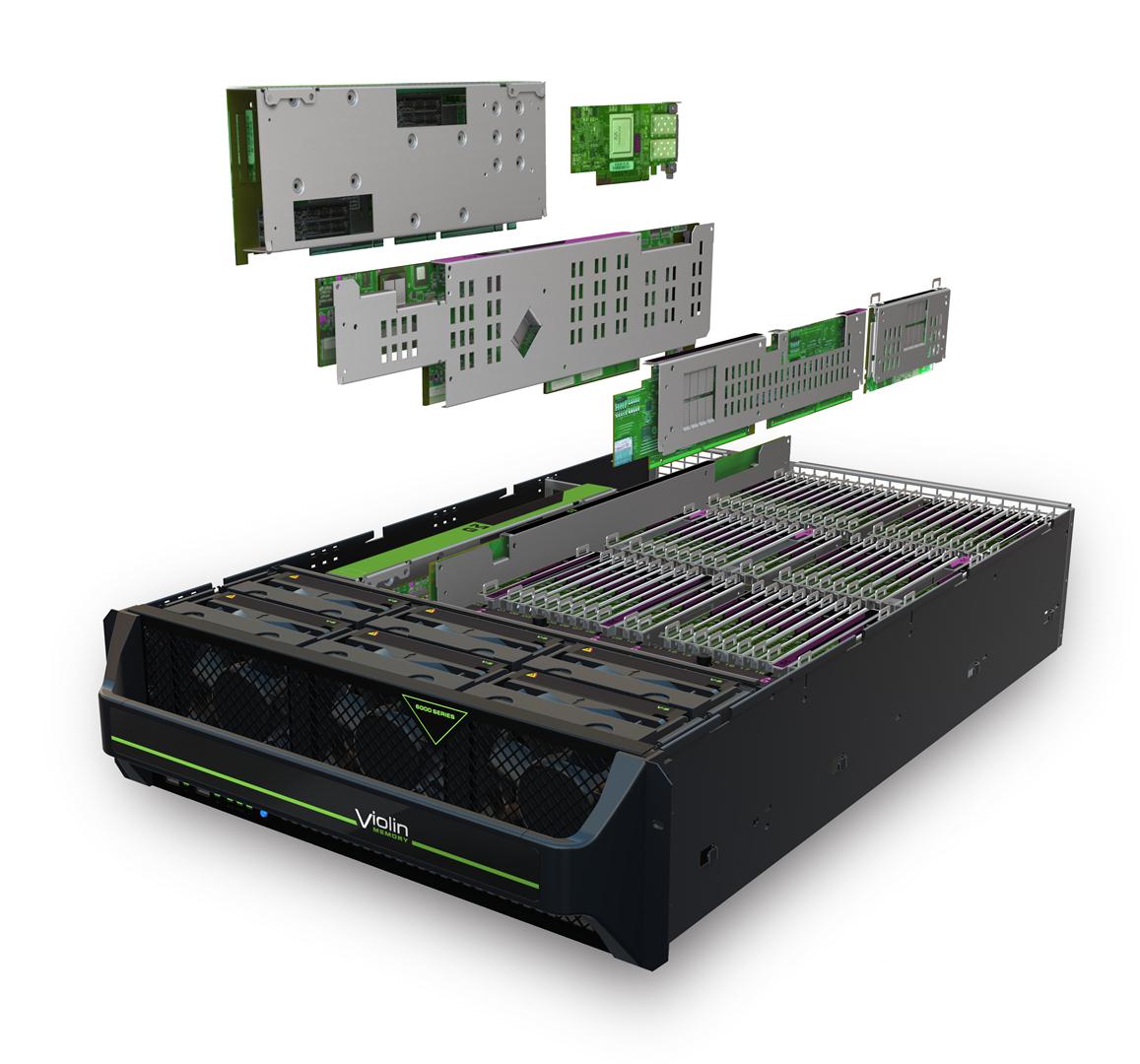
Violin Memory 6000 seriesIn the above chart, the last benchmark result (with the best value for performance per licensable core) is this one performed by Cisco. Now, I honestly didn’t engineer this article to work out this way, but it so happens that Cisco used a pair of Violin Memory 6616 flash memory arrays to achieve this workload. (I’d almost* be happier if this had been a competitor’s flash array, because I don’t want this to look like an advert for my employer and therefore detract from my point…)

The point I’m aiming to make here is that it’s worth using the best-performing processors in order to see value for money from your database licenses. But to enable that, the processors need to be released from the chains of high-latency storage – and that, quite simply, means using flash.

* almost, but not quite

The Real Cost of Oracle RAC

coins

Storage for DBAs: In my previous article (in this mini-series on database economics) I explained how to calculate the cost of a mid-range Oracle database system. My motive was a concern that many people working either directly or indirectly with database software are uninformed about just how expensive it is – particularly in comparison to the cost of hardware. And in this article I want to cover the great granddaddy of Oracle licenses costs: Oracle Real Application Clusters (RAC).

I also want to show you a little-known trick that can allow you to build a two-node fully active/active RAC cluster for a fraction of the price you would normally expect to pay.

But first, let’s talk about RAC…

Oracle RAC: High Availability For the Masses

There was a time, long ago, when big servers were very expensive. Many people ran Oracle on RISC-based UNIX systems, which had limited scalability in terms of the number of CPU cores and the maximum amount of physical memory. Oracle recognised this scalability issue and built a software solution for it, initially called Oracle Parallel Server (OPS). If you never used OPS in anger you should ask some of the grizzled, battle-scarred veterans who did how they fared against it, but at least in theory it allowed customers to scale out when scaling up wasn’t really possible.

However, things change – and nowhere more so than in IT. The days of big iron RISC systems seem long ago and nowadays (comparatively) cheap multicore x86 hardware is the norm. Scaling up to 80 cores in a server is not unusual, so the need for a software scalability solution is less strong than it was. However, Oracle knows a thing or two about staying at the top, so OPS became Real Application Servers and the scalability marketing message got overtaken by a new claim: high availability. Yes, Oracle RAC allows you to run one database across multiple nodes so if you look at it the right way that’s increasing system availability.

Of course, If you look at it another way (as I do), increasing the number of nodes is actually increasing the risk of failure to a single node. Plus, adding a whole raft of cluster functionality such as cache coherence, cluster filesystems and cluster ready services is just adding complexity, which is the enemy of availability. Yet everyone in the RAC game lives with the same shared deception: that losing a whole node does not count as a service outage. Sure, you get a whole load of users that get kicked off. Ok, so you have to bounce a whole set of application servers. But hey, technically it wasn’t a full outage so the SLAs weren’t affected. Er… ok… I think I’ve made my thoughts clear on this before.

Oracle RAC: The Expensive Way

There are two reasons why RAC can be expensive, or to put it another way two dimensions. The price goes up as the license cost increases, but it also goes up in multiples as the architecture scales out to multiple nodes.

In general, RAC is a feature of Oracle Enterprise Edition – in fact looking at the prices on the Oracle Store as I write this it’s the joint-most-expensive option (along with Oracle OLAP) priced at $23k per core (list)… If you consider that the Enterprise Edition license is $47.5k per core then that’s nearly half as much again. Don’t forget that Oracle’s core multiplication factor table determines that we need to multiply these costs by 0.5 for Intel Xeon processors, which is what I’m using in this example (see the first article in this series if you don’t know what this means).

oracle-rac-price-assumptions

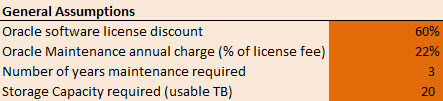
Let’s state some assumptions for this imaginary Oracle RAC cluster we are building. It will have 4 nodes (16 cores per node) and 20TB of usable disk storage. We’ll also assume that in buying the licenses we got a 60% discount. We’re looking at the three-year price and, as always, the maintenance costs us 22% of the net license cost. I’m including the Oracle Diagnostics Pack ($5k per core) in the license cost too – surely nobody can cope without it these days?

oracle-rac-price-breakdowns

The total cost over three years, just for hardware, software and support (i.e. discounting TCO-type calculations like power, cooling, etc) is now up at £1.8m. That’s a relatively large amount of money! But what I find really interesting is the proportion that goes to the database vendor compared to the proportion that is spent on hardware:

oracle-rac-4node-price-breakdown

The storage (which I naturally have an interest in) is just 8% of the total cost, while the database vendor’s products and support services comprise 89% of the total cost. This is where database consolidation starts to make sense (more databases on the same hardware means better value for money from the core-based licenses). It’s also where flash memory storage makes sense, because it allows a far better return on this massive investment: firstly by unleashing applications to run at the speed of memory, and secondly by unlocking (expensive) CPUs which are otherwise stuck waiting on I/O from slow disk storage systems.

Oracle RAC: The Inexpensive Way

But wait, I promised you an alternative to the costly system above. What is it? The answer can be found buried deep within Oracle’s Software Investment Guide (page 11 of the current published version) where we find the following information: from Oracle 10g onwards, Oracle Standard Edition includes the Real Application Clusters Option provided customers use Oracle Clusterware and ASM. Since Standard Edition is limited to a maximum of 4 CPU sockets (not cores!!) this effectively means a two-node system using two-socket servers.

That’s still an amazing revelation – it’s basically RAC (with certain caveats) for free! With the right choice of high-end CPU, a two-socket server can deliver massive performance. Let’s have a look at the cost of a two-node RAC system running on Standard Edition using the same assumptions from above [massive thanks to Doug (see comments below) for pointing out my mistake – now corrected – that Standard Edition is licensed by the socket not the core and that the core multiplication factor therefore does not apply]:

oracle-se-rac-price-breakdowns

Now many people will think, “Hang on I can’t cope without Enterprise Edition” … but for this level of saving, isn’t it worth giving that some closer analysis? The real bonus here is that, in only paying licenses by the socket, you can achieve a massive benefit if you use the fastest processors with the largest number of cores and not pay any penalty.

oracle-se-rac-2node-price-breakdown

The price of Standard Edition RAC is 87% of the price of our previous configuration. (If you were to compare a like-for-like scenario where 2 node Enterprise Edition RAC moved to 2 node Standard Edition RAC the saving would instead be £702.5k or 76%)

Conclusion

Everything here is just speculation, based on the information available from Oracle at the time of writing. You should not construe my remarks as guarantees or facts, but instead do your own research and talk to your local database vendor’s representatives.

The point of writing this article is that technical people don’t always have a handle on price, because in some organisations they don’t always need to. But when the technical design has such a dramatic effect on the price, I think we all ought to be looking at the bigger picture and taking the time to work out the implications of our choices.

Software, as they say in Redwood Shores, doesn’t come cheap…